2
Front Panel Controls
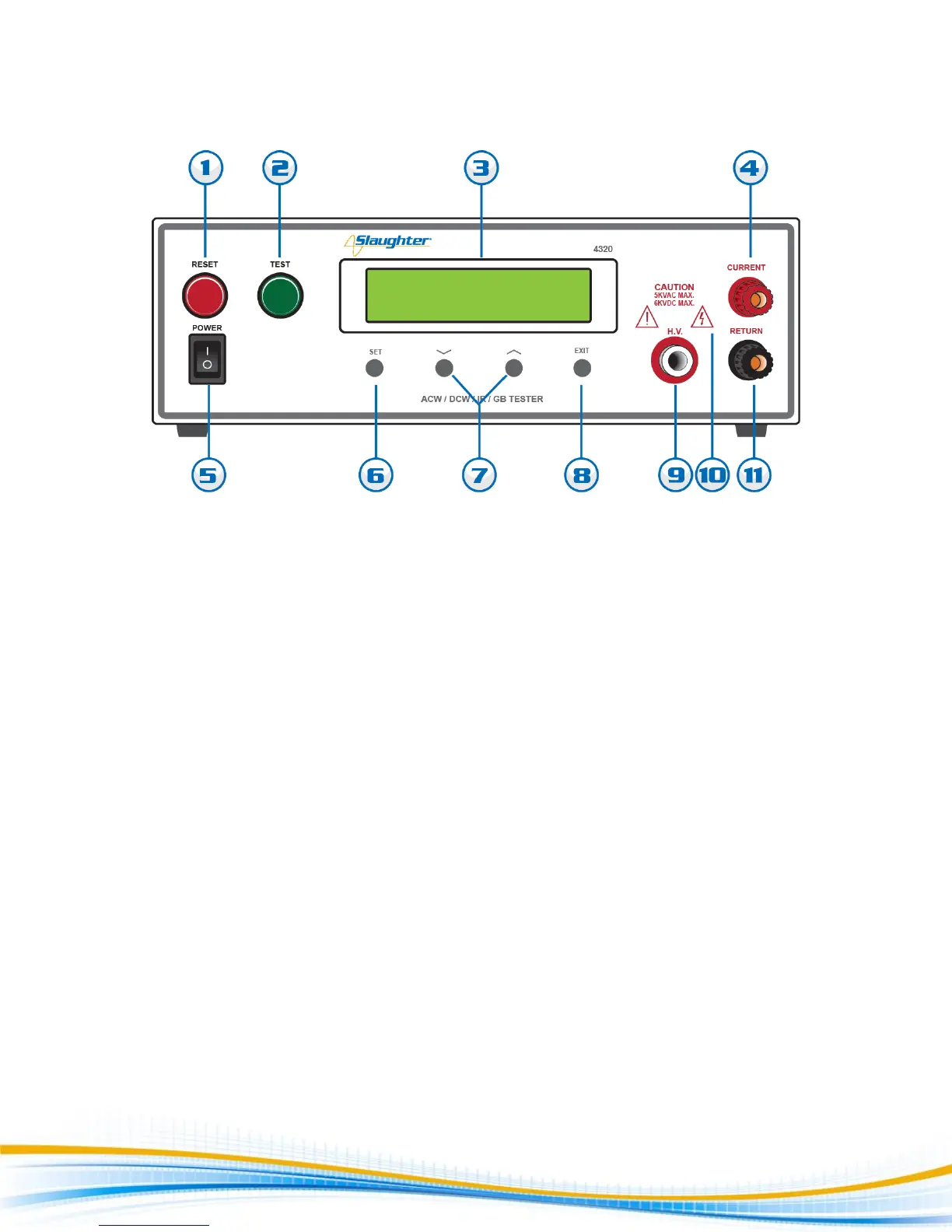
1. RESET BUTTON: This is a momentary contact switch used to reset the tester. If an out-of-range reading is
detected during a test, the red failure lamp within the button will light. To reset the system for the next
test, press and release this button. This button may also be used to abort a test in progress.
2. TEST BUTTON: This is a momentary contact switch used to start a test. Press the green button to turn on
the high voltage output when in test mode. The indicator lamp within the button will light when test
expires with pass condition.
3. LCD DISPLAY: The Liquid Crystal Display is the main readout for the operator and programmer of the test
settings and test results.
4. CURRENT OUTPUT JACK: Use this jack for the connection of the detachable 5-foot (1.52 m) red high
current test lead or adapter box. This jack is used when performing a Ground Bond test. Please refer
section E. Adapter Box connection for details on connecting the adapter box between the tester and the
device under test.
5. POWER SWITCH: Rocker-style switch with international ON ( ) and OFF (0) markings.
6. SET KEY: Use this key to advance forward through the setup menus.
7. DOWN ARROW (): Use this key to decrement numeric values in the setup mode. This key also used to
toggle ON/OFF functions. Also may be used to decrease output voltage during a test in 10-volt increments.
UP ARROW (): Use this key to increment numeric values in the setup mode. This key also used to toggle
ON/OFF functions. Also may be used to increase output voltage during a test in 10-volt increments.



 To Next Page