Programming Using Local Adjustment
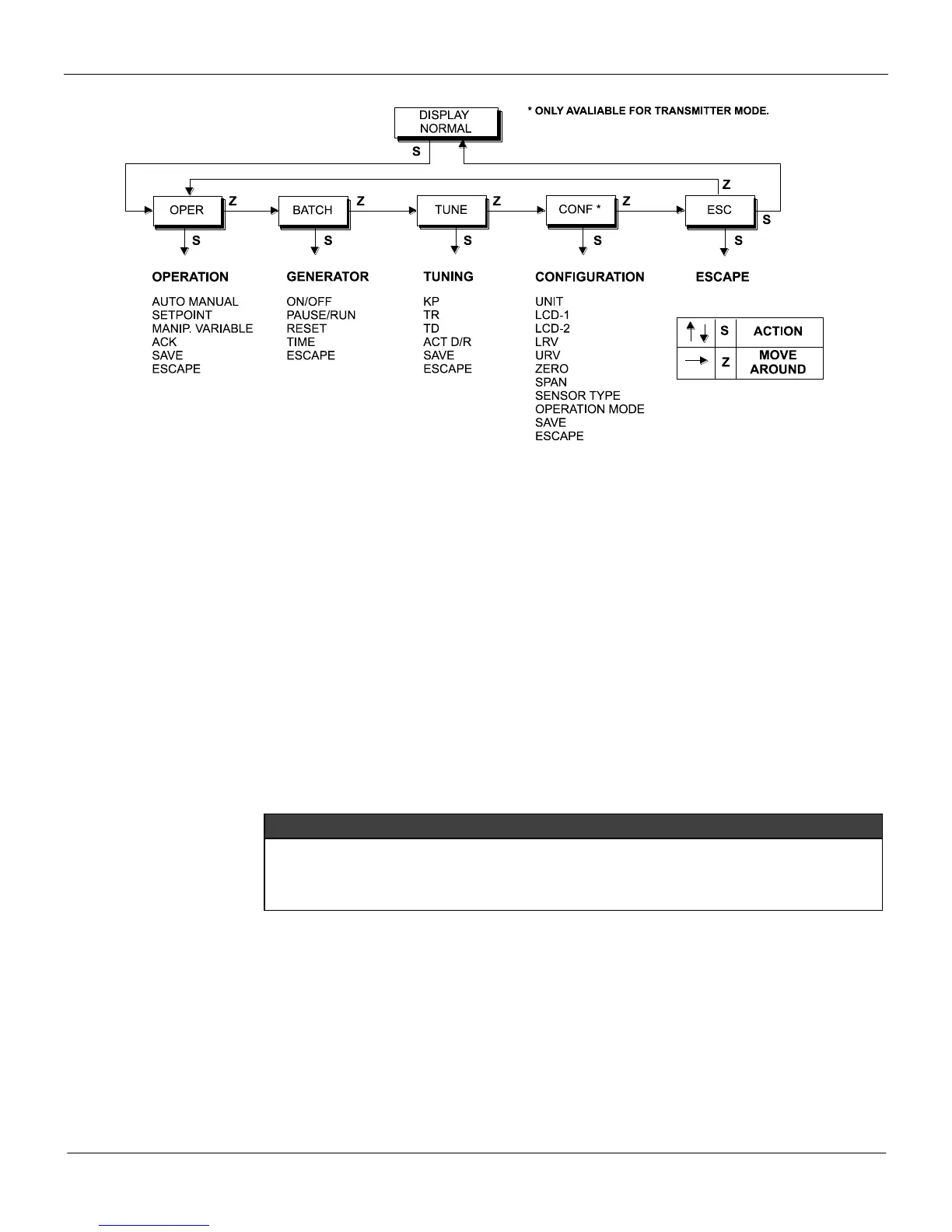
Figure 4.3 - Local Adjustment Programming Tree – Main Menu
As the reranging with reference, the span is maintained. In case you want to change the span, proceed
as follows:
Apply the Upper Value, signal.
Wait for the process to stabilize.
Insert the magnetic tool in the SPAN adjustment hole.
Remove the tool.
Note that when zero adjustment is done, the URV can not be pushed above the URL. In this case, span
is not maintained.
Complete Local Adjustment
LOCAL PROGRAMMING TREE
The programming tree is a tree-shaped structure with a menu of all available software resources, as
shown in Figure 4.3.
The Local Programming mode is entered by activating switch (Z). In transmitter mode, only the
configuration branch of the tree is applicable, thus the first menu function will be UNIT.
When programming using local adjustment, the transmitter will not prompt "Control loop should be
in manual!" as it does when programming using the Configurator. Therefore it is a good idea, prior
to configuration, to switch the loop to manual. And do not forget to return to auto after configuration
is completed
OPER (OPERATION): Is the option where the operation related parameters of the controller are
configured: Auto/ Manual, Setpoint, Manual output.
BATCH: Is the option where the Setpoint generator related functions are operated: on/off, Pause,
Reset and time adjustment.
TUNE (TUNING): Is the option where the PID-Algorithm related parameters are configured: Action, K
p
,
T
r
, and T
d
.
CONF (CONFIGURATION): Is the option where the output and display related parameters are con-
figured: unit, primary and secondary display, Lower and Upper Value, dam-ping, sensor type and
operation mode.
ESC (ESCAPE): Is the option used to go back to normal monitoring mode.



 To Next Page