CHAPTER 5
TROUBLESHOOTING THE INTERACTIVE WHITEBOARD SYSTEM
39 smarttech.com/kb/170910
Locating serial numbers
The SMARTBoard M600 interactive whiteboard serial number is located on the lower-right edge
of the frame, as well as on the back of the interactive whiteboard. For more information, see the
SMARTBoard M600 series interactive whiteboard user’s guide
(smarttech.com/kb/170410).
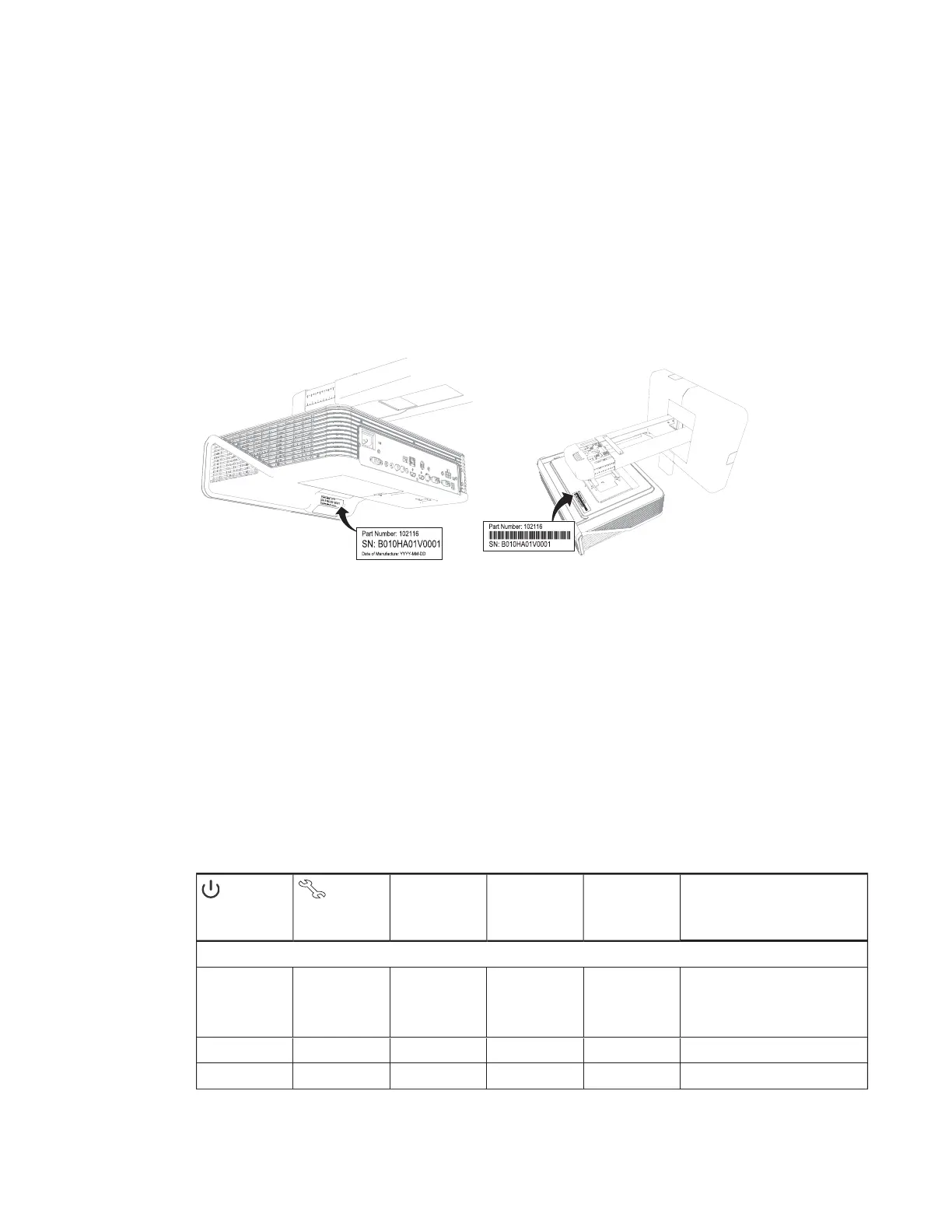
The SMARTU100 and U100w projector’s serial number is located in two places: one next to the
mirror cover and the other on the top of the projector.
For the locations of serial numbers on other components and accessories, see
smarttech.com/support.
Determining the interactive whiteboard system’s
status
Use the following table to determine the status of your interactive whiteboard system.
Projector Power
light
Projector Service
light
Pen tray Select
button status light
Projected image Touch and pen
control
Status and related troubleshooting
Normal operating statuses
Solid green Off Solid white Correct Full control The system is operating normally.
If image or sound issues occur, see
the remaining sections of this chapter
for troubleshooting information.
Flashing green Off Off None None The system is starting up.
Solid amber Off Off None None The system is in Standby mode.



 To Next Page