16 -17
Before You Start
1.9 Common Operations
1.9.1 Power Loss Recovery & Filament Runout Recovery
Your Artisan supports Power Loss Recovery and Filament Runout Recovery, so you don't need to worry about
unexpected disruption anymore!
In case of power loss during a job, you can choose to resume or cancel the job on the Touchscreen after the
machine is powered on again.
When the filament runs out, you can tap Load Filament on the pop-up window and follow the on-screen
instructions to load the new filament and resume printing.
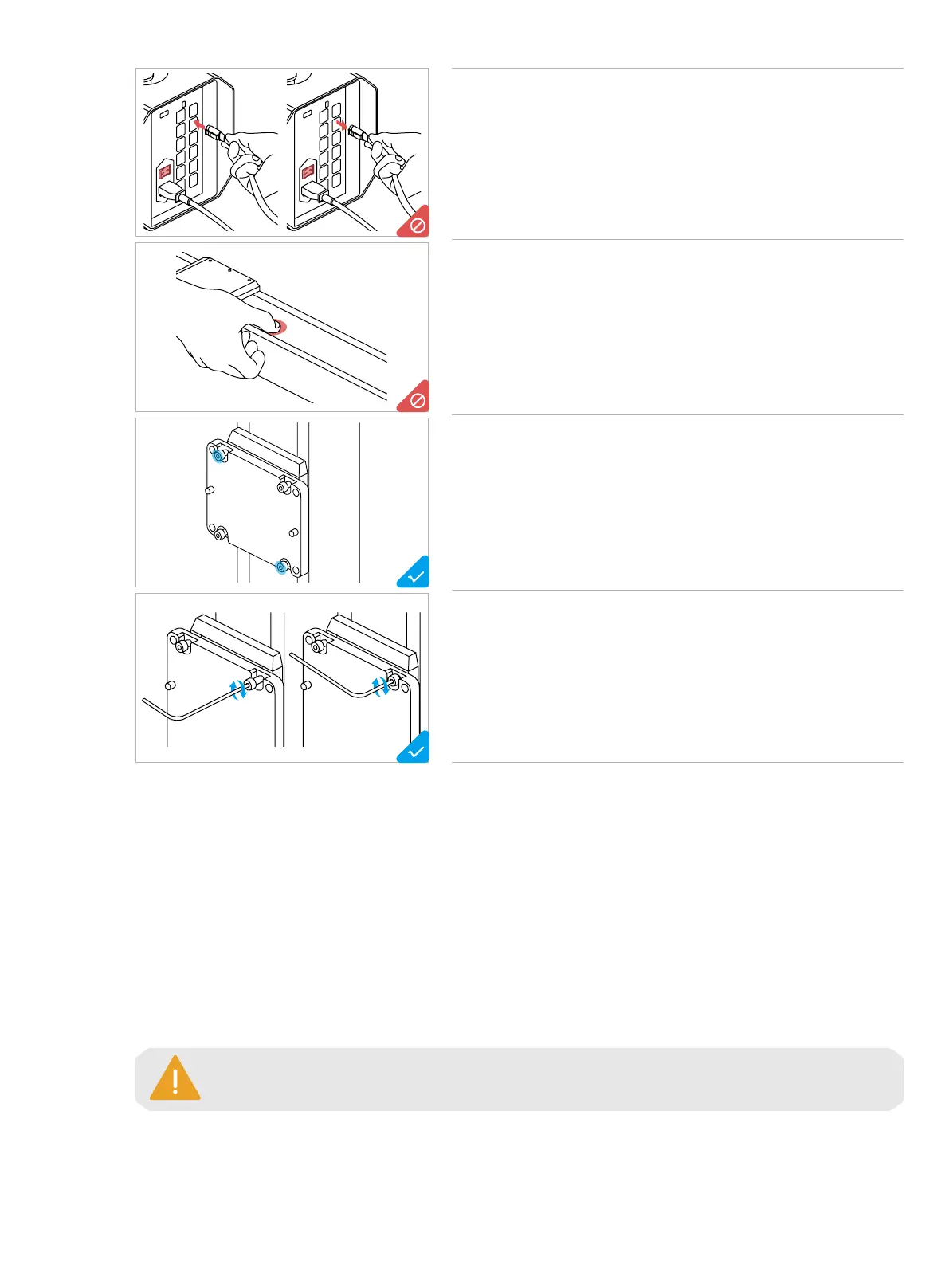
Do NOT plug or unplug any cables when the machine is powered
on.
Do NOT press the steel strip.
To install multiple screws in one step:
1. Pre-tighten the screws at the outermost corner;
2. Pre-tighten the remaining screws;
3. Tighten all the screws in the pre-tightening order.
* Pre-tighten: To screw the screw into the hole, yet not fully tighten it.
To install screws with the provided hex key:
1. Screw the screw into the hole with the long handle;
2. Tighten the screw with the short handle.
The cooling down of the heated bed before the machine is powered on again will weaken the
adhesion between the print and the platform, which might result in failure of recovery.



 To Next Page