27
User Manual M70 / M80 / M90 Getting to know
• Changing the settings:
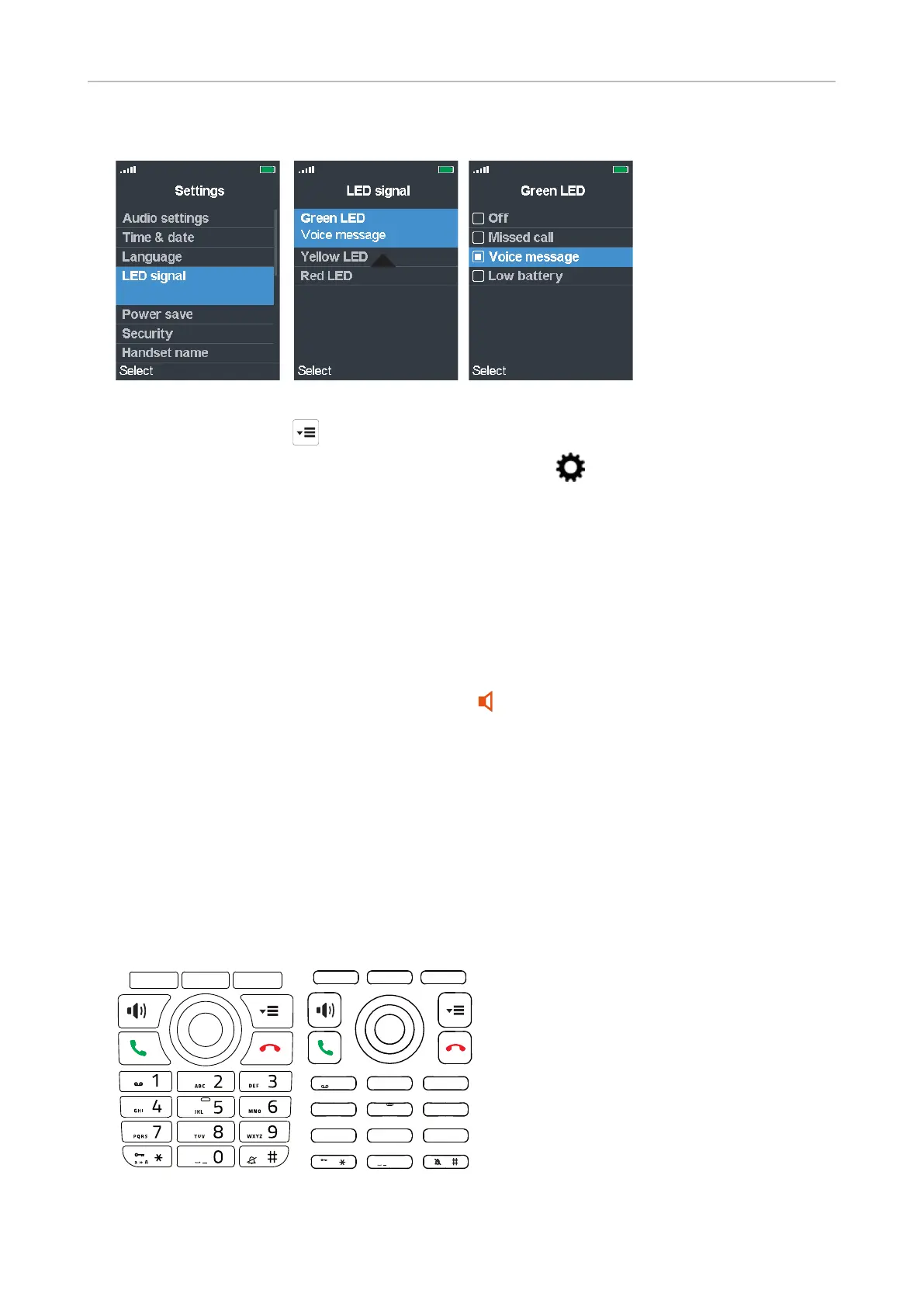
Fig. 1 Fig. 2 Fig. 3
1. Press the menu key to open the top menu (Fig. 1).
2. Use the navigation key to navigate to the Settings menu and press the OK key (see
"Navigation and "OK" keys" on page 28).
3. Select LED signal (Fig. 1).
4. Select a color (Fig. 2).
5. Select one of the three options Voice message, Missed call, or Low battery for each color, or
select O to disable the LED for the selected color.
Speakerphone key LED
The speakerphone key has a red LED which lights up when speakerphone is turned on during a
call. Press the speakerphone key again to turn o speakerphone and the red LED.
Hard keys
Keypad illumination
The keypad is illuminated. The LEDS will light up when any key on the keypad is touched. When the
keypad is not touched for the number of seconds specified in the Power save setting (see "Power
save" on page 49), the LEDs will be turned o; the default setting is 60 seconds.
1
4
7 8
0
5
GH I
JK L
PQRS
a » A
TUV
6
MNO
2AB C
3
DEF
9
WXYZ
M70 / M80 M90



 To Next Page