1 INTRODUCTION
This chapter demonstrates how to set up and use the SI
1287,
using the front panel
menus. The SI1287 can also be controlled remotely via RS423 and
GPIB, refer
to Chapter
4
for Remote Control details. Connections to a test cell module are
also detailed, followed by the initial set
up
and relevant steps to produce
results
on
the display.
The
chapter
aims
to
make
you
aware
of the set-up and
control
facilities of the
SI1287 and help build your confidence in the use of the instrument.
It should be noted that before attempting to use the SI1287, the installation and
safety instructions should be followed; refer to the Safety notes
at the start of the
manual and the Installation procedure,
Appendix A.
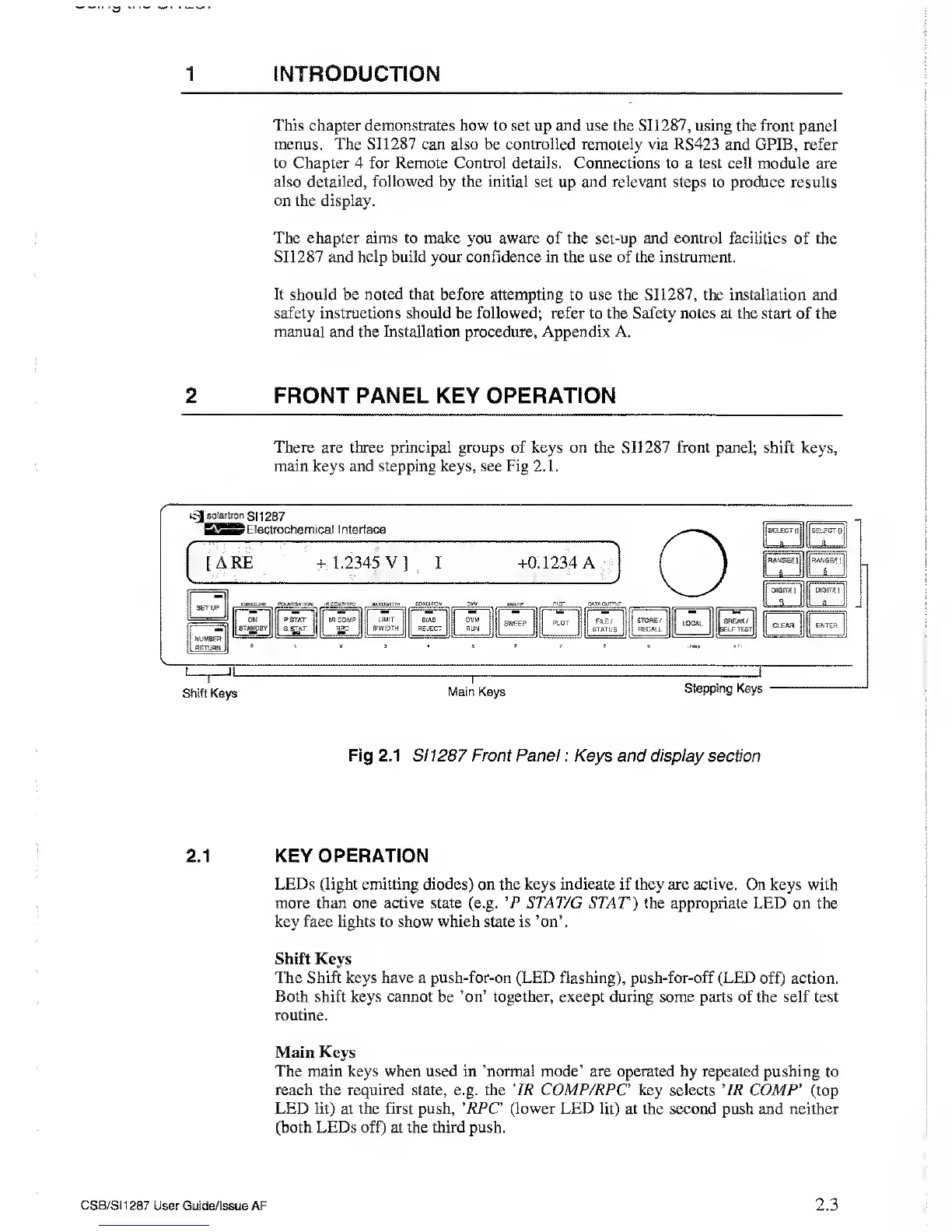
2 FRONT PANEL KEY OPERATION
There are three principal groups
of
keys on the SI1 287 front
panel; shift keys,
main keys and stepping keys, see Fig 2.1.
C-
]
solartron
S1 1287
> Electrochemical Interface
ARE + 1.2345 V] I +0.1234 A
DUMBER
RETURN
1 lUEASU^E
PlXASiSAHO*
.KMMVWC 9AMDW0TH BOHXnat
DVV
OKI,
PLOT DATA CJTT’fjT
ON
STANDBY
PSTAT
G^TAT
ir cow?
RPC
LIMIT
S'WIDTH
m,
m
—
b;as
REJECT
OVM
RUN
SWEEP
PLOT
RLE/
STATUS
STORE/
RECALL
LOCAL
m
SREAX/
SELF TEST
•
•
‘
«
•
7 •
/tae
Shift Keys
Main Keys
Stepping Keys
Fig 2.1 S1 1287 Front Panel : Keys and display section
2.1 KEY OPERATION
LEDs
(light
emitting diodes) on the keys
indicate if they are active. On keys with
more than one active state (e.g. *P STAT/G STAT) the appropriate LED on the
key face lights to show which state is ’on’.
Shift Keys
The Shift keys have a push-for-on (LED flashing), push-for-off
(LED off) action.
Both
shift keys
cannot
be
’on’ together,
except during some parts of the self test
routine.
Main Keys
The main keys when used in ’normal mode’ are operated by repeated pushing
to
reach the required state, e.g. the ' IR COMP/RPC key selects 'IR
COMP
’
(top
LED lit)
at
the first push,
’ RPC
(lower
LED
lit)
at the second push and neither
(both LEDs off) at the third push.
CSB/SI1287
User Guide/Issue AF
2.3



 To Next Page