EasyManua.ls Logo

Solartron 1287 - Stepped Sweep

Default Icon
134 pages
Print Icon
To Next Page IconTo Next Page
To Previous Page IconTo Previous Page
Loading...
Ul
icipioi
\J
8.8
STEPPED SWEEP:
MINIMUM PERMITTED VALUES
OF
T/STP
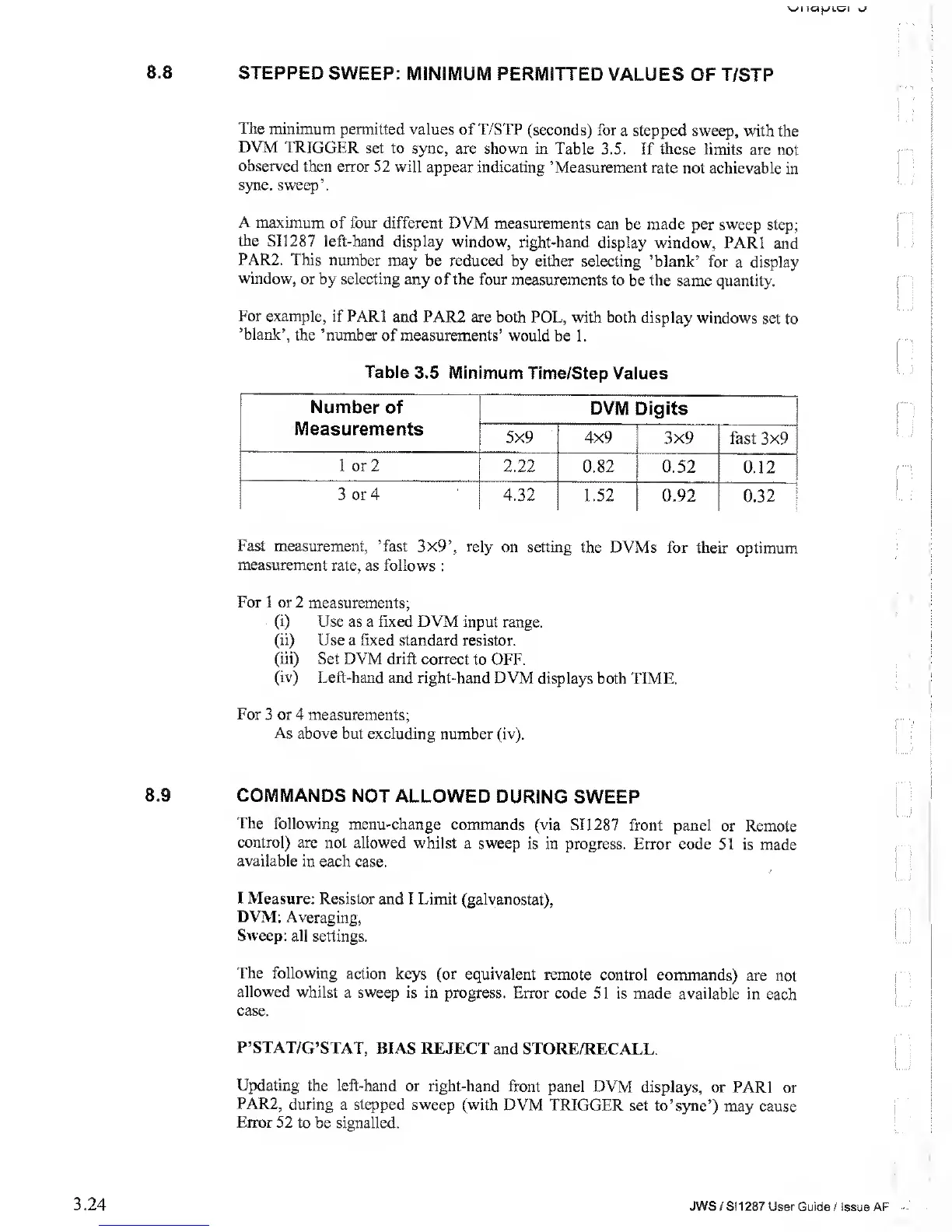
The minimum
permitted
values of T/STP
(seconds) for a stepped sweep,
with
the
DVM
TRIGGER
set to
sync, are shown in Table
3.5. If these limits
are not
observed then
error 52 will
appear indicating ’Measurement
rate not
achievable
in
sync, sweep’.
A
maximum of four
different DVM measurements
can be
made per sweep
step;
the
SI 1287 left-hand
display window,
right-hand display
window, PARI
and
PAR2. This
number may
be reduced by either
selecting ’blank’
for a display
window,
or
by
selecting
any of the four
measurements
to be the same
quantity.
For
example, if PARI
and PAR2 are both
POL, with both
display windows
set to
’blank’,
the ’number
of measurements’ would
be 1.
Table
3.5 Minimum
Time/Step Values
Fast measurement,
’fast 3x9’,
rely on setting
the DVMs
for their optimum
measurement
rate, as
follows :
For
1 or 2 measurements;
(i) Use
as a
fixed
DVM
input range.
(ii)
Use a fixed standard
resistor.
(iii) Set DVM
drift correct
to OFF.
(iv)
Left-hand and right-hand DVM
displays both
TIME.
For
3 or 4 measurements;
As above
but excluding
number (iv).
8.9
COMMANDS
NOT ALLOWED
DURING SWEEP
The
following menu-change
commands
(via SI1287
front panel or Remote
control)
are not allowed
whilst a sweep
is in progress.
Error code 51
is made
available in
each case.
I
Measure:
Resistor and I Limit (galvanostat),
DVM: Averaging,
Sweep:
all settings.
The following
action keys (or
equivalent remote
control commands)
are not
allowed
whilst a sweep is
in progress. Error
code 51 is made
available in each
case.
P’STAT/G’STAT,
BIAS REJECT
and STORE/RECALL.
Updating the left-hand
or right-hand
front panel DVM
displays, or
PARI or
PAR2,
during a stepped sweep
(with DVM TRIGGER
set to’ sync’)
may cause
Error 52
to be signalled.
3.24
JWS
/ S1 1
287
User Guide
/
Issue AF