6. Operation
6.1 Main Menu
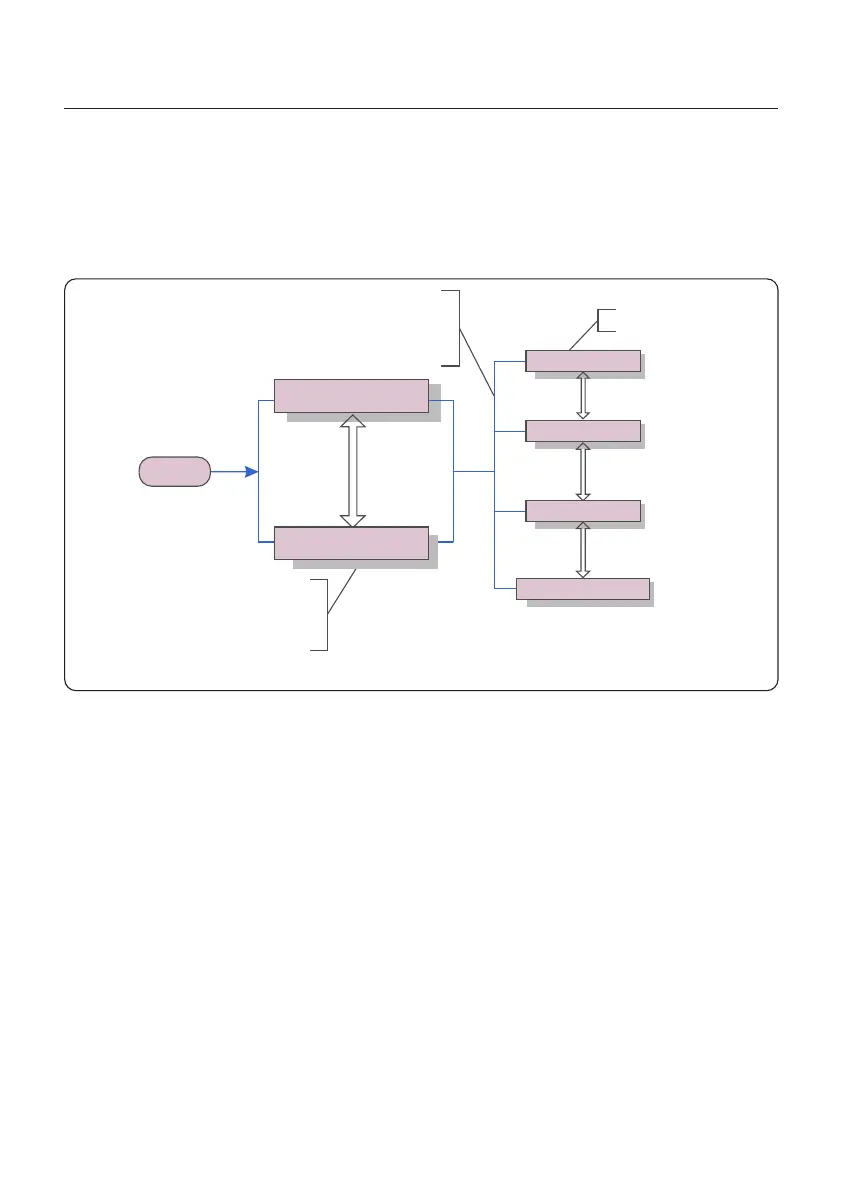
During normal operation, the display alternately shows the power and the operation
status with each screen lasting for 10 seconds (see Figure 6.1). Screens can also be
scrolled manually by pressing the UP and DOWN keys. Press the ENTER key to
access to the Main Menu.
There are four submenus in the Main Menu (see Figure 6.1):
1. Information
2. Settings
3. Advanced Info.
4. Advanced Settings
6.2 Information
The Solis single phase inverter main menu provides access to operational data and
information. The information is displayed by selecting "Information" from the menu
and then by scrolling up or down.
5 sec
Start
Power 3424W
01-01-2020 00:00
Status: Generating
01-01-2020 00:00
Information
Settings
Advanced Info.
Advanced settings
UP/DOWN
UP/DOWN
UP/DOWN
UP/DOWN or
auto-scroll
(10 sec)
Pressing the
ENTER key
gives access to
the main menu.
Pressing the
ESC key
calls back the
previous menu.
Main Menu
Figure 6.1 Operation Overview
User Manual
22






 To Next Page