– 7 –
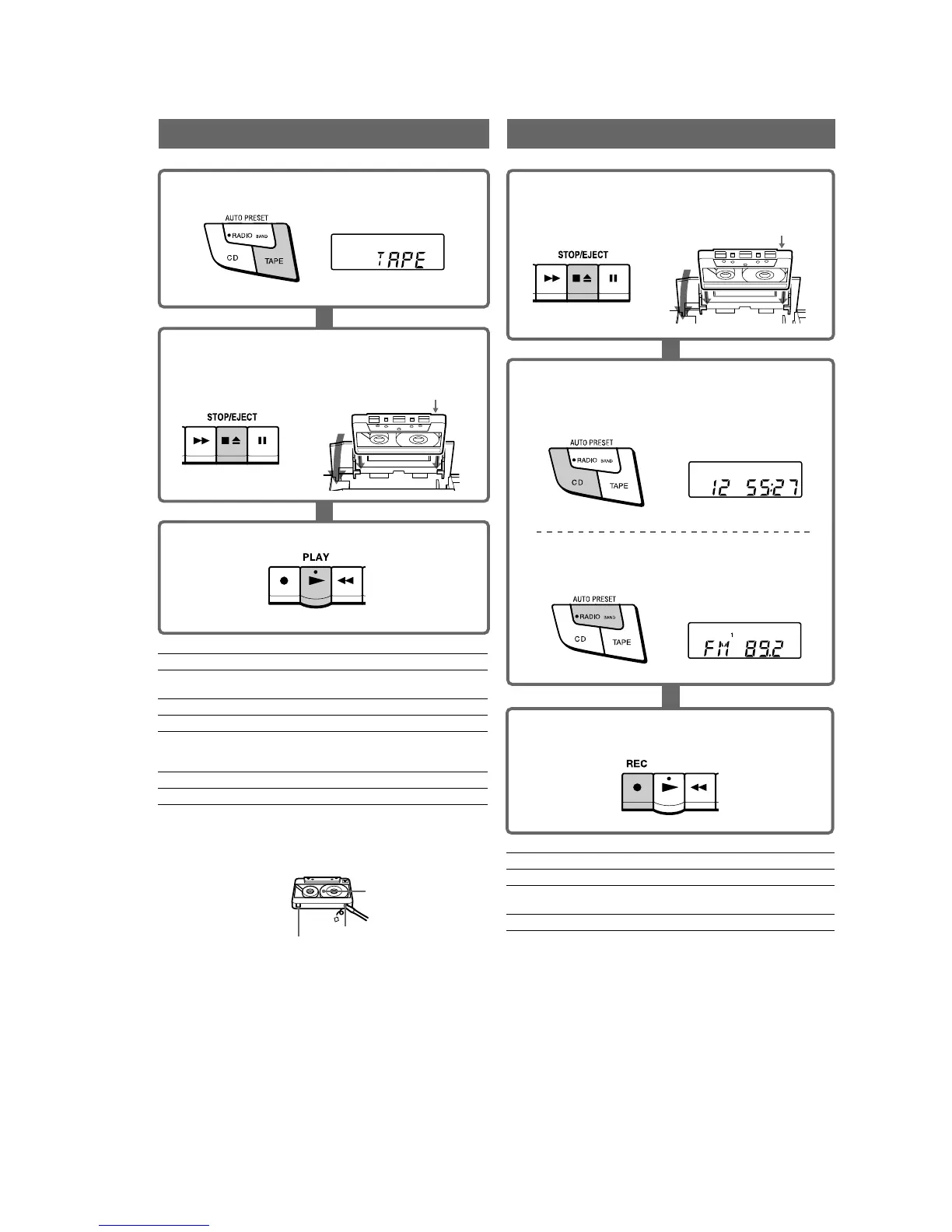
Use TYPE I (normal) tape only.
1 Press TAPE (direct power-on).
2 Press xZ to open the tape compartment and insert a
recorded tape. Close the compartment.
3 Press N.
With the side you want to
play facing upward
2 Select the program source you want to record.
To record from the CD player
Press CD and insert a CD (See "Playing a CD").
To record from the radio
Press RADIO BAND•AUTO PRESET and tune in the
station you want (See "Listening to the radio").
3 Press z to start recording.
(N is depressed automatically).
1 Press xZ to open the tape compartment and insert a
blank tape.
With the side you want to
record on facing upward
To
stop recording
pause recording
turn on/off the player POWER
Tips
• Adjusting the volume or the audio emphasis will not affect the
recording level.
• For the best results, use the AC power as a power source for recording.
• To erase a recording, proceed as follows:
1 Insert a tape with the recording you want to erase.
2 Press TAPE.
3 Press z.
To
adjust the volume
stop playback
fast-forward or rewind the tape
pause playback
eject the cassette
turn on/off the player
Notes on cassettes
• Break off the cassette tab from side A or B to prevent accidental
recording. If you want to reuse the tape for recording, cover the broken
tab with adhesive tape.
• The use of a cassette with more than 90 minutes of play time is not
recommended except for long, continuous recording or playback.
Tab for side B
Tab for side A
Side A
c
c
Use TYPE I (normal) tape only.
RecordingPlaying a tape
Press
VOLUME +, – (VOL +, – on the
remote, CFD-S32 only)
xZ
M or m
X
Press the button again to resume play
after pause.
xZ
POWER
Press
xZ
X
Press the button again to resume recording.
Display
Display
Display


 To Next Page