13
GB
Getting Started
Note
• Do not set the speakers in an inclined position.
• Do not place the speakers in locations that are:
– Extremely hot or cold
– Dusty or dirty
– Very humid
– Subject to vibrations
– Subject to direct sunlight
• Use caution when placing the speakers and/or
speaker stands (not supplied) that are attached to the
speakers on a specially treated (waxed, oiled,
polished, etc.) floor, as staining or discolouration may
result.
• When cleaning, use a soft cloth such as a cleaning
cloth for glasses.
• Do not use any type of abrasive pad, scouring
powder, or solvent such as alcohol or benzine.
• Image distortion on the TV screen may occur
depending on the location of the subwoofer. In this
case, place the subwoofer away from the TV.
Ti
• When you change the position of the speakers, Sony
recommends that you change the settings. For details,
see “Calibrating the Appropriate Settings
Automatically” (page 81).
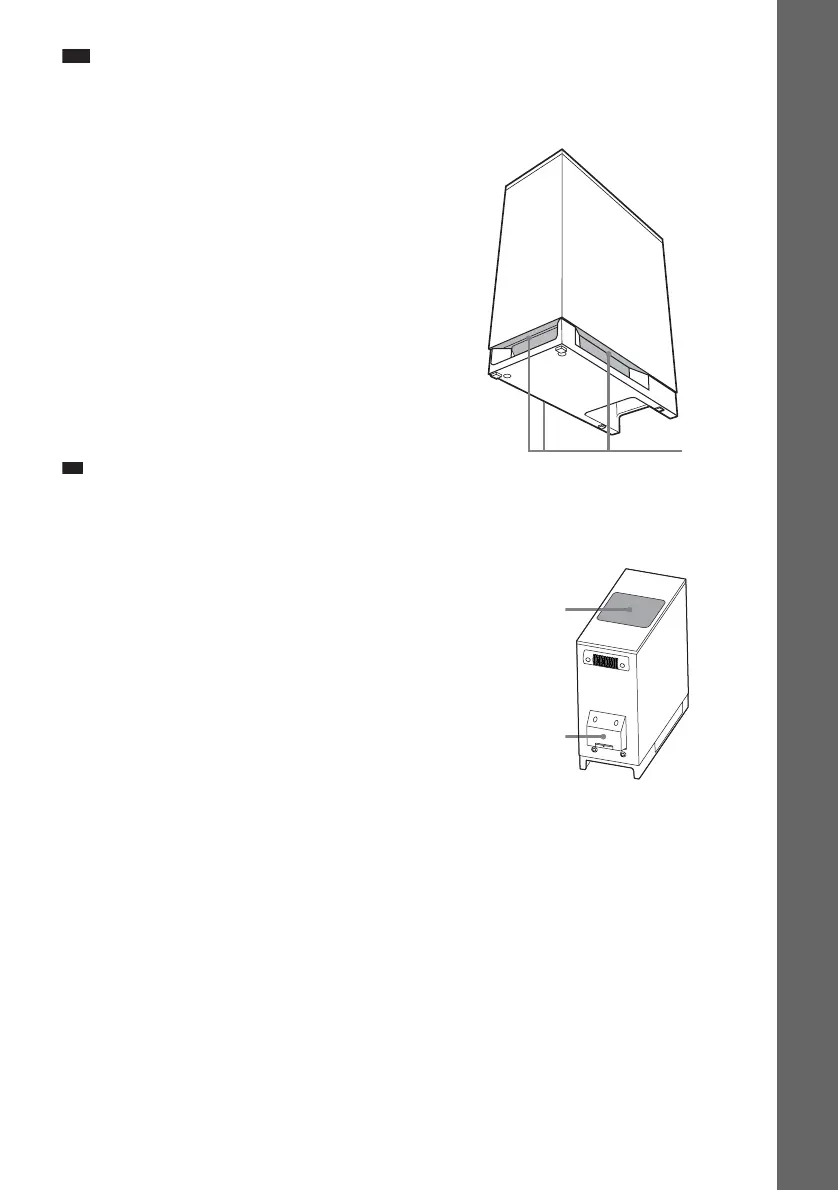
Note on handling the subwoofer
• Do not place your hand into the slit of the subwoofer
when lifting it. The speaker driver may be damaged.
When lifting, hold the bottom of the subwoofer.
• Do not hold the EZW-T100 slot when lifting the
subwoofer.
• Do not push the top of the subwoofer where the
speaker unit is installed.
Slits
Subwoofer
Speaker unit
EZW-T100 slot





 To Next Page