44
GB
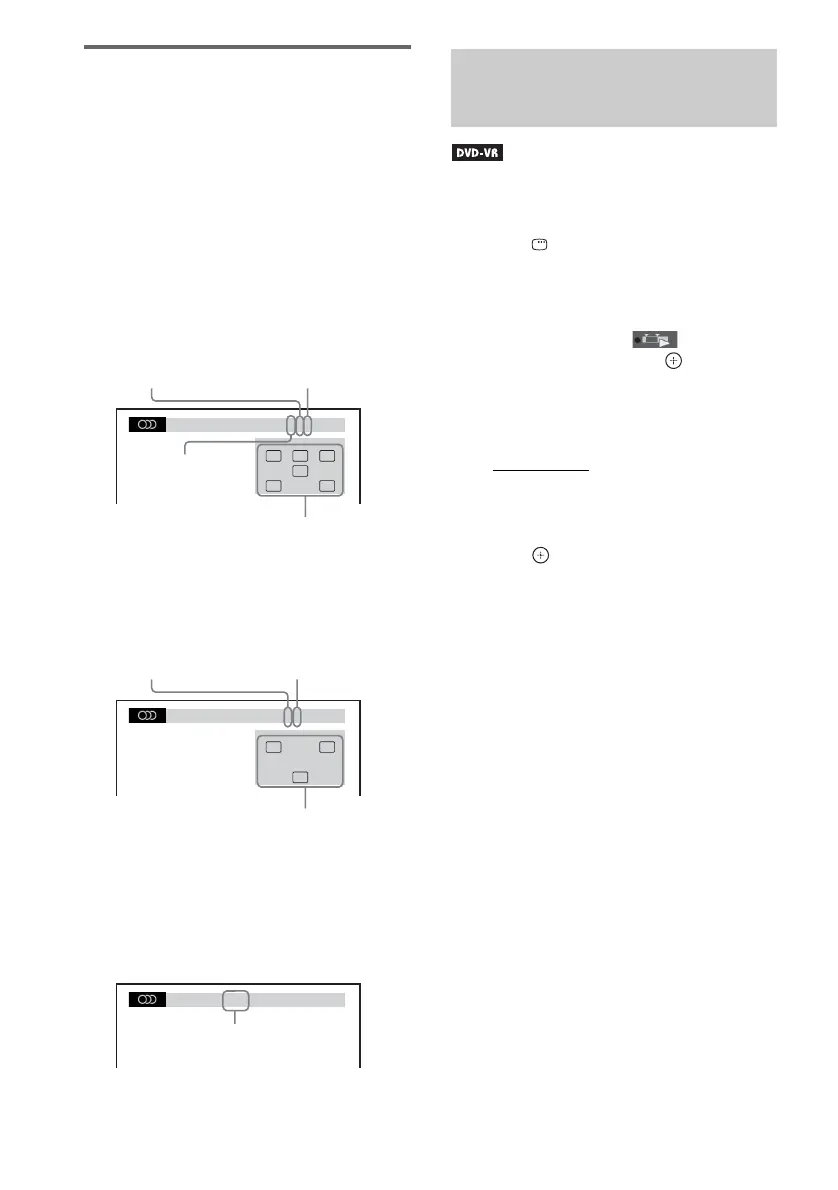
Checking the audio signal
format
(DVD VIDEO, DATA DVD, DATA CD
only)
If you press AUDIO repeatedly during
playback, the format of the current audio signal
(PCM, Dolby Digital, DTS, etc.) appears as
shown below.
x DVD
Example:
Dolby Digital 5.1 channel
Example:
Dolby Digital 3 channel
x DATA CD (DivX video file)/DATA DVD
(DivX video file)
Example:
MP3 audio
This function is only available for DVD-VRs
with a playlist created.
1 Press DISPLAY while the system is
in stop mode.
The Control Menu display appears on the
TV screen.
2 Press X/x to select [ORIGINAL/
PLAY LIST], then press .
The options for [ORIGINAL/PLAY LIST]
appear.
3 Press X/x to select a setting.
• [PLAY LIST]: You can play the titles
created from [ORIGINAL] for editing.
• [ORIGINAL]: You can play the titles
originally recorded.
4 Press .
1: ENGLISH
DOLBY DIGITAL 3 / 2 .1
LFE
CL R
LS RS
Surround (L/R)
Front (L/R) +
Center
LFE (Low
Frequency Effect)
Currently playing
program format
1:SPANISH
DOLBY DIGITAL 2 / 1
S
L R
Front (L/R)
Surround
(Monaural)
Currently playing
program format
1:MP3 128k
Bit rate
Selecting [ORIGINAL] or
[PLAY LIST] on a DVD-VR












 To Next Page