117
Editing Videomontage
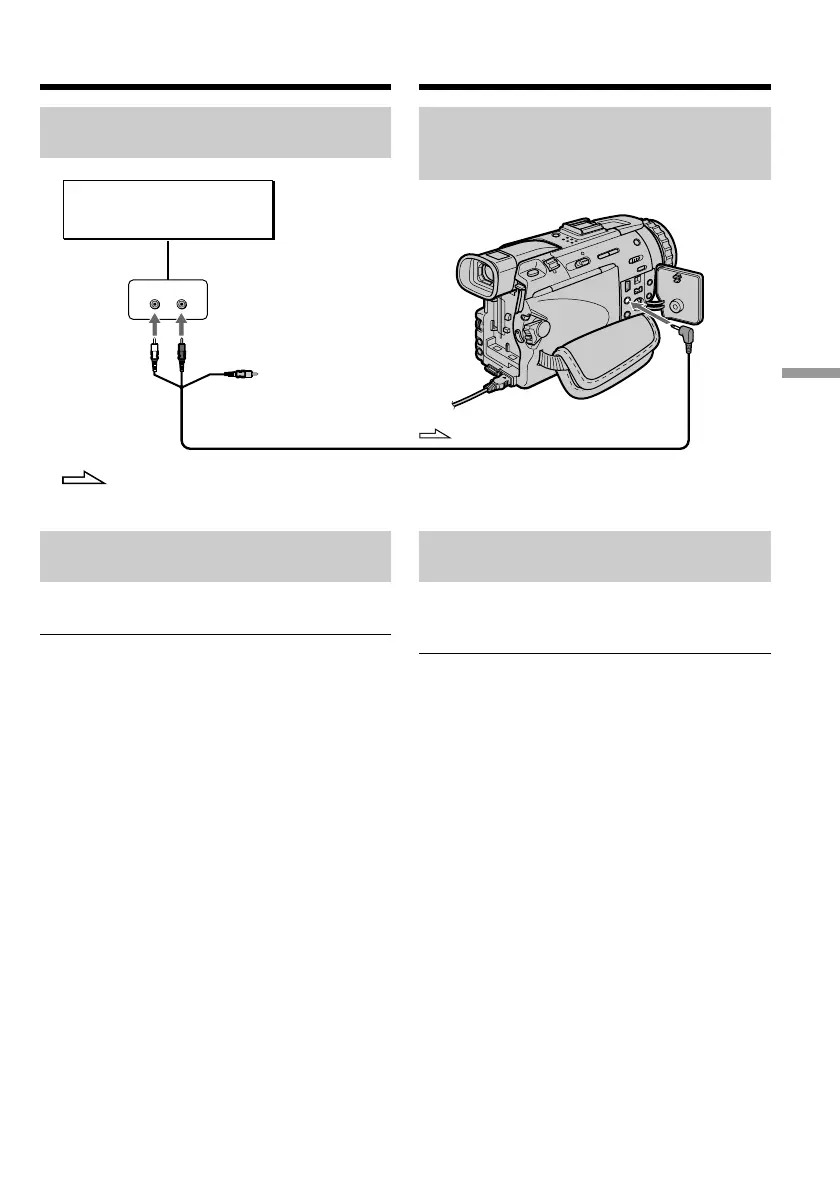
Het audio/video-aansluitsnoer
verbinden met de AUDIO/VIDEO
aansluiting
Geluid inlassen via de
ingebouwde microfoon
Hiervoor hoeft u niets op de camcorder aan te
sluiten.
Opmerking
Bij inlassen van geluid via de AUDIO/VIDEO
aansluiting of de ingebouwde microfoon worden
de beelden niet uitgestuurd via de S-video
aansluiting of de AUDIO/VIDEO aansluiting. U
kunt de opgenomen beelden controleren op het
scherm en de geluidsopnamen via een
aangesloten luidspreker of hoofdtelefoon.
Als u alle beschreven aansluitingen gemaakt
hebt
Het op te nemen geluidssignaal wordt gekozen
aan de hand van de volgende rangorde.
•MIC (PLUG IN POWER) aansluiting
•Intelligente accessoireschoen
•AUDIO/VIDEO aansluiting
•Ingebouwde microfoon
Audio dubbing
Connecting the A/V connecting
cable to the AUDIO/VIDEO jack
Dubbing with the built-in
microphone
No connection is necessary.
Note
When dubbing with the AUDIO/VIDEO jack or
the built-in microphone, pictures are not output
through S VIDEO jack or the AUDIO/VIDEO
jack. Check the recorded picture on the screen.
You can check the recorded sound by using
headphones.
If you make all the connections
The audio input to be recorded will take
precedence over others in the following order.
•MIC (PLUG IN POWER) jack
•Intelligent accessory shoe
•AUDIO/VIDEO jack
•Built-in microphone
LINE OUT
LR
AUDIO/
VIDEO
AUDIO L AUDIO R
Audio equipment/
Stereo-apparatuur
Do not connect the video
(yellow) plug./
De (gele) videostekker
hoeft u niet aan te sluiten.
: Signal flow/Signaalstroom
Nieuwe geluidsopnamen inlassen













 To Next Page