163
“Memory Stick” operations “Memory Stick” functies
Recording an image from a tape
as a still image
Connect the yellow plug of the A/V connecting
cable to the video jack on the VCR or the TV.
If your TV or VCR has an S video jack
Connect using an S video cable (optional) to
obtain high-quality pictures.
With this connection, you do not need to connect
the yellow (video) plug of the A/V connecting
cable.
Connect an S video cable (optional) to the S video
jacks of both your camcorder and the TV or VCR.
This connection produces higher quality DV
format pictures.
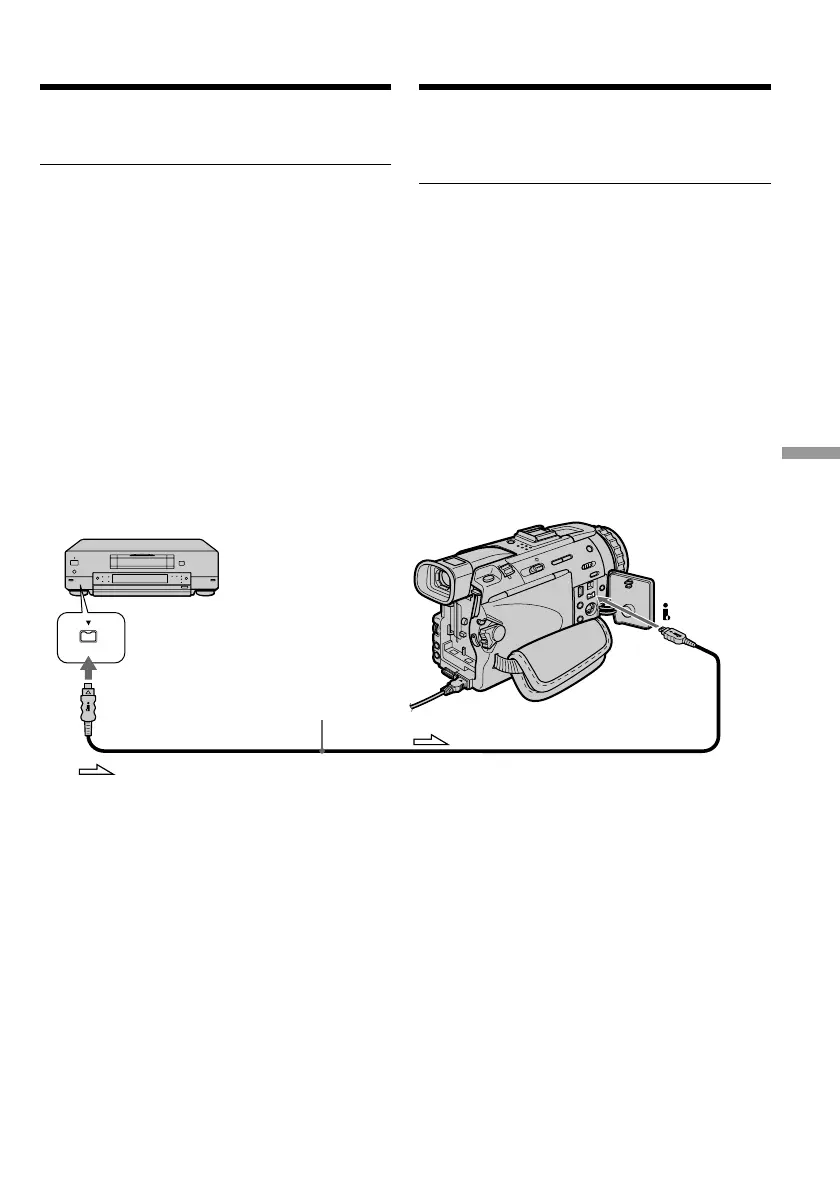
Using the i.LINK cable (DV connecting
cable)
DV
DV OUT
DV IN/OUT
: Signal flow/Signaalstroom
(optional)/(los verkrijgbaar)
Een scène van een cassette
overnemen als stilstaand beeld
Sluit de gele stekker van het audio/video-
aansluitsnoer aan op de video-uitgang van de
videorecorder of het TV-toestel.
Als uw TV-toestel of videorecorder beschikt
over een S-video ingangsaansluiting
Maak de aansluiting dan met een S-video
aansluitsnoer (niet bijgeleverd) om de beste
beeldkwaliteit te verkrijgen. Bij deze wijze van
aansluiten hoeft u de gele (video) stekker van het
audio/video-aansluitsnoer niet aan te sluiten.
Sluit het S-video snoer (niet bijgeleverd) aan op
de S-video stekkerbussen van uw camcorder
enerzijds en uw TV-toestel of videorecorder
anderzijds.
Bij deze wijze van aansluiten verkrijgt u de beste
kwaliteit DV-formaat beelden.
Via aansluiting met een i.LINK kabel
(DV aansluitsnoer)




 To Next Page