Erasing the cassette memory data
You can erase data stored in cassette n]en]ory, each item's data c'an be erased separately.
You can also erase all items' data once.
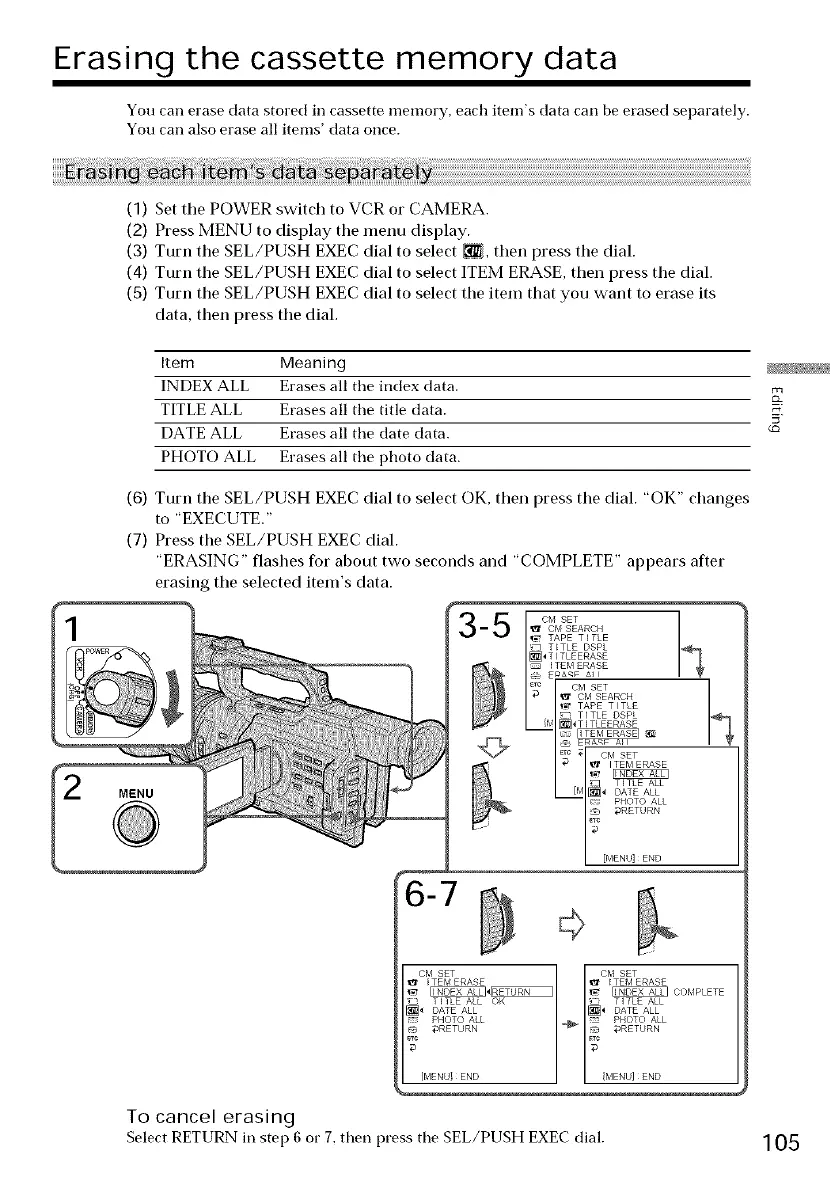
(1) Set tile POWER switch to VCR or CAMERA.
(2) Press MENU to display the menu display.
(3) Turn the SEL/PUSH EXEC dial to select _, then press the dial.
(4) Turn the SEL/PUSH EXEC dial to select ITEM ERASE, then press the dial.
(S) Turn the SEL/PUSH EXEC dial to select the item that you want to erase its
data, then press the dial.
Item Meanin 9
INDEX ALL Erases all the index data.
TITLE ALL Erases all the title data.
DATE ALL Erases all the date data.
PHOTO ALL Erases all the photo data.
MENU
(6) Turn the SEL/PUSH EXEC dial to select OK, then press the dial. "OK" changes
to "EXECUTE."
(7) Press the SEL/PUSH EXEC dial.
"ERASING" flashes for about two seconds and "COMPLETE" appears after
erasing the selected item's data.
'l_ CM SEARCH
TAPE TITLE
_] TtTLE DSPL
_ g_a<_ all
ate CM SET
_ CM SEARCH
_ TAPE T I TLE
TITLE DSPL
@ _ ERA_ AN
_Tc ,71 CM SET
I _ ITEM ERASE
I_l _ T'TLE ALL
aRETURN
_) [blENU] END
6-7
,l_ _TEbl ERASE
'_ _ CObIPLETE
_ TITLE ALL[_ DATE ALL
=: PHOTO ALL
PHOTO ALL
.J _RETURN
BTC
[MENU! END
To cancel erasing
Select RETURN in step 6 or 7, then press the SEL/PUSH EXEC dial.
105







 To Next Page