Recording a picture
Zoom greater than 12x is performed digitally, if you set D ZOOM to 24x or 48x in tile
menu settings. Tile digital zoom ftmction is set to OFF as a default setting (p. 107). If
you use tile digital zoom ftmction, tile picture quality deteriorates.
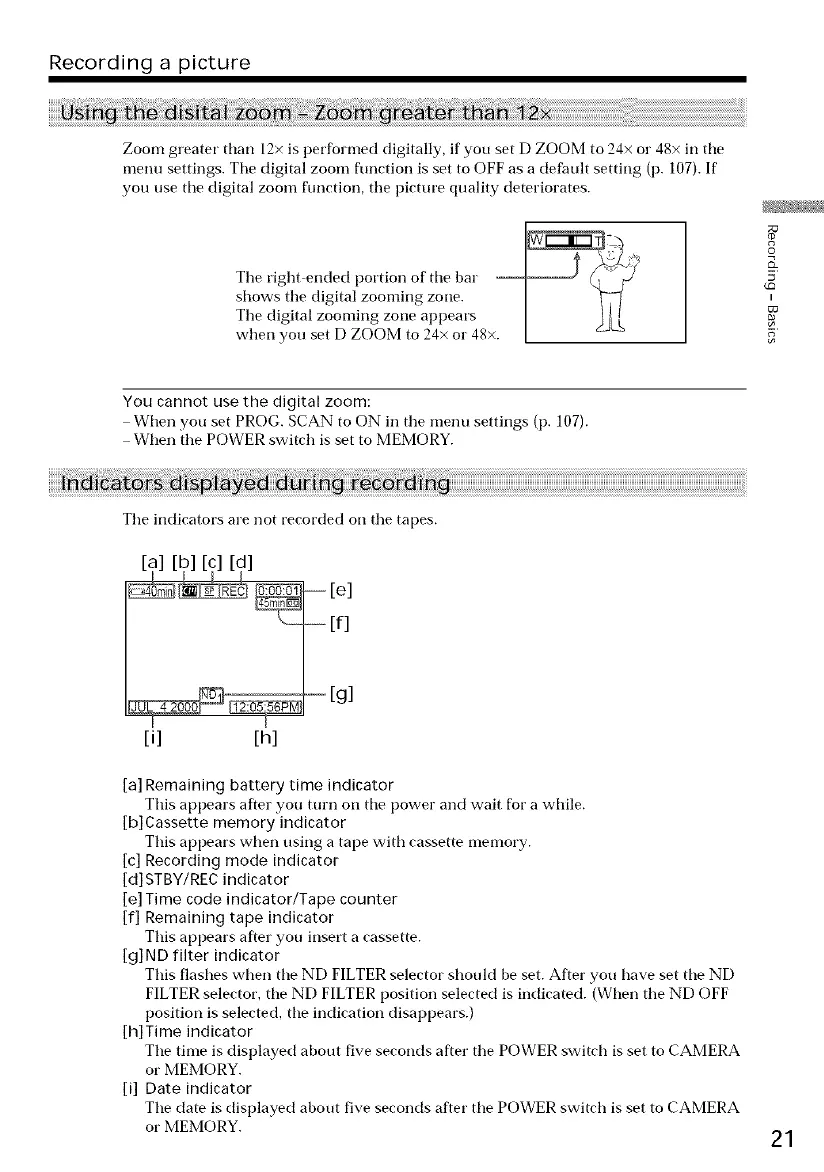
Tile right ended portion of tile bar ii_.i
shows tile digital zooming zone. ]
Tile digital zooming zone appears ] _flLL
when you set D ZOOM to 24x o1"48x. [
o
I
5
You cannot use the digital zoom:
When you set PRO(;. SCAN to ON in tile menu settings (p. 107).
When the POWER switch is set to MEMORY.
Tile indicators are not recorded on tile tapes.
[a] [b] [c] [d] [e]
if]
[g]
[i] [h]
[a] Remaining battery time indicator
This appears after you turn on tile power and wait for a while.
[b] Cassette memory indicator
This appears when using a tape with cassette nlenlory.
[c] Recording mode indicator
[d]STBY/REC indicator
[e] Time code indicator/Tape counter
if] Remaining tape indicator
This appears after you insert a cassette.
[g] ND filter indicator
This flashes when tile ND FILTER selector should be set. After you have set tile ND
FILTER selector, tile ND FILTER position selected is indicated. (When the ND OFF
position is selected, tile indication disappears.)
[h]Time indicator
Tile time is displayed about five seconds after the POWER switch is set to CAMERA
or MEMORY.
[i] Date indicator
Tile date is displayed about five seconds after tile POWER switch is set to CAMERA
or MEMORY.
21




 To Next Page