Shooting with manual adjustment
Adjust tile exposure manually under tile following cases.
[a] [b]
[a]
• Tile background is too bright (back lighting)
• hlsuf'ficient light: most of tile picture is dark
[b]
• Bright subject and dark background
• To record the darkness faithflflly
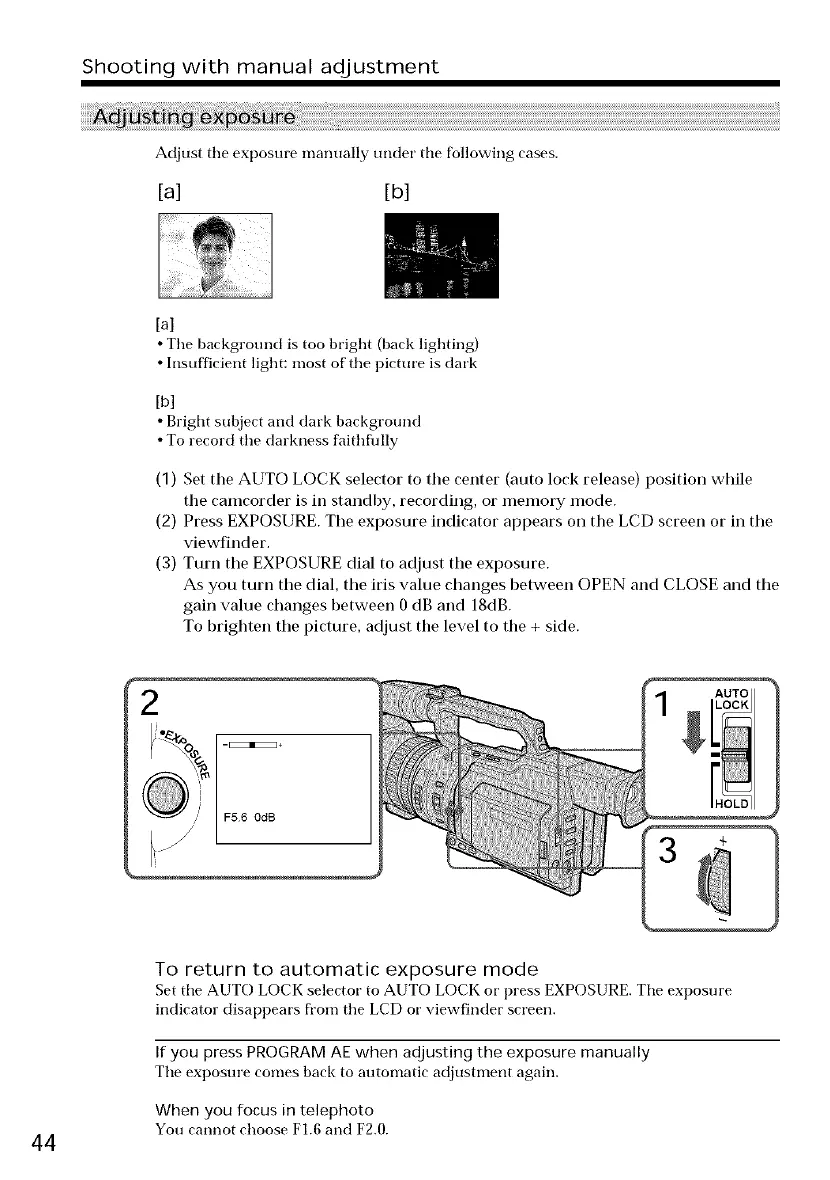
(1) Set tile AUTO LOCK selector to tile center (auto lock release) position while
the camcorder is in standby, recording, or memory mode.
(2) Press EXPOSURE. The exposure indicator appears on the LCD screen or in the
viewfinder.
(3) Turn the EXPOSURE dial to adjust the exposure.
As you turn the dial, the iris value changes between OPEN and CLOSE and the
gain value changes between 0 dB and 18dB.
To brighten the picture, adjust the level to the + side.
To return to automatic exposure mode
Set tile AUTO LOCK selector to AUTO LOCK or press EXPOSURE. Tile exposure
indicator disappears from the LCD or viewfinder screen.
If you press PROGRAM AE when adjusting the exposure manually
Tile exposure comes back to autonmtic adjustnmnt again.
When you focus in telephoto
You cannot choose F1.6 and F2.0.
44















 To Next Page