Shooting with manual adjustment
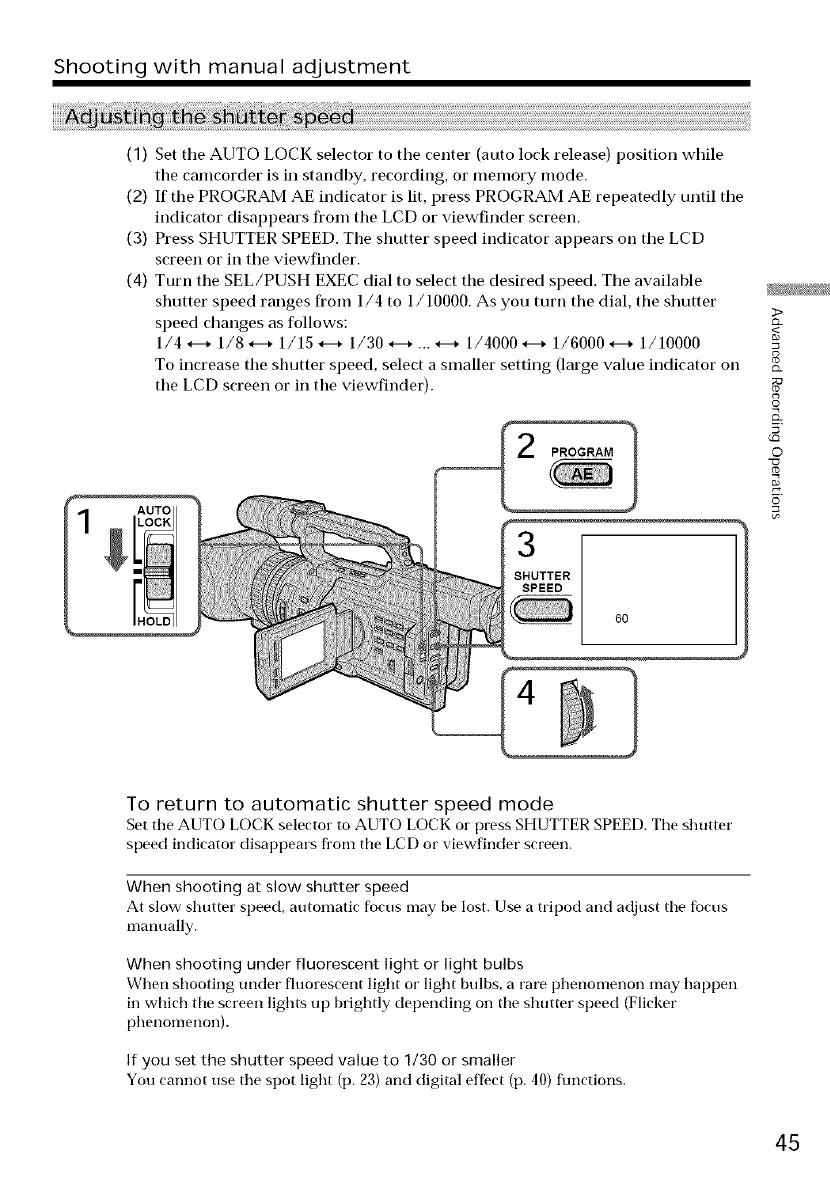
(1) Set tile AUTO LOCK selector to tile center (auto lock release) position while
the camcorder is in standby, recording, or memory mode.
(2) If the PROGRAM AE indicator is lit, press PROGRAM AE repeatedly until tile
indicator disappears from tile LCD or viewfinder screen.
(3) Press SHUTTER SPEED. The shutter speed indicator appears oil tile LCD
screen or in tile viewfinder.
(4) Turn tile SEL/PUSH EXEC dial to select tile desired speed. The available
shutter speed ranges from 1/4 to 1/10000. As you turn the dial, the shutter
speed changes as follows:
1/4.---* 1/8.---* 1/15.---* 1/30.---* ... _--_ 1/4000.---* 1/6000.---* 1/10000
To increase the shutter speed, select a smaller setting (large value indicator on
the LCD screen or in the viewfinder).
PROGRAM 1
>
g
©
5'
©
To return to automatic shutter speed mode
Set the AUTO LOCK selector to AUTO LOCK or press SHUTTER SPEED. The shutter
speed indicator disappears from the LCD or viewfinder screen.
When shooting at slow shutter speed
At slow shutter speed, automatic focus may be lost. Use a tripod and adjust tile focus
mammlly.
When shooting under fluorescent light or light bulbs
When shooting under fluorescent light oi" light bulbs, a rare l)t_enomenon may happen
in wlfich tile screen lights up brightly depending on tile shutter speed (Flicker
phenomenon).
If you set the shutter speed value to 1/30 or smaller
You cannot use tile spot light (p. 23) and digital effect (p. 40) functions.
45















 To Next Page