Dubbing only desired scenes - Digital program editing
Setting the buttons to cancel the recording pause on the VCR
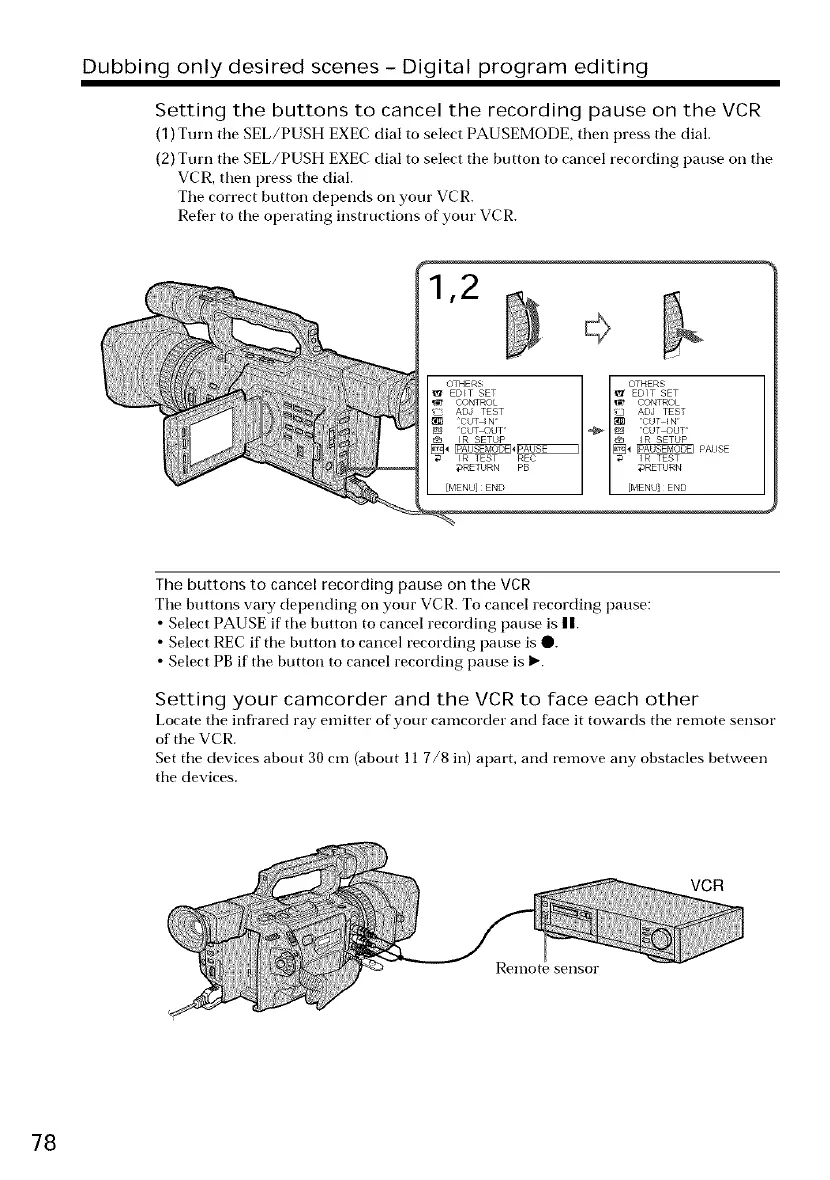
(1) Turn tile SEL/PUSH EXEC dial to select PAUSEMODE, then press tile dial.
(2) Turn the SEL/PUSH EXEC dial to select the button to cancel recording pause on the
VCR, then press tile dial.
Tile correct button depends on your VCR.
Refer to tile operating instructions of your VCR.
OTHERS OTHERS
1_ EDtT SET _ EDIT SET
CONTROL _ CONTROL
I_ ADJ TEST _ ADJ TEST
[_4 IPAUSEMODEI4IPAUSE I [_ _ PAIJSE
CUT IN = _1_ CUT _N
CUT OUT _ _ CUT OUT'
I R SETUP €_ I R SETUP
I R TEST REC _ I R TEST
#RETURN PB @RETURN
[MENU] END [MENU] END
The buttons to cancel recording pause on the VCR
Ttle buttons vary depending on your VCR. To cancel recording pause:
• Select PAUSE if tile button to cancel recording pause is n.
• Select REC if tile button to cancel recording pause is O.
• Select PB if the button to cancel recording pause is 1_.
Setting your camcorder and the VCR to face each other
Locate tile infl'ared ray emitter of your camcorder and face it towards tile remote sensor
of tile VCR.
Set tile devices about 30 cm (about 11 7/8 in) apart, and remove any obstacles between
tile devices.
VCR
Remote sellsor
78















 To Next Page