Dubbing only desired scenes - Digital program editing
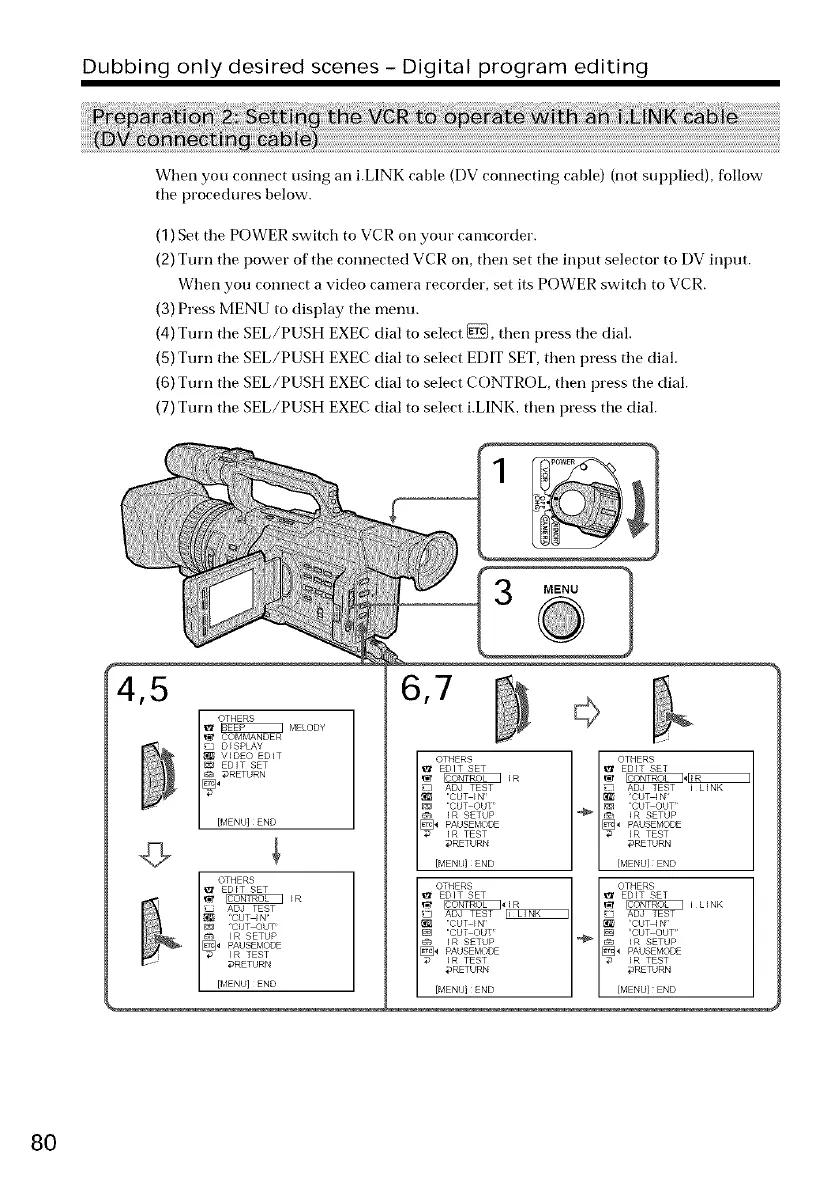
When you connect using an i.LINK cable (DV connecting cable) (not supplied), follow
tile procedures below.
(1)Set tile POWER switch to VCR on your camcorder.
(2)Turn tile power of tile connected VCR on, then set tile input selector to DV input.
When you connect a video camera recorder, set its POWER switch to VCR.
(3)Press MENU to display tile menu.
(4)Turn tile SEL/PUSH EXEC dial to select _, then press tile dial.
(5)Turn tile SEL/PUSH EXEC dial to select EDIT SET,then press tile dial.
(6)Turn tile SEL/PUSH EXEC dial to select CONTROL, then press tile dial.
(7)Turn tile SEL/PUSH EXEC dial to select i.LINK, then press tile dial.
4,5
I OTHERS
EDIT SET
ADJ TEST
• /_ CUT IN =
CUT OUT
IR SETUP
I R TEST
DRETURN
[MENU] END
6,7
OTHERS
EDIT SET
_ DJ TEST
CUT IN
CUT OUT'
IR SETUP
[_4 PAUSEMODE
[7 IR TEST
DRETURN
[MENIJ] END
MENU
l THERS
EDIT SET
:._iLINK
ADJ TEST
CUT ]N
CUT OUT
'_ _ _R SETUP
I R TEST
#RETURN
{MENU]END
80















 To Next Page