Audio dubbing
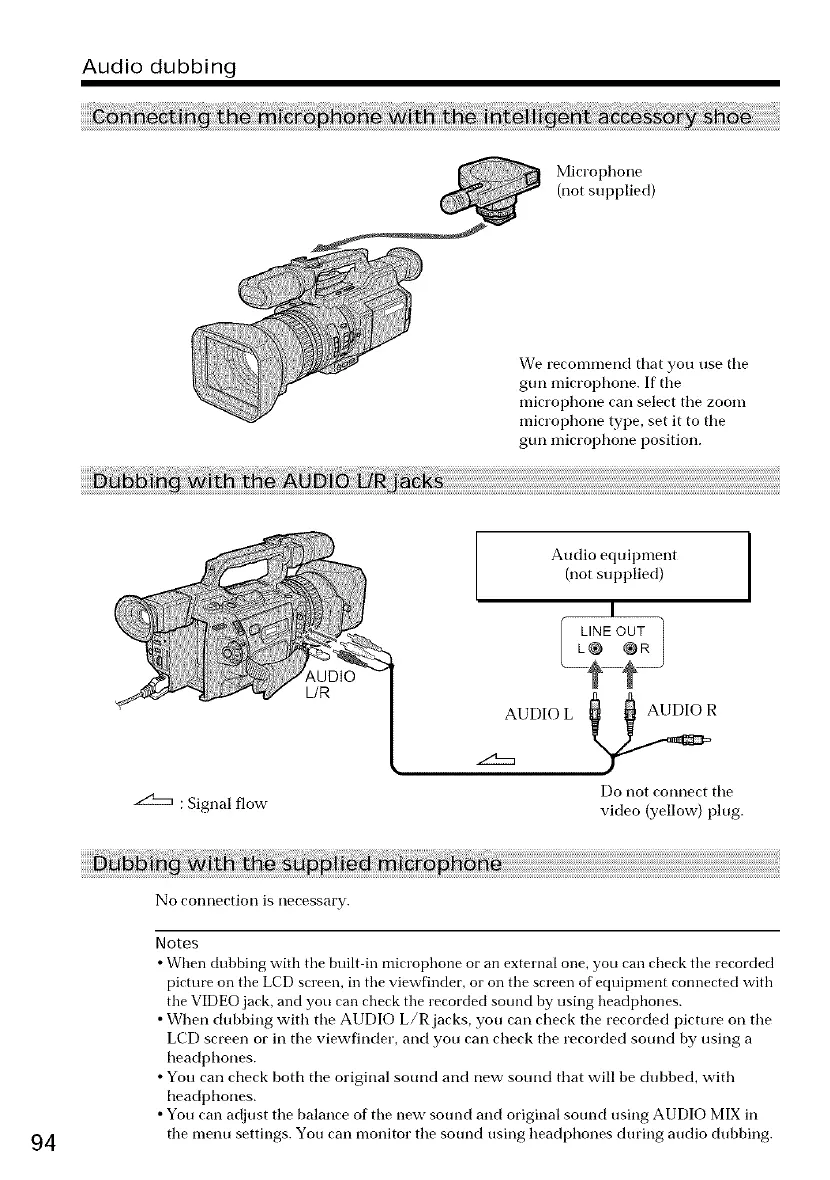
Microphone
(not supplied)
We recommend that you use tile
gun microphone. If tile
microphone carl select the zoom
microphone type, set it to tile
gun microphone position.
L/R
: Signal flow
Audio equipment
(not supplied)
AUDIO L AUDIO R
Do not connect the
video (yellow) plug.
94
No connection is necessary.
Notes
• When dubbing with tire built in microphone or an external one, you can check tire recorded
pictut_ on tire LCD screen, in tire viewfinder, or on tire screen of eqtfipment connected with
tire VIDEO jack, and you can check the recorded sound by using headphones.
• When dubbing with tile AUDIO L/R jacks, yon carl check tile recorded picture on tile
LCD screen or in tile viewfinder, and yon carl check tile recorded sound by using a
headl) hones.
• You carl check both the original sound and new sound that will be dubbed, with
headl_hones.
• Yon can adjust the balance of the new sound and original sound using AUDIO MIX in
tile nmnu settings. You carl monitor tile sound using headphones during audio dubbing.















 To Next Page