Superimposing a title
If you use a tape with cassette memory, you can superiml)ose tile title while
recording or after recording. When you play back tile tape, tile title is displayed
for five seconds fl'om the point where you superimposed it.
You carl select one of eight preset titles and two custom titles (p. 101).
You carl also select tile color, size and
position of titles.
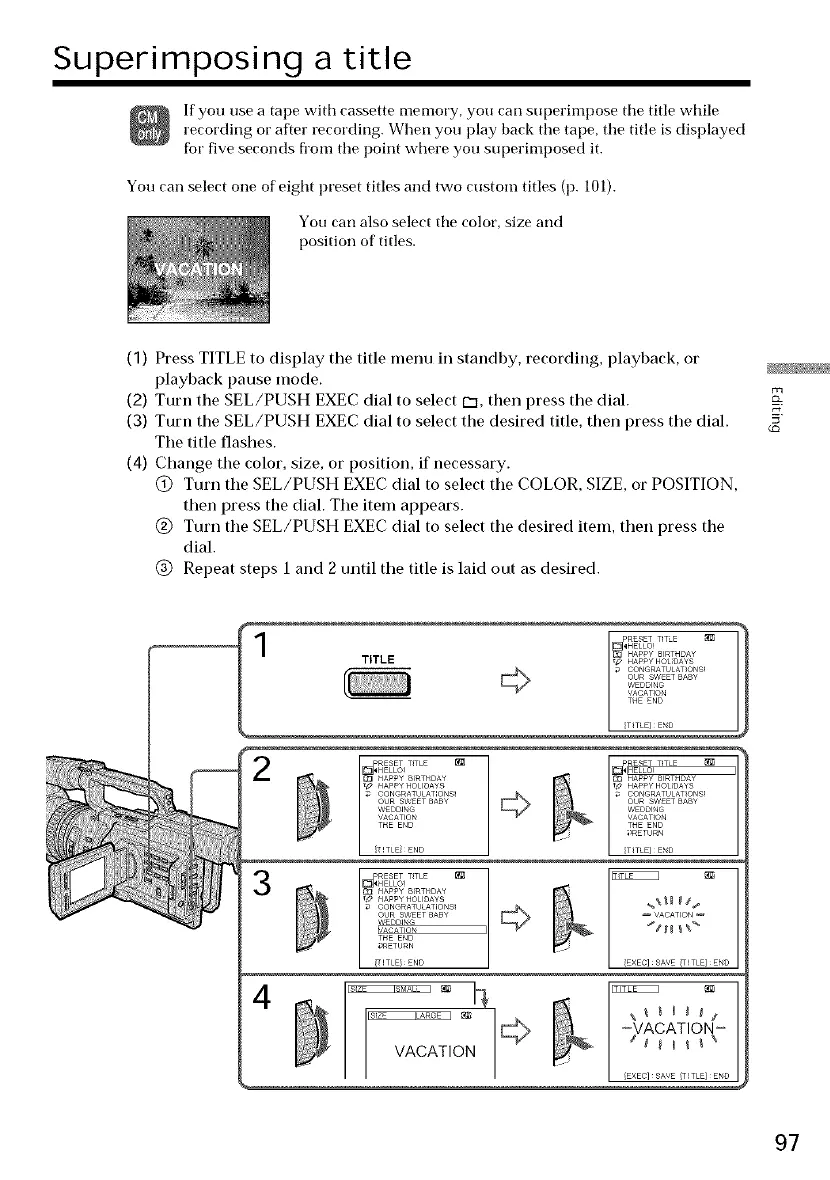
(1) Press TITLE to display the title menu in standby, recording, playback, or
playback pause mode.
(2) Turn the SEL/PUSH EXEC dial to select C3, then press the dial.
(3) Turn the SEL/PUSH EXEC dial to select the desired title, then press the dial.
The title flashes.
(4) Change the color, size, or position, if necessary.
@ Turn tile SEL/PUSH EXEC dial to select the COLOR, SIZE, or POSITION,
then press the dial. Tile item appears.
(_) Turn the SEL/PUSH EXEC dial to select the desired item, then press the
dial.
(_) Repeat steps 1 and 2 until tile title is laid out as desired.
_HELLO!
HAPPY 8_RTHDA¥
TITLE ,# HAppyHOLIDAYS
_ CONGRATULAT QNS!
OUR SWET BABY
WEDDING
VACATION
[TITLE / ENI]
THE ENO
3
RF_FT TITi F _
HELLO!
_ l HAPPY 8_RTHDA¥
_ HAPPY HOLIDAYS
_ _ CONGRATULAT_ONS!
OUR SWEET BABY
WEDDING
[T_TLE} END
VACATION
THE ENO
_>RETURN
1 AVE ,T EI D
© ,,0,,,,
'-_VACATION _
VACATION
L EXEC SAVE /-ITLE END
97















 To Next Page