_"Memory Stick" media that
you can use
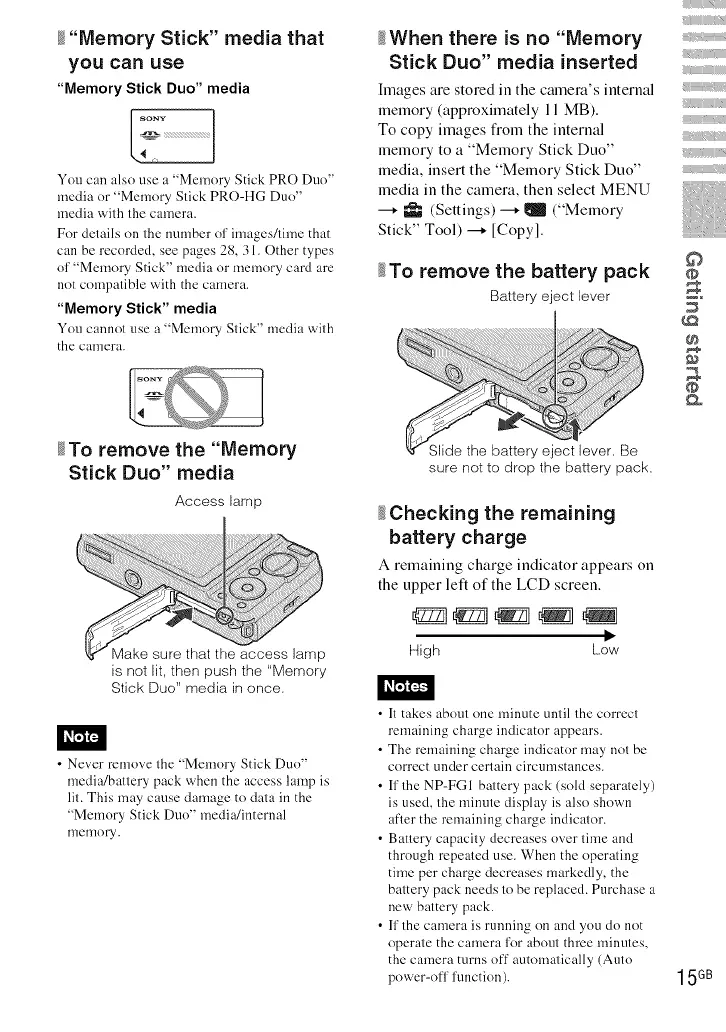
"Memory Stick Duo" media
You can also use a "Memory Stick PRO Duo"
media or "Memory Stick PRO-HG Duo"
media with the camera.
For details on the number of images/lime that
can be recorded, see pages 2& 31. Other types
of "Memory Stick" media or memory card are
not compatible with the camera.
"Memory Stick" media
You cannot use a "Memory Stick" media with
the cal]nera.
_To remove the "Memory
Stick Duo" media
Access lamp
I
access lamp
is not lit, then push the "Memor
Stick Duo" media in once.
• Never remove the "Memory Stick Duo"
media/battery pack when the access lamp is
lit. This may cause damage to data in the
"Memory Stick Duo" media/iutemal
memory.
>, 1'{ g
1:1 {{
}_When there is no "Memory
Stick Duo" media inserted
iiJii_]iiiiiiiiiiii]iiiii)i]iiiiiiiiiiiiii!
hnages are stored in the camera's internal
memory (approximately 11 MB).
To copy images fiom the internal i:[
memory to a "Memory Stick Duo"
media, insert the "Memory Stick Duo"
media in the camera, then select MENU
--+ _._ (Settings) --+ qR ("Memory
Stick" Tool) --+ [Copyl.
_To remove the battery pack
Battery eject lever
31ide the battery eject lever, Be
sure not to drop the battery pack.
_Checking the remaining
battery charge
A remaining charge indicator appears on
the upper left of the LCD screen.
ID
High Low
• It takes about one minute until the correct
remaining charge indicator appears.
• The remaining charge indicator may not be
correct under certain circuulstances.
• If the NP-FGI battery pack (sold separately)
is used, the minute display is also shown
after the remaining charge indicator.
• Battery capacity decreases over time and
through repeated use. When the operating
time per charge decreases markedly, the
battery pack needs to be replaced. Purchase a
new battery pack.
• If the camera is running on and you do not
operate the camera for about three minutes,
the camera turns off automatically (Auto
power-off function).
©
O
15 GB













 To Next Page