i_i iiil
iiiiiiiiiiiii_
iiUi_iiiii_
iiiiii iiiii_
iiiiii--_iiiiiiiii_i
iiiiiiiii_iii
iiiiiiiii',,,,iiiiii/i_iii_
iiiiiiiiiiiiiiiiiiiiiiiiiiiiiiiiiiiii_m
©
@
Setting the clock
1
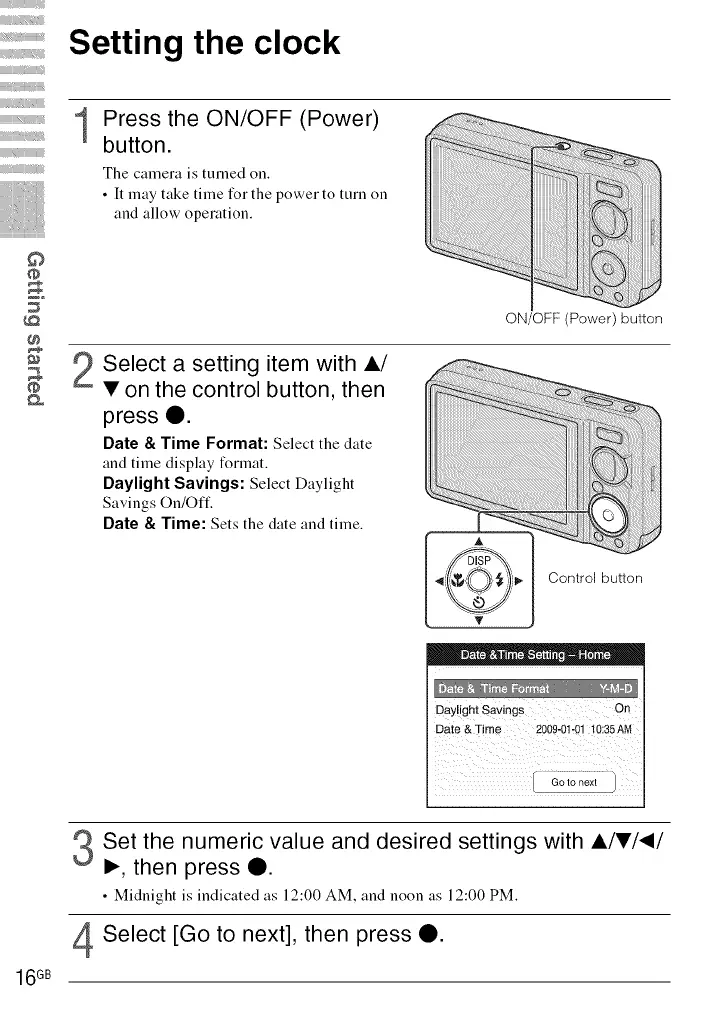
Press the ON/OFF (Power)
button.
The camera is turned on.
• It may take time for the power to turn on
and allow operation.
ON/OFF (Power) button
Select a setting item with A/
• on the control button, then
press O.
Date & Time Format: Select the date
and time display format.
Daylight Savings: Select Daylight
Savings On/Off.
Date 8, Time: Sets the date and time.
Control button
Dayligh t Savings O a
Date&Time 2009-01@1 !0:35 AN
16GB
Set the numeric value and desired settings with A/•/_/
I_, then press O.
• Midnight is indicated as 12:00 AM, and noon as 12:00 PM.
Select [Go to next], then press O.













 To Next Page