Viewing images
1
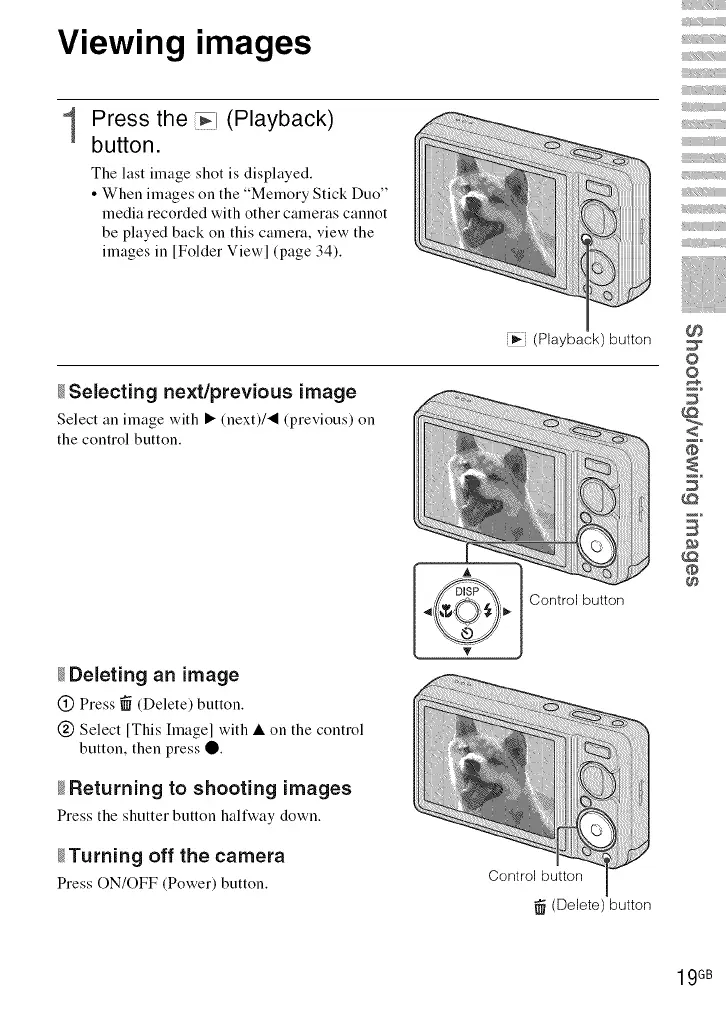
Press the _ (Playback)
button.
The last image shot is displayed.
• When images on the "Memory Stick Duo"
media recorded with other cameras cannot
be played back on this camera, view the
images in [Folder Viewl (page 34).
....... iiiiiii!i!!_i_il
Fi_ (Playback) button
_Selecting next/previous image
Select an image with • (next)/'_ (previous) on
the control button.
_Deleting an image
(_) Press _ (Delete) button.
(_ Select [This hnagel with • on the control
button, then press O.
_Returning to shooting images
Press the shutter button halfway down.
_Turning off the camera
Press ON/OFF (Power) button.
Control button
(Delete) button
iii_iiiii
i
iii
0
©
@
B
@
@
19GB













 To Next Page