Selecting the image size to match the usage
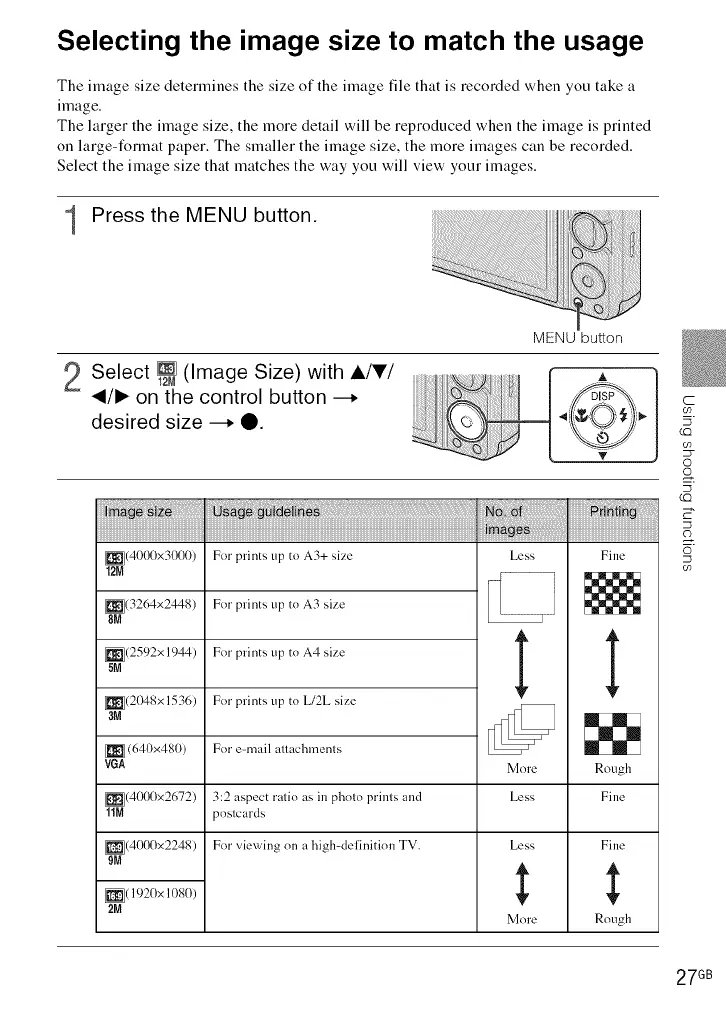
The image size determines the size of the image file that is recorded when you take a
image.
The larger the image size, the more detail will be reproduced when the image is printed
on large-format paper. The smaller the image size, the more images can be recorded.
Select the image size that matches the way you will view your images.
1 Press the MENU button.
2 Select _ (Image Size) with A/V/
_/1_ on the control button --.
desired size --. O.
MENU button
_(40(X)x3(X)0)
12M
_(32(Mx2448)
8M
_(2592x 1944)
5M
_(2048x 1536)
aM
(640x480)
VGA
Less
_k
For prints up to A3+ size
For prints up to A3 size
For prints up to A4 size
For prints up to L/2L size
For e-mail attachments
3:2 aspect ratio as in photo prints and
postcards
For viev_'ing on a high-delinition TV.
_r
More
_(401)t)x2672) Less
11M
_(401)t)x2248)
9M
_( 1920x 10SO)
2M
Less
More
Fine
' F
Rough
Fine
Fine
Rough
C
O9
(22
O
o
5
(22
o9
27 GB













 To Next Page