iiiiii-_iiiiiiii_
iiiiii/i
iiiiii iii_
iiiiii_iii:• iii_
iiiiii/i_/_i/iiiiii_
iiiiiiiiiiiiii_iiiiiiiiii(i}iiiiiiiii_
iiiiiiiiiiiit!itiiiiiit_iiiiiii
iiiiiiiiii_iiiiiiiiiiiiiiiiiiiiiiiti_
iiiiiiiiiiii/b••iiiiiWiii
_iiiiiiiiiiiiiiii
Shooting images
1
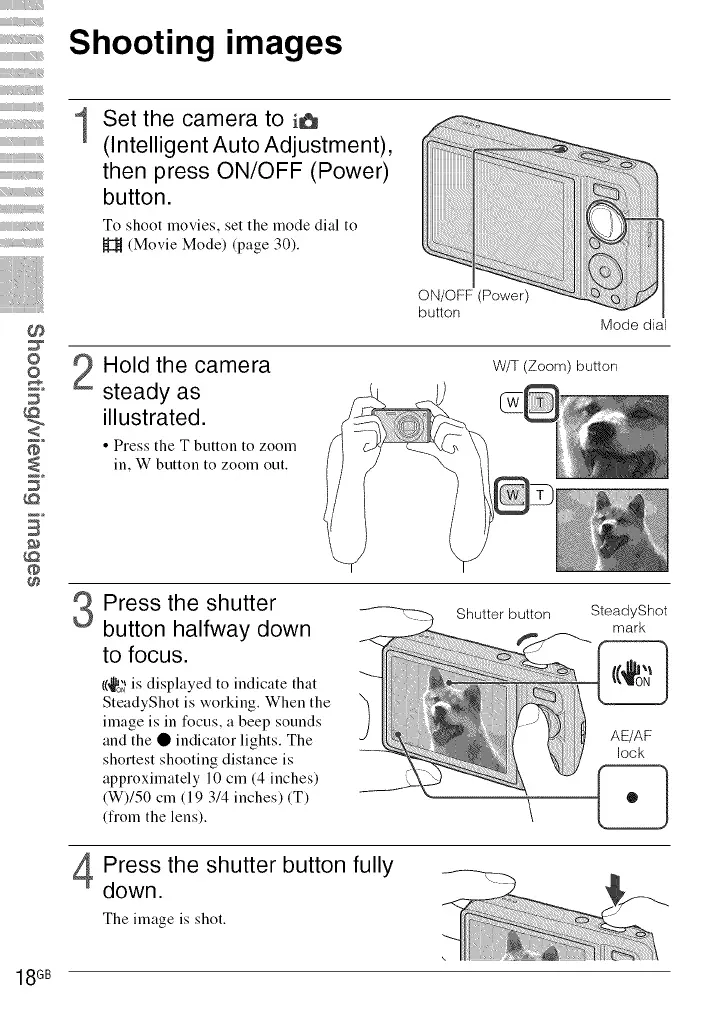
Set the camera to i6
(Intelligent Auto Adjustment),
then press ON/OFF (Power)
button.
To shoot movies, set the mode dial to
_t (Movie Mode) (page 30).
O
&
B
ON/OFF (Power)
button
Mode dial
Hold the camera
steady as
illustrated.
• Press the T button to zoom
in, W button to zoom out.
W/T (Zoom) button
3
4
Press the shutter
button halfway down
to focus.
I(_o_'is displayed to indicate that
SteadyShot is working. When the
image is in focus, a beep sounds
and the • indicator lights. The
shortest shooting distance is
approximately 10 cm (4 inches)
(W)/50 cm (19 3/4 inches) iT)
(fiom the lens).
Shutter button
Press the shutter button fully
down.
The image is shot.
SteadyShot
mark
AE/AF
lock
18 GB













 To Next Page