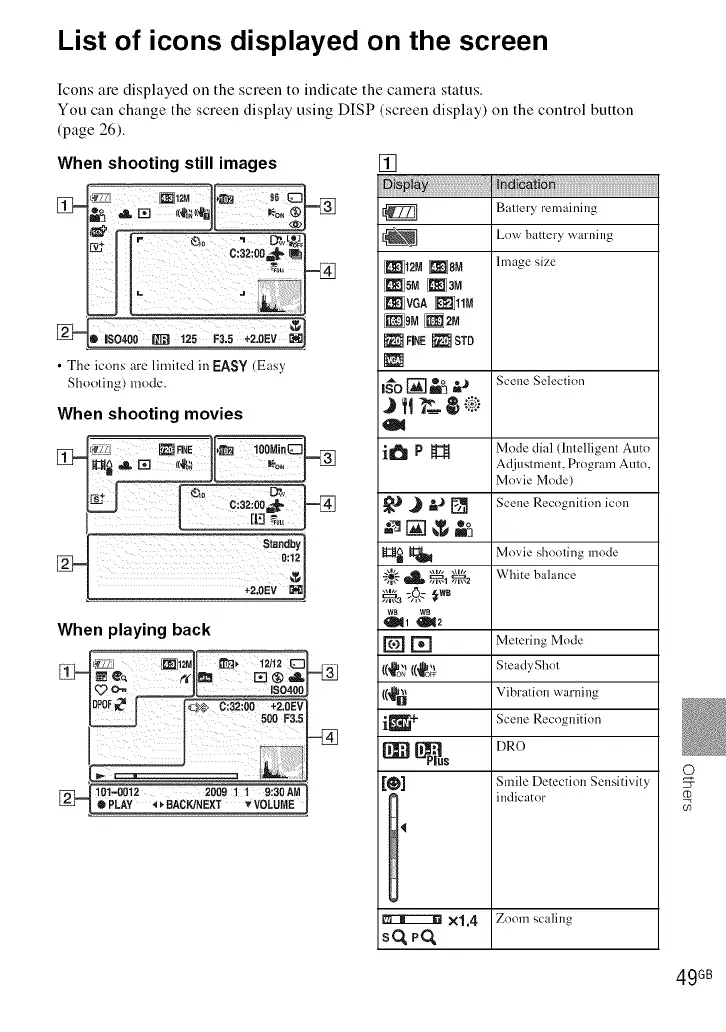
List of icons displayed on the screen
Icons are displayed on the screen to indicate the camera status.
You can change the screen display using DISP (screen display) on the control button
(page 26).
[]
: _a!oa
[_ Ballery remaining
Low battery warning
-_ _12M _8M Image size
i_isMiNaM
When shooting still images
_q- ¢
D ISO400 RR] 125 F3.5 +2.0EV []
• The icons are limited in EASY (Easy
Shooting) mode.
When shooting movies
standby1
0:lq
When playing back
[_ 101-0012 200911 9:30AN
li, PLAY _p-BACK/NEXT vVOLUME
_VGA _11M
HNE_ STD
,_'o[]=% "-* s..... Selection
i_ P _ Mode dial (Intelligent Auto
Adjustment, Program Auto,
Movie Mode)
_J J _J [] S..... Recognition i......
mn
[t;lt_ _ Movie shooting mode
"_,'-'-_ _, _a White hal .......
[] [] Metering Mode
1(_o_,_((_o_} Steadyghol
1(_1_1_ Vibration warning
i[_+ Scene Recognition
[_ _us DRO
[_] Smile Detection Sensitivity
indicator
1'
®
X1.4 Zoom scaling
sq_q
49 GB













 To Next Page