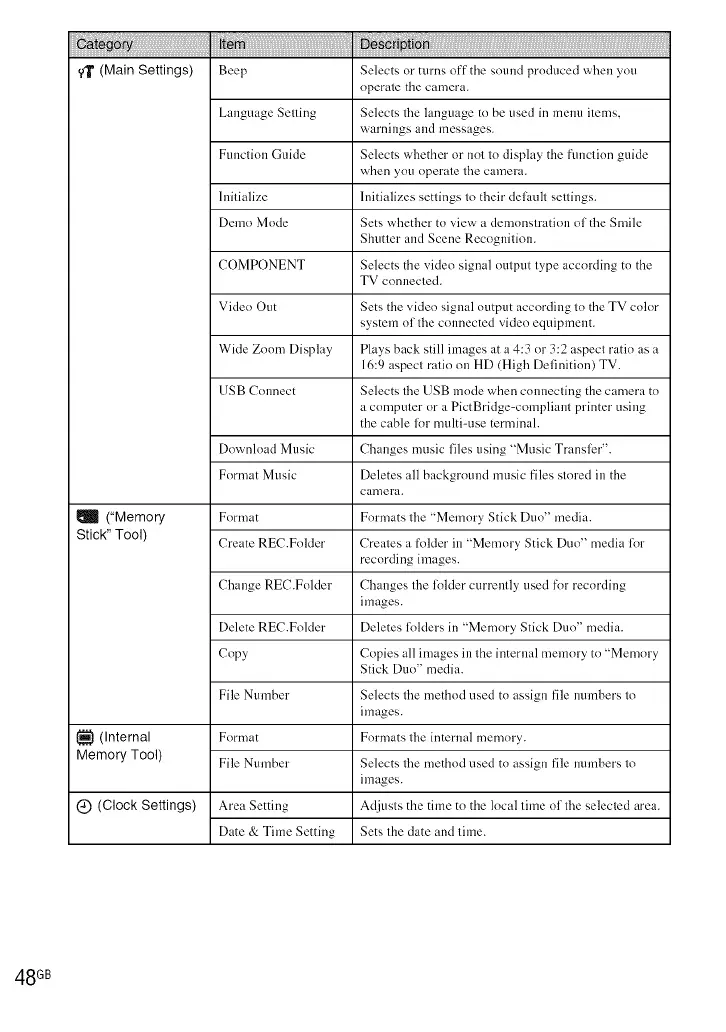
qT (Main Settings) Beep Selects or turns off the sound produced when you
operate the camera.
Language Setting Selects tile language to be used in menu items,
warnings and messages.
Ftmction Guide Selects whether or nnt to display the flmction guide
when you nperate tile camera.
Initialize Initializes settings to their del_.mlt settings.
Demo Mode Sets whether tn view a demonstration nfthe Smile
Shutter and Scene Recognition.
COMPONENT Selects the video signal output type according tn the
TV connected.
Video Out Sets the video signal output according to the TV color
system of tile connected video equipment.
Wide Zoom Display Plays back still images at a 4:3 or 3:2 aspect ratio as a
16:9 aspect ratio nu HD (High Definition) TV.
USB Connect Selects tile USB mode when connecting the camera tn
a computer or a PictBridge-compliaut printer using
the cable lklr multi-use tern/inal.
Download Music Changes music files using "Music TranslL'r".
Fnrn/at Music Deletes all background music files stored in the
can/era.
I_ ("Memory Fnrn/at Formats tile "Memnry Stick Dun" media.
Stick" Tool) Create REC.Folder Creales a folder ill "Memory Stick Duo" media for
recording images.
Change REC.Fnlder Changes tile li!lder currently used for recording
images.
Delete REC.Fnlder Deletes li!l(lers in "Memnry Stick Duo" media.
Copy Copies all images in the internal memory tn "Memnry
Stick Dun" media.
File Number Selects tile method used tn assign file numbers to
images.
1_1 (internal Format Formats lhe internal memory.
Memory Tool) File Number Selects file method used tn assign file numbers lo
images.
C) (Clock Settings) Area Setting Adjusts the time to the local time of tile selected area.
Date & Time Setting Sets the date and time.
48 GB













 To Next Page