_Stage 2: importing images to your computer using "PMB"
1 Insert a fully charged battery pack to the camera, then press
the _ (Playback) button.
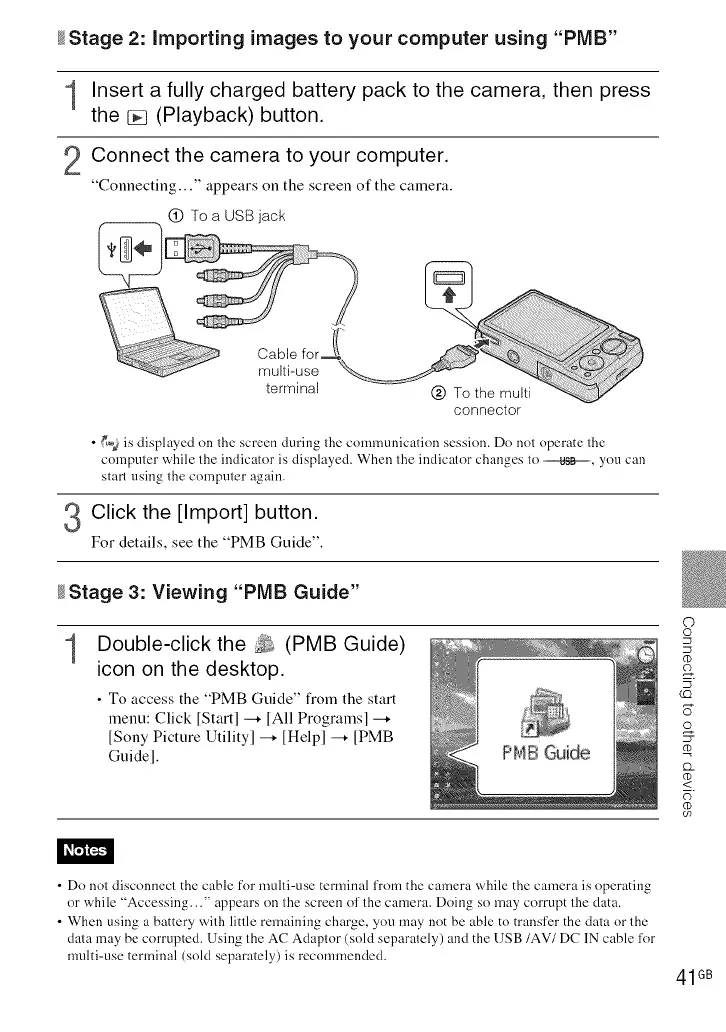
Connect the camera to your computer.
"Connecting..." appears on the screen of the camera.
O To a USB jack
connector
• _ is displayed on the screen during the comnmnieation session. Do not operate the
computer while the indicator is displayed. When the indicator changes to ,_, you can
start using the computer again.
3 Click the [Import] button.
For details, see the "PMB Guide".
_Stage 3: Viewing "PMB Guide"
1
Double-click the _ (PMB Guide)
icon on the desktop.
• To access the "PMB Guide" fiom the start
menu: Click [Start l -+ [All Programsl -+
[Sony Picture Utilityl -+ [Helpl -+ [PMB
Guidel.
c)
S
g
5
(C)
U
D_
<
U)
• Do not disconnect the cable for multi-use terminal from the camera while the camera is operating
or while "Accessing..." appears on the screen of the camera. Doing so may corrupt the data.
• When using a battery with little remaining charge, you may not be able to transfer the data or the
data may be corrupted. Using the AC Adaptor (sold separately) and the USB/AV/DC IN cable for
multi-use terminal (sold separately) is recommended.
41GB













 To Next Page