3-2
DXC-D30 (UC)
DXC-D30P (CE)
3-1-3. Switch Setting Before Adjustment
[DXC-D30, DXC-D30P]
Switch setting for camera side
GAIN switch : 0 dB
OUTPUT/DL/DCC + switch : CAM/DCC +
WHITE BAL switch : PRESET
FILTER control : 1
SHUTTER switch : OFF
ZEBRA switch : OFF
MARKER switch : OFF
HYPER GAIN switch : OFF
SET UP switch : STD
EZ MODE switch : OFF
IRIS (Lens) : Manual
ZOOM (Lens) : Manual
[CA-537, CA-537P]
S1 switch (IF-313 board) : AUTO (Center position)
3-1-4. Notes on Adjustment
Note:
(1) Before adjustment, be sure to allow for 10-minute warm-
up time.
(2) When using the SERVICE menu, refer to “2-7. SERVICE
MODE OPERATION”.
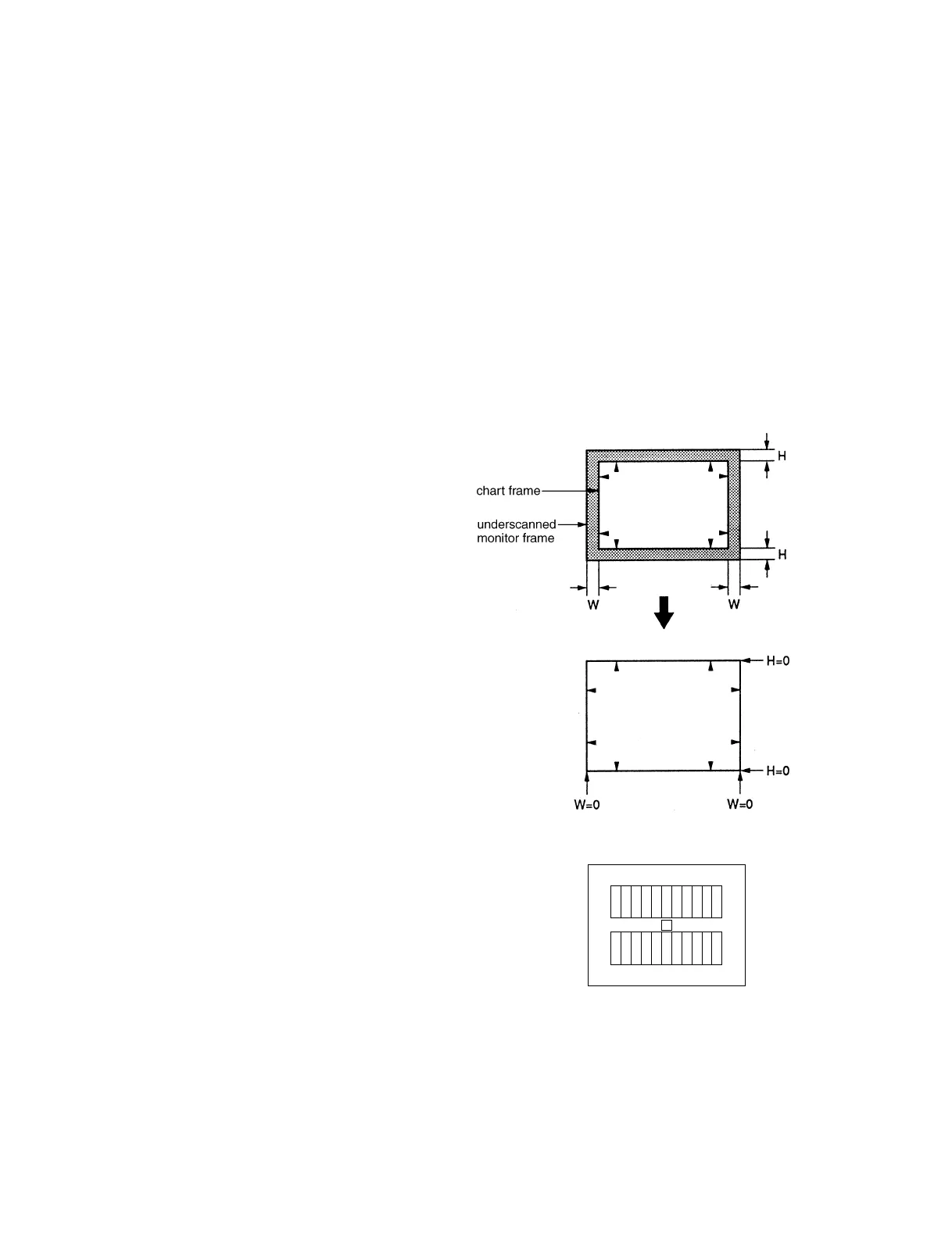
(3) Unless otherwise specified, the sentence “chart frame =
underscanned monitor frame” is written about the shooting
condition.
In this case, make sure that the lens is best focused.
Then adjust the zoom control of the lens so that the chart
frame touches the underscanned monitor frame.
In case of the Grayscale chart:
(underscanned monitor screen)



 To Next Page