Chapter 2 Fitting and Connections
22
Chapter 2 Fitting and Connections
4
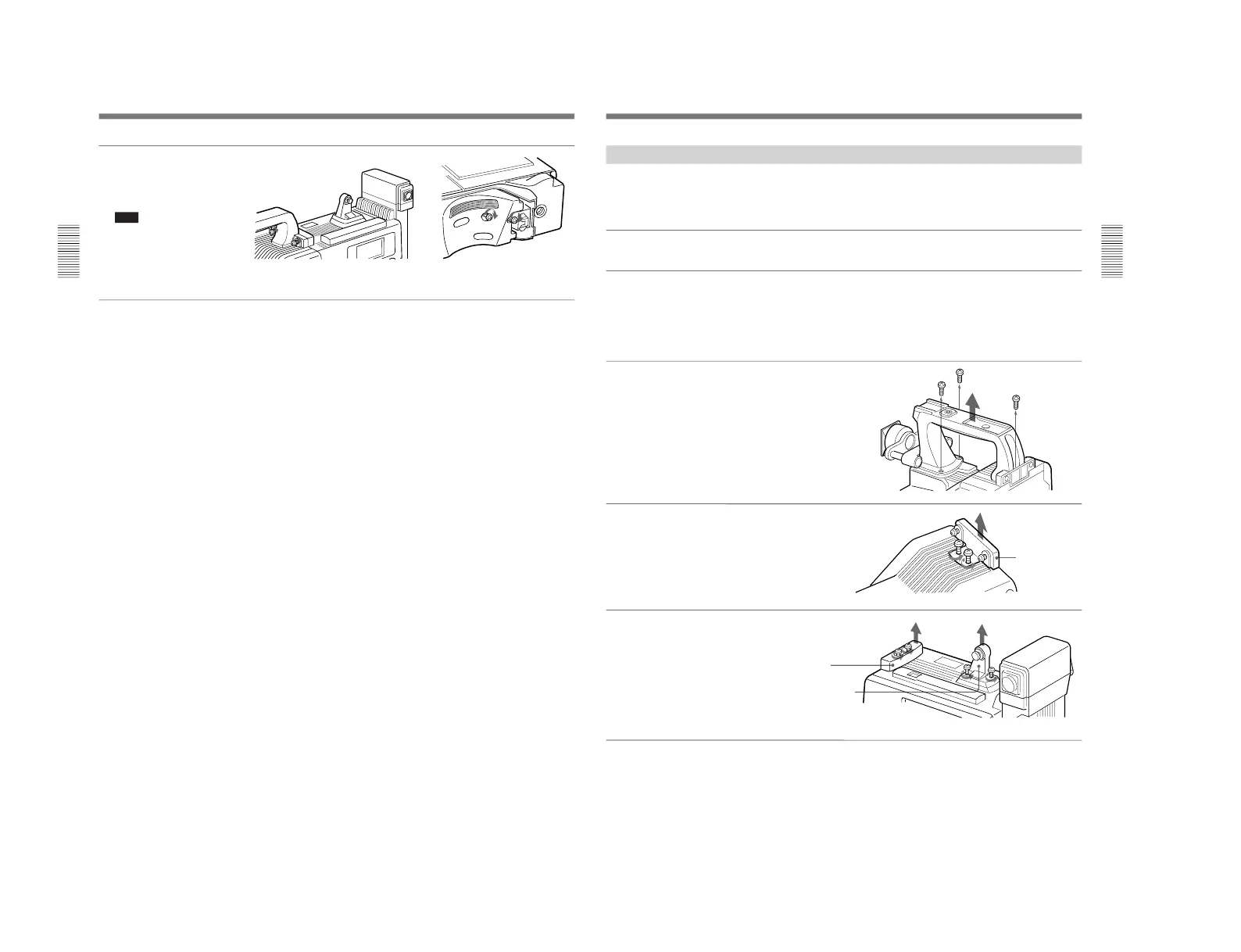
Tighten the two screws in the
grip connector and the two
screws in the should pad
section.
Note
Slide the shoulder pad to its
central position before
tightening the screws.
Otherwise the screws may not
be properly fixed.
Screws
To remove the VTR
Reverse the fitting procedure.
To fit a camera adaptor
Follow the same procedure as when fitting a VTR.
Fitting a VTR
Chapter 2 Fitting and Connections
Chapter 2 Fitting and Connections
23
Using the Camcorder Grip
When using the camera head with a VTR as a
camcorder, you can replace the camera head’s grip
with a camcorder grip (not supplied). The type of
camcorder grip and the method for attaching it differ
slightly depending on the type of VTR.
Attaching a camcorder grip to the DSR-1/1P.
1
If the viewfinder is attached,
adjust the viewfinder to the
full-forward position.
For details, see “Adjusting the
viewfinder position” on page 28.
2
Remove the camera head
grip’s three screws, then pull
up the grip to remove it.
3
Remove the VTR connection
plate.
4
Remove the DSR-1/1P’s
shoulder strap fitting and the
camera head connection plate.
VTR connection
plate
(continued)
Camera head
connection plate
Shoulder strap fitting



 To Next Page