EasyManua.ls Logo

Sony EV-S800 - Clock Set; Setting the Clock

Sony EV-S800
44 pages
Print Icon
To Next Page IconTo Next Page
To Previous Page IconTo Previous Page
Loading...
CLOCK
SET
To
cancel
an
unused
programme
1
Select
the
programme
to
be
cancelled
with
+
or
PROGRAM/TRACK/INDEX.
2
Press
RESET.
The
cancelled
programme
will
be
skipped
when
+
or
PROGRAM/TRACK/INDEX
is
pressed.
When
the
corresponding
programme
number
button
on
the
Commander
is
pressed,
the
sound
of
the
cancelled
programme
will
be
cut
out
and
no
picture
will
be
displayed.
To
fine
tune
a
station
If
the
picture
of a
particular
station
is
not
acceptable,
set
AFT
in
the
upper
compartment
to
OFF
and
keep
+
or
FINE
pressed
until
the
picture
becomes
clear.
To
view
this
particular
station,
set
AFT
to
OFF.
SETTING
THE
CLOCK
1.
When
you
connect
the
unit
to
a
mains
outlet,
the
clock
shows
“Su
0:00”.
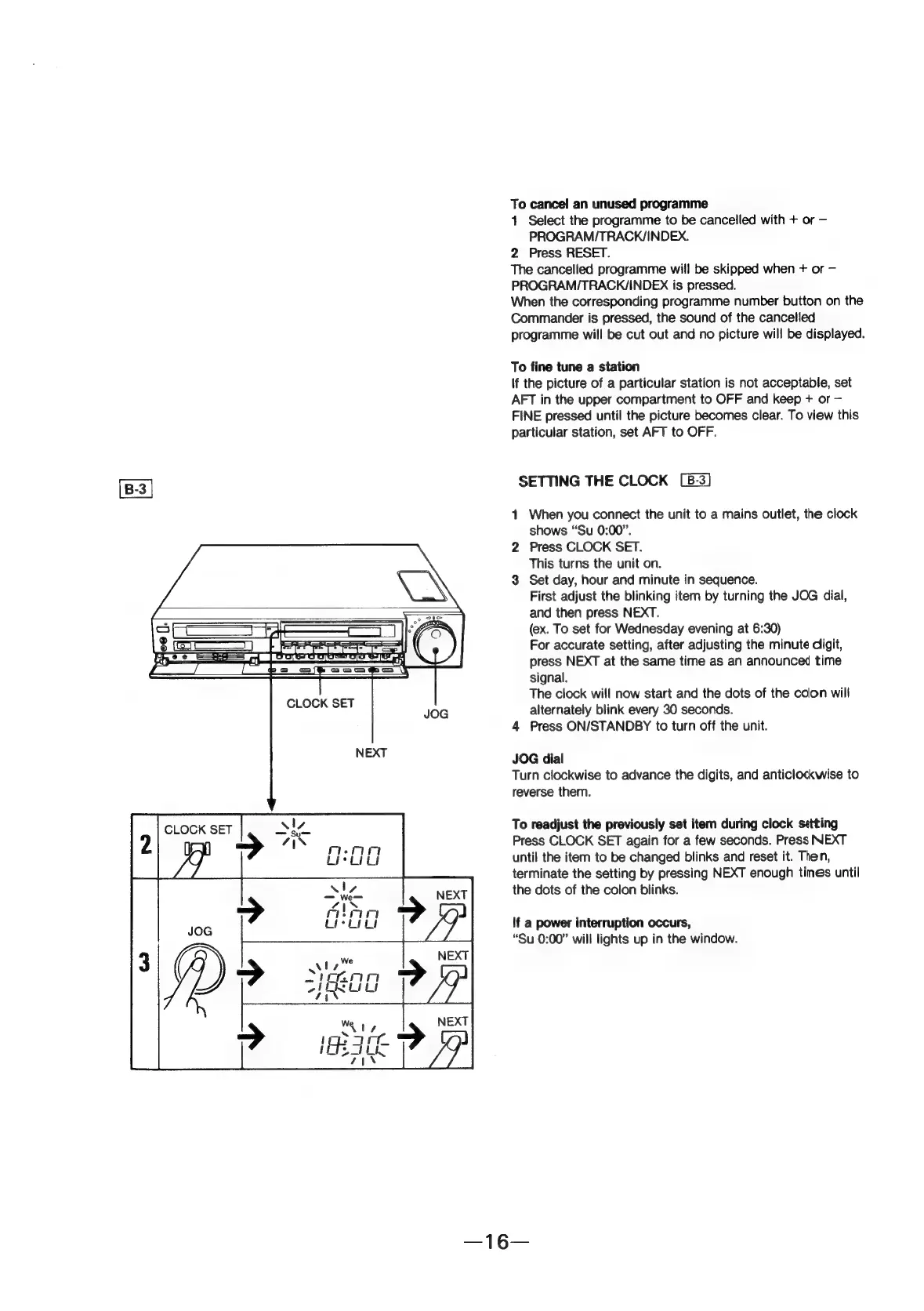
2
Press
CLOCK
SET.
This
turns
the
unit
on.
3
Set
day,
hour
and
minute
in
sequence.
First
adjust
the
blinking
item
by
turning
the
JOG
dial,
and
then
press
NEXT.
(ex.
To
set
for
Wednesday
evening
at
6:30)
For
accurate
setting,
after
adjusting
the
minute
digit,
press
NEXT
at
the
same
time
as
an
announced
time
signal.
The
clock
will
now
start
and
the
dots
of
the
colon
will
alternately
blink
every
30
seconds.
4
Press
ON/STANDBY
to
turn
off
the
unit.
JOG
dial
Turn
clockwise
to
advance
the
digits,
and
anticlockwise
to
reverse
them.
To
readjust
the
previously
set
item
during
clock
setting
Press
CLOCK
SET
again
for
a
few
seconds.
Press
NEXT
until
the
item
to
be
changed
blinks
and
reset
it.
Then,
terminate
the
setting
by
pressing
NEXT
enough
tines
until
the
dots
of
the
colon
blinks.
If
a
power
interruption
occurs,
“Su
0:00”
will
lights
up
in
the
window.