EasyManua.ls Logo

Sony EV-S800 - Index Search

Sony EV-S800
44 pages
Print Icon
To Next Page IconTo Next Page
To Previous Page IconTo Previous Page
Loading...
INDEX
SCAN
INDEX
SEARCH
To
locate
the
desired
programme
You
can
locate
the
desired
programme
and
play
it
back
automatically
by
designating
the
number
of
its
index
signal.
Up
to
99th
index
signal
from
the
present
position
on
the
tape
can
be
located.
Before
operating
Set
PCM
MODE
to
NORM
or
P
(or
S).
If
you
have
set
to
P
(or
S),
select
the
digital
multi
audio
track.
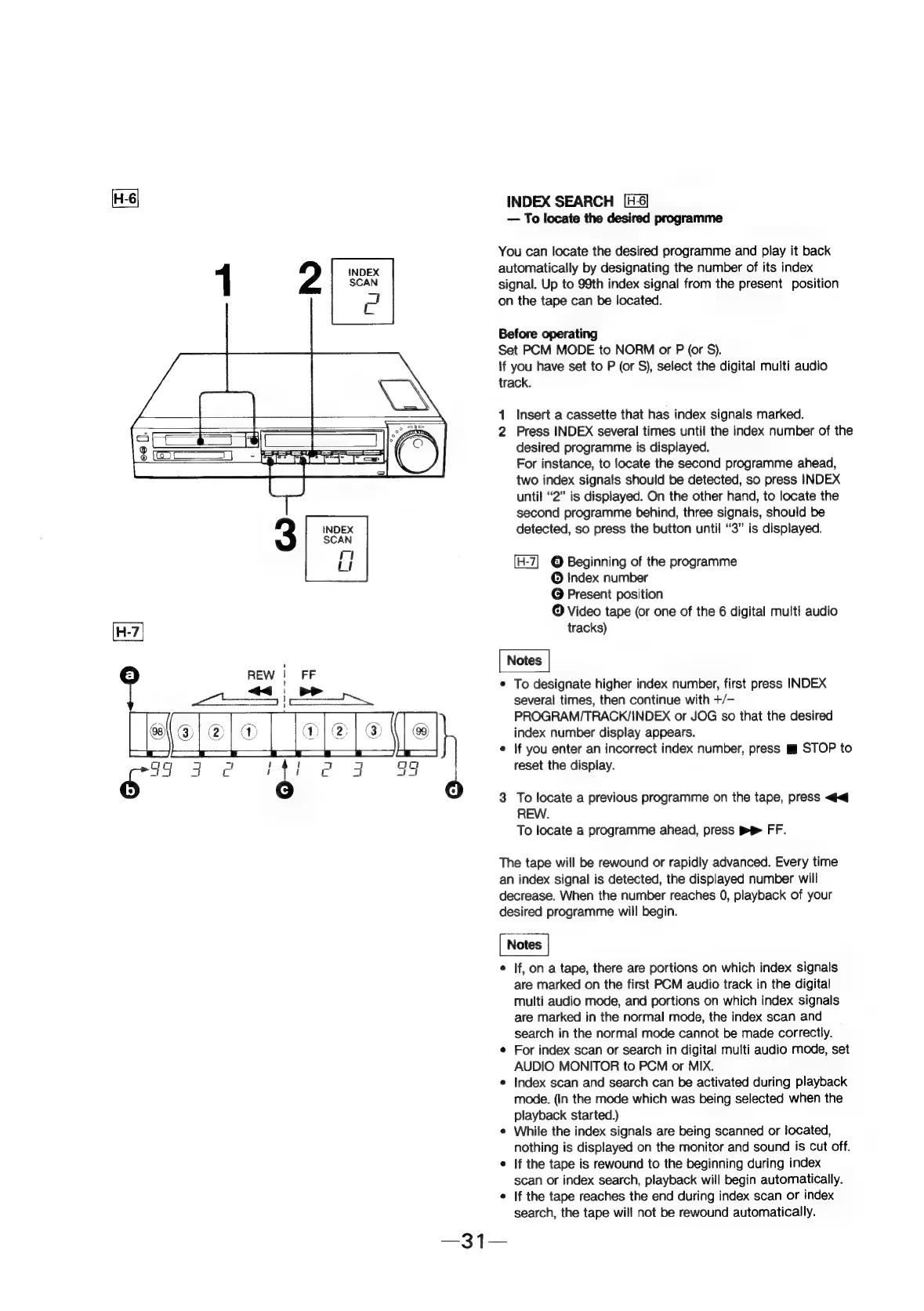
1
Insert
a
cassette
that
has
index
signals
marked.
2
Press
INDEX
several
times
until
the
index
number
of
the
desired
programme
is
displayed.
For
instance,
to
locate
the
second
programme
ahead,
two
index
signals
should
be
detected,
so
press
INDEX
until
“2”
is
displayed.
On
the
other
hand,
to
locate
the
second
programme
behind,
three
signals,
should
be
detected,
so
press
the
button
until
“3”
is
displayed.
©
Beginning
of
the
programme
©
index
number
©
Present
position
©
Video
tape
(or
one
of
the
6
digital
multi
audio
tracks)
°
To
designate
higher
index
number,
first
press
INDEX
several
times,
then
continue
with
+/-
PROGRAM/TRACK/INDEX
or
JOG
so
that
the
desired
index
number
display
appears.
©
if
you
enter
an
incorrect
index
number,
press
™m
STOP
to
reset
the
display.
3
To
locate
a
previous
programme
on
the
tape,
press
<<
REW.
To
locate
a
programme
ahead,
press
PP
FF.
The
tape
will
be
rewound
or
rapidly
advanced.
Every
time
an
index
signal
is
detected,
the
displayed
number
will
decrease.
When
the
number
reaches
0,
playback
of
your
desired
programme
will
begin.
¢
If,
on
a
tape,
there
are
portions
on
which
index
signals
are
marked
on
the
first
PCM
audio
track
in
the
digital
multi
audio
mode,
and
portions
on
which
index
signals
are
marked
in
the
normal
mode,
the
index
scan
and
search
in
the
normal
mode
cannot
be
made
correctly.
¢
For
index
scan
or
search
in
digital
multi
audio
mode,
set
AUDIO
MONITOR
to
PCM
or
MIX.
e
Index
scan
and
search
can
be
activated
during
playback
mode.
(In
the
mode
which
was
being
selected
when
the
playback
started.)
¢
While
the
index
signals
are
being
scanned
or
located,
nothing
is
displayed
on
the
monitor
and
sound
is
Cut
off.
¢
If
the
tape
is
rewound
to
the
beginning
during
index
scan
or
index
search,
playback
will
begin
automatically.
If
the
tape
reaches
the
end
during
index
scan
or
index
search,
the
tape
will
not
be
rewound
automatically.