EasyManua.ls Logo

Sony EV-S800 - ABOUT CASSETLES) Nu

Sony EV-S800
44 pages
Print Icon
To Next Page IconTo Next Page
To Previous Page IconTo Previous Page
Loading...
1-4.
ABOUT
CASSETTES
C-1
OPEN/CLOSE
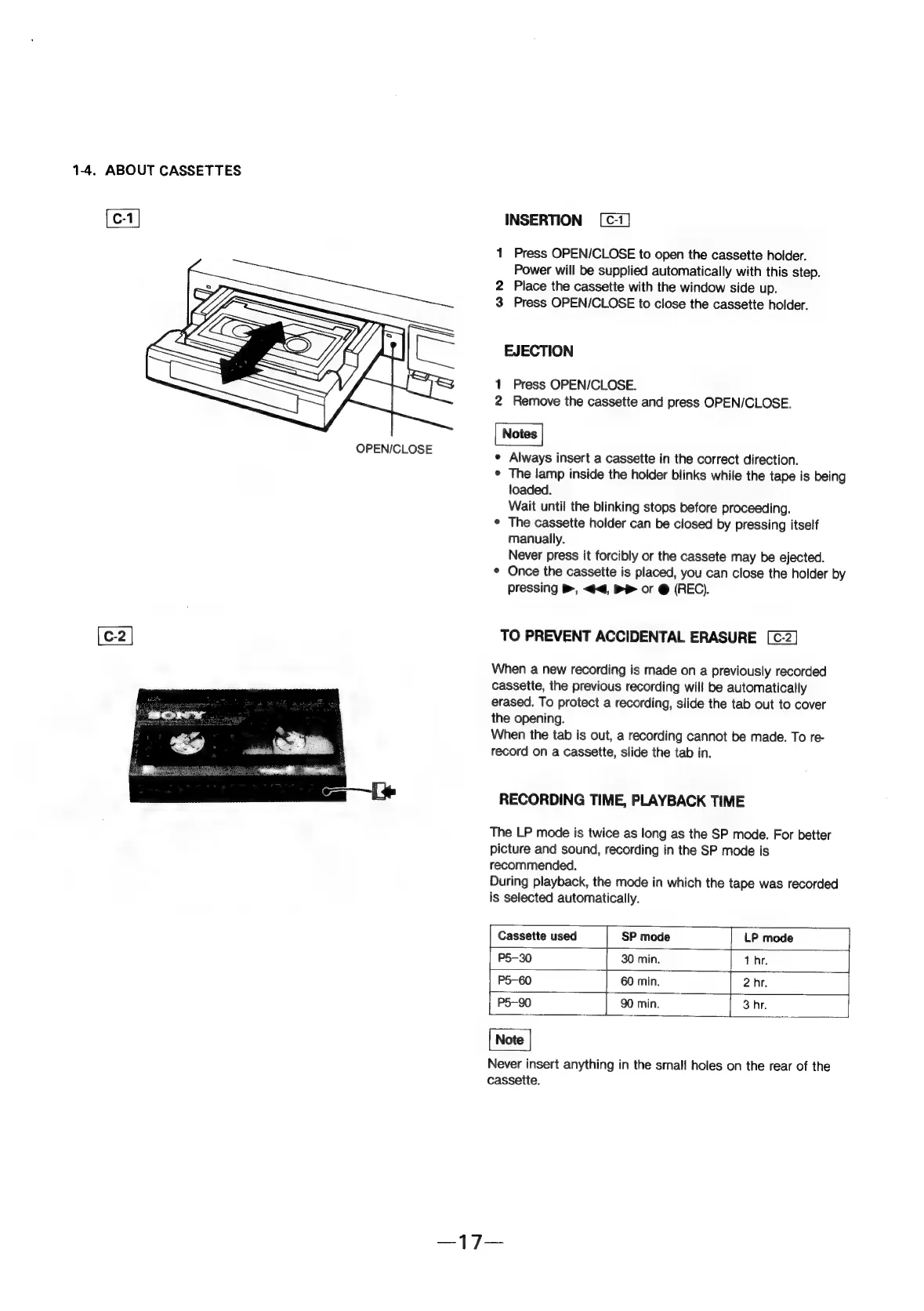
INSERTION
1
Press
OPEN/CLOSE
to
open
the
cassette
hoider.
Power
will
be
supplied
automatically
with
this
step.
2
Place
the
cassette
with
the
window
side
up.
3
Press
OPEN/CLOSE
to
close
the
cassette
holder.
EJECTION
1
Press
OPEN/CLOSE.
2
Remove
the
cassette
and
press
OPEN/CLOSE.
¢
Always
insert
a
cassette
in
the
correct
direction.
¢
The
lamp
inside
the
holder
blinks
while
the
tape
is
being
loaded.
Wait
until
the
blinking
stops
before
proceeding.
¢
The
cassette
holder
can
be
closed
by
pressing
itself
manually.
Never
press
it
forcibly
or
the
cassete
may
be
ejected.
¢
Once
the
cassette
is
placed,
you
can
close
the
holder
by
Pressing
B,
<4,
Be
or
@
(REC).
TO
PREVENT
ACCIDENTAL
ERASURE
When
a
new
recording
is
made
on
a
previously
recorded
cassette,
the
previous
recording
will
be
automatically
erased.
To
protect
a
recording,
slide
the
tab
out
to
cover
the
opening.
When
the tab
is
out,
a
recording
cannot
be
made.
To
re-
record
on
a
cassette,
slide
the
tab
in.
RECORDING
TIME,
PLAYBACK
TIME
The
LP
mode
is
twice
as
long
as
the
SP
mode.
For
better
picture
and
sound,
recording
in
the
SP
mode
is
recommended.
During
playback,
the
mode
in
which
the
tape
was
recorded
is
selected
automatically.
Cassette
used
SP
mode
LP
mode
P5-—30
30
min.
1
hr.
P5-60
60
min.
2
hr.
P5—90
|
90
min.
3
hr.
Never
insert
anything
in
the
small
holes
on
the
rear
of
the
cassette.