EasyManua.ls Logo

Sony EV-S800 - Audio Dubbing

Sony EV-S800
44 pages
Print Icon
To Previous Page IconTo Previous Page
Loading...
J-10
AUDIO
DUBBING
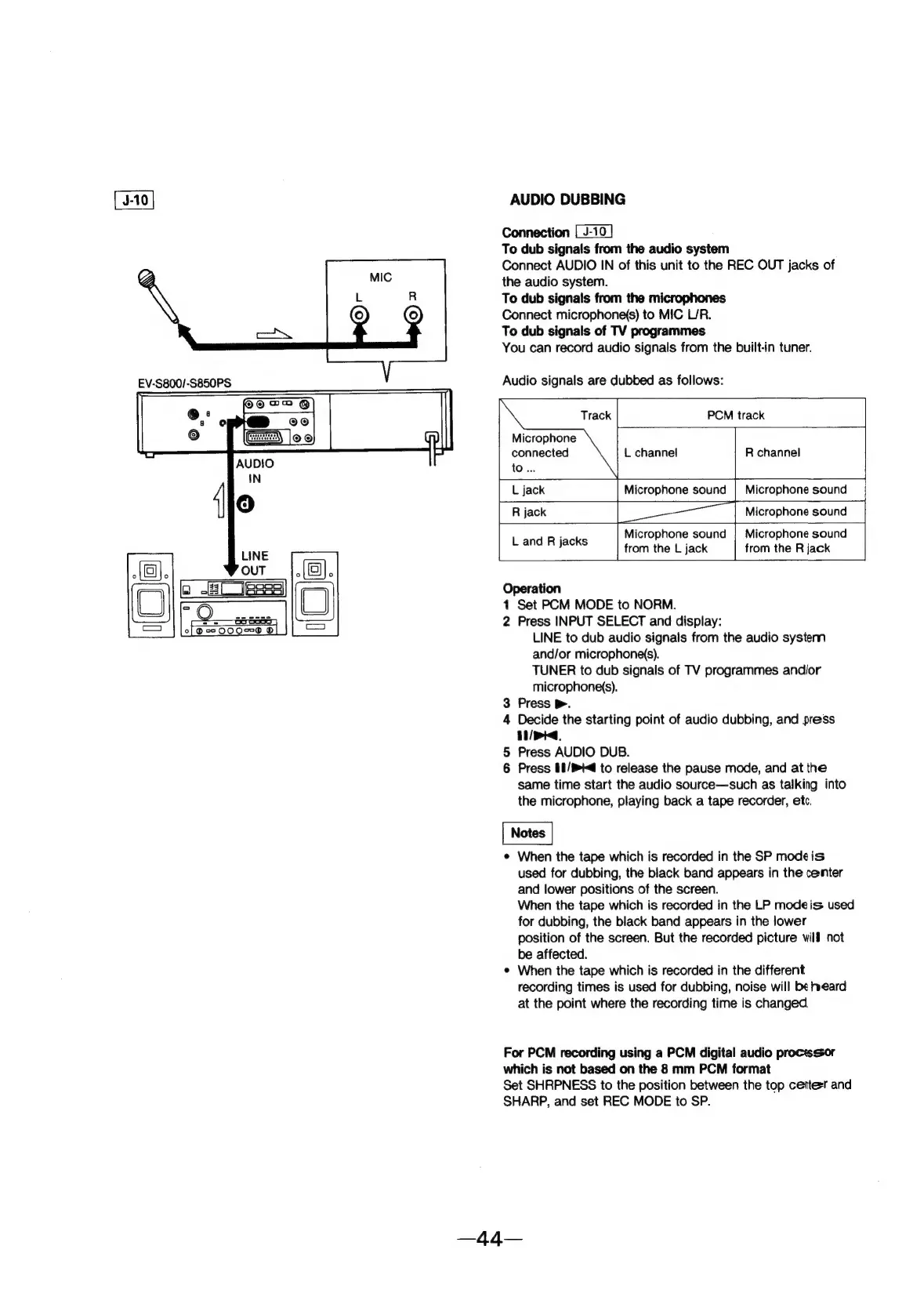
Connection
To
dub
signals
from
the
audio
system
Connect
AUDIO
IN
of
this
unit
to
the
REC
OUT
jacks
of
the
audio
system.
To
dub
signals
from
the
microphones
Connect
microphone(s)
to
MIC
L/R.
To
dub
signals
of
TV
programmes
You
can
record
audio
signals
from
the
built-in
tuner.
Audio
signals
are
dubbed
as
follows:
Track
PCM
track
Microphone
connected
to
...
L
channel
R
channel
L
jack
Microphone
sound
|
Microphone
sound
eas
R
jack
Microphone
sound
:
Microphone
sound
|
Microphone
sound
Land
A
jaeKs.
from
the
L
jack
from
the
R
jack
Operation
1
Set
PCM
MODE
to
NORM.
2
Press
INPUT
SELECT
and
display:
LINE
to
dub
audio
signals
from
the
audio
system
and/or
microphone(s).
TUNER
to
dub
signals
of
TV
programmes
andior
microphone(s).
3
Press
>.
4
Decide
the
starting
point
of
audio
dubbing,
and
press
TT
i
5
Press
AUDIO
DUB.
6
Press
II/®t
to
release
the
pause
mode,
and
at
the
same
time
start
the
audio
source—such
as
talking
into
the
microphone,
playing
back
a
tape
recorder,
etc.
e
When
the
tape
which
is
recorded
in
the
SP
mode
is
used
for
dubbing,
the
black
band
appears
in
the
center
and
lower
positions
of
the
screen.
When
the
tape
which
is
recorded
in
the
LP
modeis
used
for
dubbing,
the
black
band
appears
in
the
lower
position
of
the
screen.
But
the
recorded
picture
wilf
not
be
affected.
e
When
the
tape
which
is
recorded
in
the
different
recording
times
is
used
for
dubbing,
noise
will
be
eard
at
the
point
where
the
recording
time
is
changed
For
PCM
recording
using
a
PCM
digital
audio
proctsssor
which
is
not
based
on
the
8
mm
PCM
format
Set
SHRPNESS
to
the
position
between
the
top
cetterr
and
SHARP,
and
set
REC
MODE
to
SP.