EasyManua.ls Logo

Sony EV-S800 - DEG BIB AC IG Ap Ceisece Wcoisancicntioce- Atta Itace Ses Contpiintvdaiydoehiipshbiedsieo Ne

Sony EV-S800
44 pages
Print Icon
To Next Page IconTo Next Page
To Previous Page IconTo Previous Page
Loading...
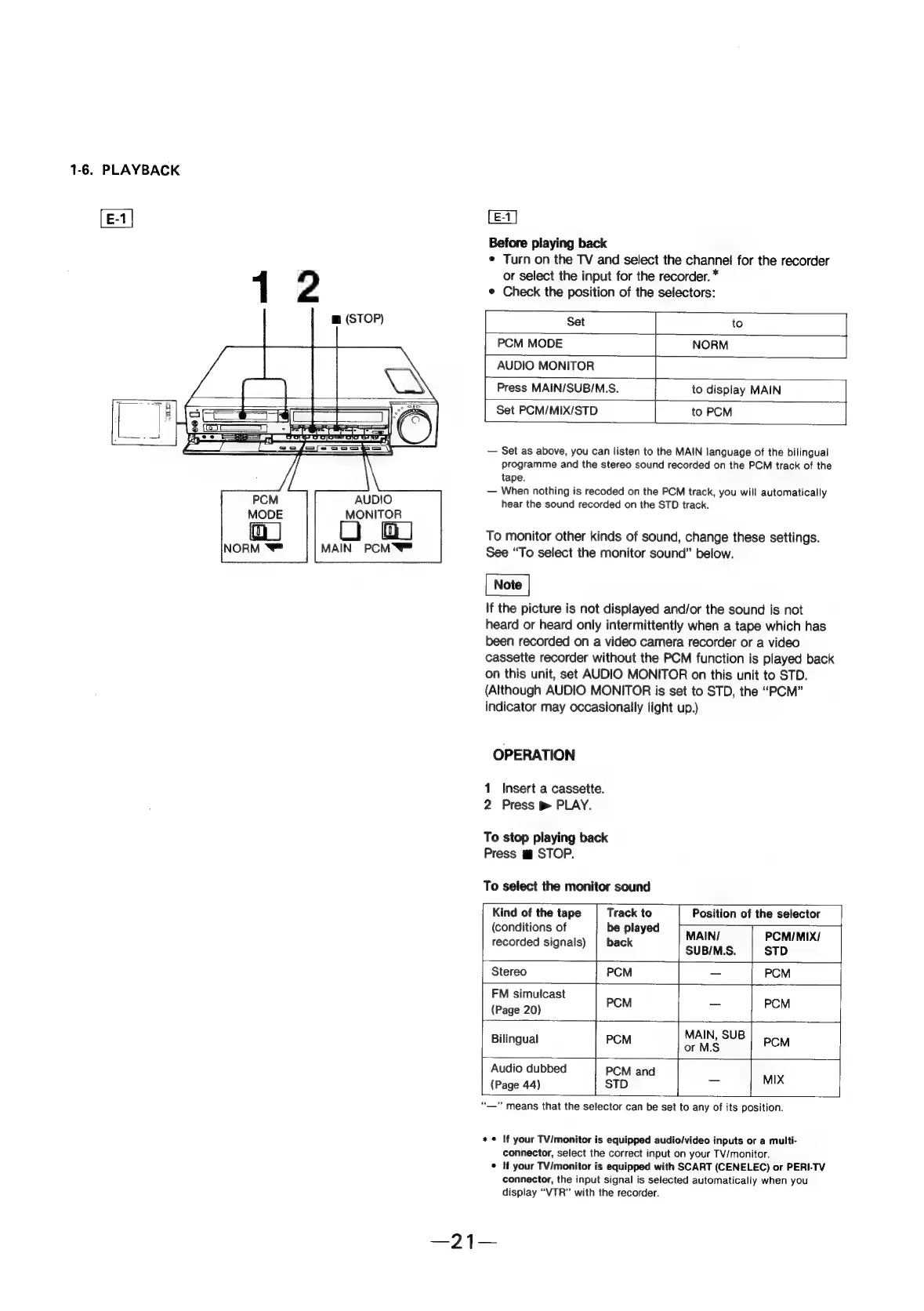
1-6.
PLAYBACK
[E-1|
[E-1]
Before
playing
back
¢
Turn
on
the
TV
and
select
the
channel
for
the
recorder
or
select
the
input
for
the
recorder.
*
1
2
¢
Check
the
position
of
the
selectors:
m
(STOP)
Set
|
to
PCM
MODE
|
NORM
AUDIO
MONITOR
Press
MAIN/SUB/M.S.
to
display
MAIN
Set
PCM/MIX/STD
|
to
PCM
—
Set
as
above,
you
can
listen
to
the
MAIN
language
of
the
bilingual
programme
and
the
stereo
sound
recorded
on
the
PCM
track
of
the
tape.
—
When
nothing
is
recoded
on
the
PCM
track,
you
will
automatically
hear
the
sound
recorded
on
the
STD
track.
MONITOR
To
monitor
other
kinds
of
sound,
change
these
settings.
See
“To
select
the
monitor
sound”
below.
If
the
picture
is
not
displayed
and/or
the
sound
is
not
heard
or
heard
only
intermittently
when
a
tape
which
has
been
recorded
on
a
video
camera
recorder
or
a
video
cassette
recorder
without
the
PCM
function
is
played
back
on
this
unit,
set
AUDIO
MONITOR
on
this
unit
to
STD.
(Although
AUDIO
MONITOR
is
set
to
STD,
the
“PCM”
indicator
may
occasionally
light
up.)
MAIN
PCM
OPERATION
1
Insert
a
cassette.
2
Press
pm
PLAY.
To
stop
playing
back
Press
m
STOP.
To
select
the
monitor
sound
Kind
of
the
tape
Track
to
Position
of
the
selector
(conditions
of
be
played
‘
MAIN/
PCM/MIX/
recorded
signals)
|
back
SUBIM.S.
STD
Stereo
i
PCM
—
PCM
FM
simulcast
(Page
20)
PCM
—
PCM
i
MAIN,
SUB
Bilingual
PCM
or
MS
PCM
Audio
dubbed
PCM
and
(Page
44)
STD
-_
mrs
“—”
means
that
the
selector
can
be
set
to
any
of
its
position.
*
©
If
your
TV/monitor
is
equipped
audio/video
inputs
or
a
multi-
connector,
select
the
correct
input
on
your
TV/monitor.
©
If
your
TV/monitor
is
equipped
with
SCART
(CENELEC)
or
PERI-TV
connector,
the
input signal
is
selected
automatically
when
you
display
“VTR”
with
the
recorder.