EasyManua.ls Logo

Sony EV-S800 - Page 20

Sony EV-S800
44 pages
Print Icon
To Next Page IconTo Next Page
To Previous Page IconTo Previous Page
Loading...
TO
VIEW
ONE
TV
PROGRMME
WHILE
RECORDING
ANOTHER
1
Press
TV/VTR
so
that
the
“VTR”
indicator
disappers
from
the
window.
2
Select
the
programme
you
want
to
view
on
the
TV.
If
your
TV
is
equipped
with
a
TV/VTR
input
selector,
simply
set
the
selector
to
“TV”
and
select
the
programme
on
the
TV.
TO
RECORD
A
TV
PROGRAMME
WHILE
RECORDING
AN
FM
BROADCAST
AT
THE
SAME
TIME
FM
simulcast
recording
Sometimes
a
TV
station
and
an
FM
radio
station
will
broadcast
a
programme
simultaneously
so
that
you
can
record
a
TV
programme
in
high-fidelity
stereo.
The
TV
programme
(video
and
monaural
audio)
is
recorded
normally
on
the
standard
track
and
the
stereo
audio
portion
is
recorded
on
the
PCM
track
from
your
FM
tuner.
For
details
on
connection.
Operation
Operate
as
described
in
“TV
programme
recording”
on
page
18
except
the
following
points:
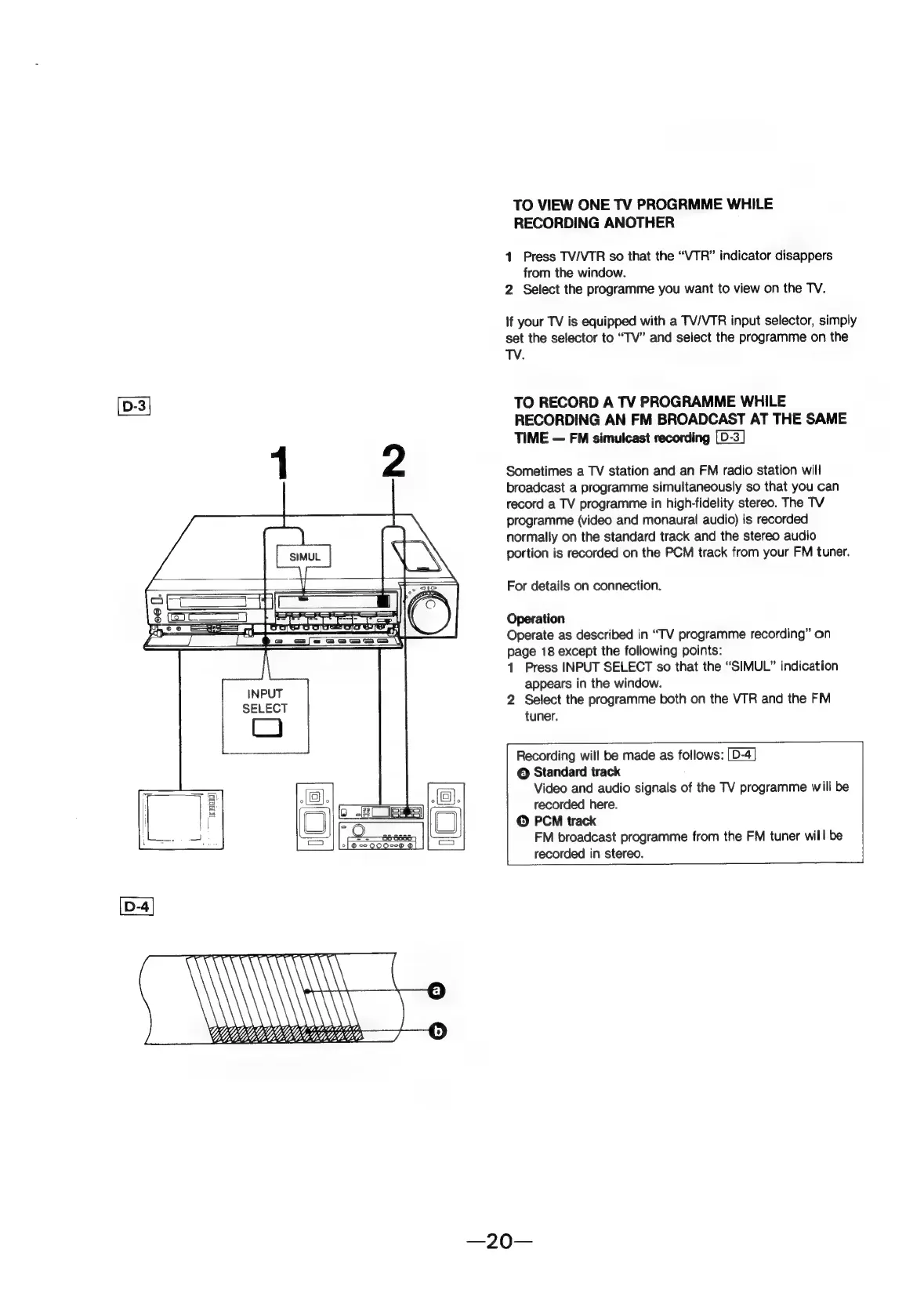
1
Press
INPUT
SELECT
so
that
the
“SIMUL”
indication
appears
in
the
window.
2
Select
the
programme
both
on
the
VTR
and
the
FM
tuner.
Recording
will
be
made
as
follows:
©
Standard
track
Video
and
audio
signals
of
the
TV
programme
will
be
recorded
here.
©
PCM
track
FM
broadcast
programme
from
the
FM
tuner
will
be
recorded
in
stereo.