EasyManua.ls Logo

Sony EV-S800 - During Recording

Sony EV-S800
44 pages
Print Icon
To Next Page IconTo Next Page
To Previous Page IconTo Previous Page
Loading...
©
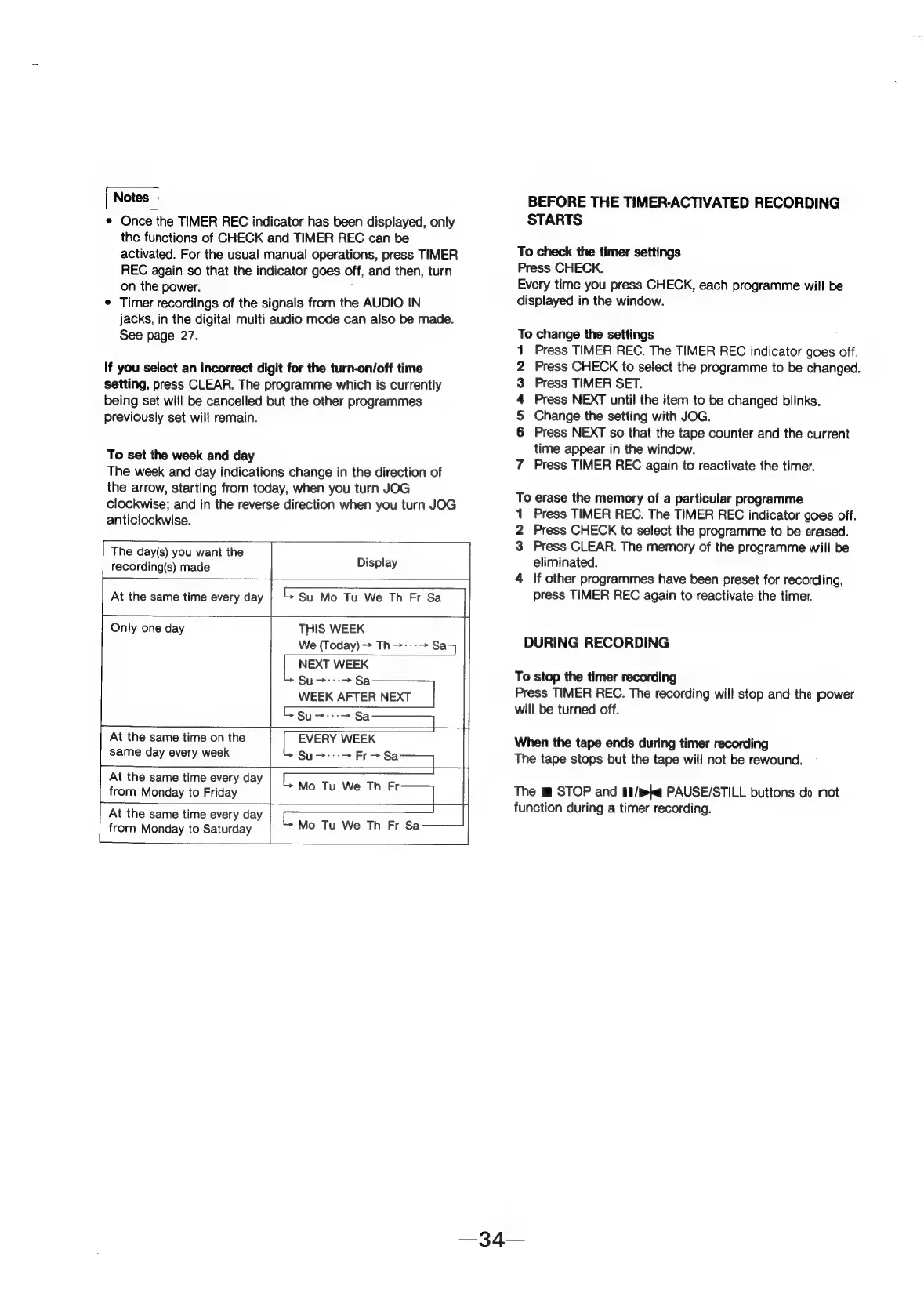
Once
the
TIMER
REC
indicator
has
been
displayed,
only
the
functions
of
CHECK
and
TIMER
REC
can
be
activated.
For
the
usual
manual
operations,
press
TIMER
REC
again
so
that
the
indicator
goes
off,
and
then,
turn
on
the
power.
¢
Timer
recordings
of
the
signals
from
the
AUDIO
IN
jacks,
in
the
digital
multi
audio
mode
can
also
be
made.
See
page
27.
If
you
select
an
incorrect
digit
for
the
turn-on/off
time
setting,
press
CLEAR.
The
programme
which
is
currently
being
set
wiil
be
cancelled
but the
other
programmes
previously
set
will
remain.
To
set
the
week
and
day
The
week
and
day
indications
change
in
the
direction
of
the
arrow,
starting
from
today,
when
you
turn
JOG
clockwise;
and
in
the
reverse
direction
when
you
turn
JOG
anticlockwise.
The
day(s)
you
want
the
recording(s)
made
Display
At
the
same
time
every
day
Su
Mo
Tu
We
Th
Fr
Sa
Only
one
day
THIS
WEEK
We
(Today)
>
Th>:-->
Sa
NEXT
WEEK
Su>:::->Sa
At
the
same
time
on
the
WEEK
AFTER
NEXT
|
Su
Sa
EVERY
WEEK
At
the
same
time
every
day
Same
day
every
week
Su>-->
Fro
a
Sa
Ly
from
Monday
to
Friday
MeO
eT)
Er
[
At
the
same
time
every
day
Mo
Tu
We
Th
Fr
from
Monday
to
Saturday
BEFORE
THE
TIMER-ACTIVATED
RECORDING
STARTS
To
check
the
timer
settings
Press
CHECK.
Every
time
you
press
CHECK,
each
programme
will
be
displayed
in
the
window.
To
change
the
settings
Press
TIMER
REC.
The
TIMER
REC
indicator
goes
off.
Press
CHECK
to
select
the
programme
to
be
changed.
Press
TIMER
SET.
Press
NEXT
until
the
item
to
be
changed
blinks.
Change
the
setting
with
JOG.
Press
NEXT
so
that
the
tape
counter
and
the
current
time
appear
in
the
window.
7
Press
TIMER
REC
again
to
reactivate
the
timer.
anf
waNd
To
erase
the
memory
of
a
particular
programme
1
Press
TIMER
REC.
The
TIMER
REC
indicator
goes
off.
2
Press
CHECK
to
select
the
programme
to
be
erased.
3
Press
CLEAR.
The
memory
of
the
programme
will
be
eliminated.
4
If
other
programmes
have
been
preset
for
recording,
press
TIMER
REC
again
to
reactivate
the
timer.
DURING
RECORDING
To
stop
the
timer
recording
Press
TIMER
REC.
The
recording
will
stop
and
the
power
will
be
turned
off.
When
the
tape
ends
during
timer
recording
The
tape
stops
but
the
tape
will
not
be
rewound.
The
m
STOP
and
§8/mkq
PAUSE/STILL
buttons
do
not
function
during
a
timer
recording.