EasyManua.ls Logo

Sony EV-S800 - Timer Recording; Rec Mode

Sony EV-S800
44 pages
Print Icon
To Next Page IconTo Next Page
To Previous Page IconTo Previous Page
Loading...
EC
MODE
TIMER
RECORDING
If
you
connect
any
audio
tuner
with
timer
presetting
functions,
you
can
record
up
to
6
radio
programmes
in
the
digital
PCM
sound.
6
programmes
can
be
recorded
either
on
6
separate
audio
tracks
(for
parallel
recording)
or
they
can
be
recorded
successively
on
one
track
(for
series
recording).
Before
presetting
e
Turn
on
the
audio
tuner.
©
Check
if
the
clock
is
set
correctly.
(Page
16.)
©
Check
the
position
of
selectors:
0123
4(5)67
8
910
L
RC}
REC
LEVEL
Press
to
display
REC
MODE
SP
or
LP
Set
to
PCM
MODE
ai
P
(parallel)
or
S
(series)
REC
LEVEL
NB.
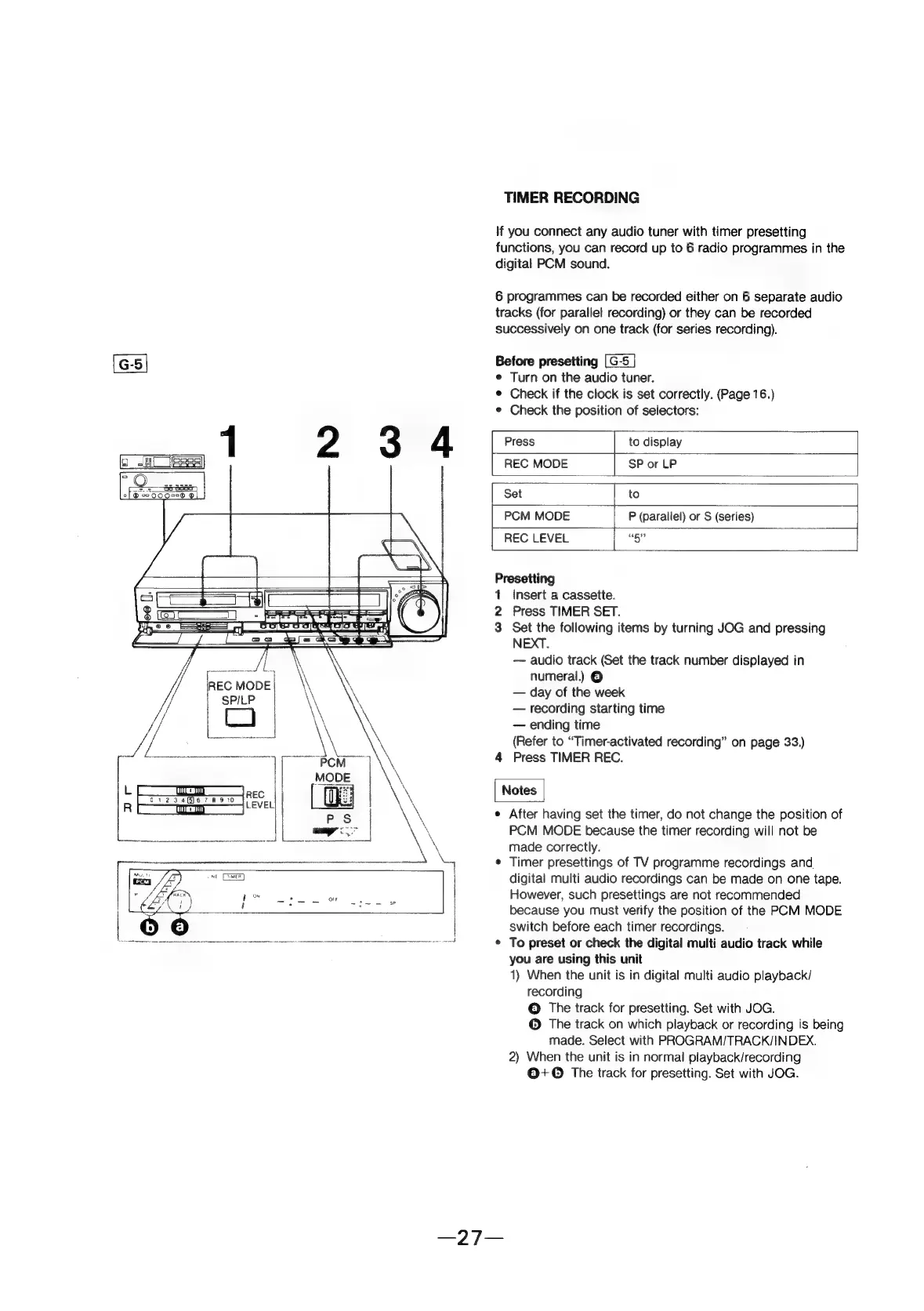
Presetting
1
Insert
a
cassette.
2
Press
TIMER
SET.
3
Set
the
following
items
by
turning
JOG
and
pressing
NEXT.
audio
track
(Set
the
track
number
displayed
in
numeral.)
©
day
of
the
week
recording
starting
time
ending
time
(Refer
to
“Timer-activated
recording”
on
page
33.)
4
Press
TIMER
REC.
e
After
having
set
the
timer,
do
not
change
the
position
of
PCM
MODE
because
the
timer
recording
will
not
be
made
correctly.
¢
Timer
presettings
of
TV
programme
recordings
and
digital
multi
audio
recordings
can
be
made
on
one
tape.
Howeyer,
such
presettings
are
not
recommended
because
you
must
verify
the
position
of
the
PCM
MODE
switch
before
each
timer
recordings.
¢
To
preset
or
check
the
digital
multi
audio
track
while
you
are
using
this
unit
1)
When
the
unit
is
in
digital
multi
audio
playback/
recording
©
The
track
for
presetting.
Set
with
JOG.
©
The
track
on
which
playback
or
recording
is
being
made.
Select
with
PROGRAM/TRACK/INDEX.
2)
When
the
unit
is
in
normal
playback/recording
@+©
The
track
for
presetting.
Set
with
JOG.