EasyManua.ls Logo

Sony EV-S800 - Page 28

Sony EV-S800
44 pages
Print Icon
To Next Page IconTo Next Page
To Previous Page IconTo Previous Page
Loading...
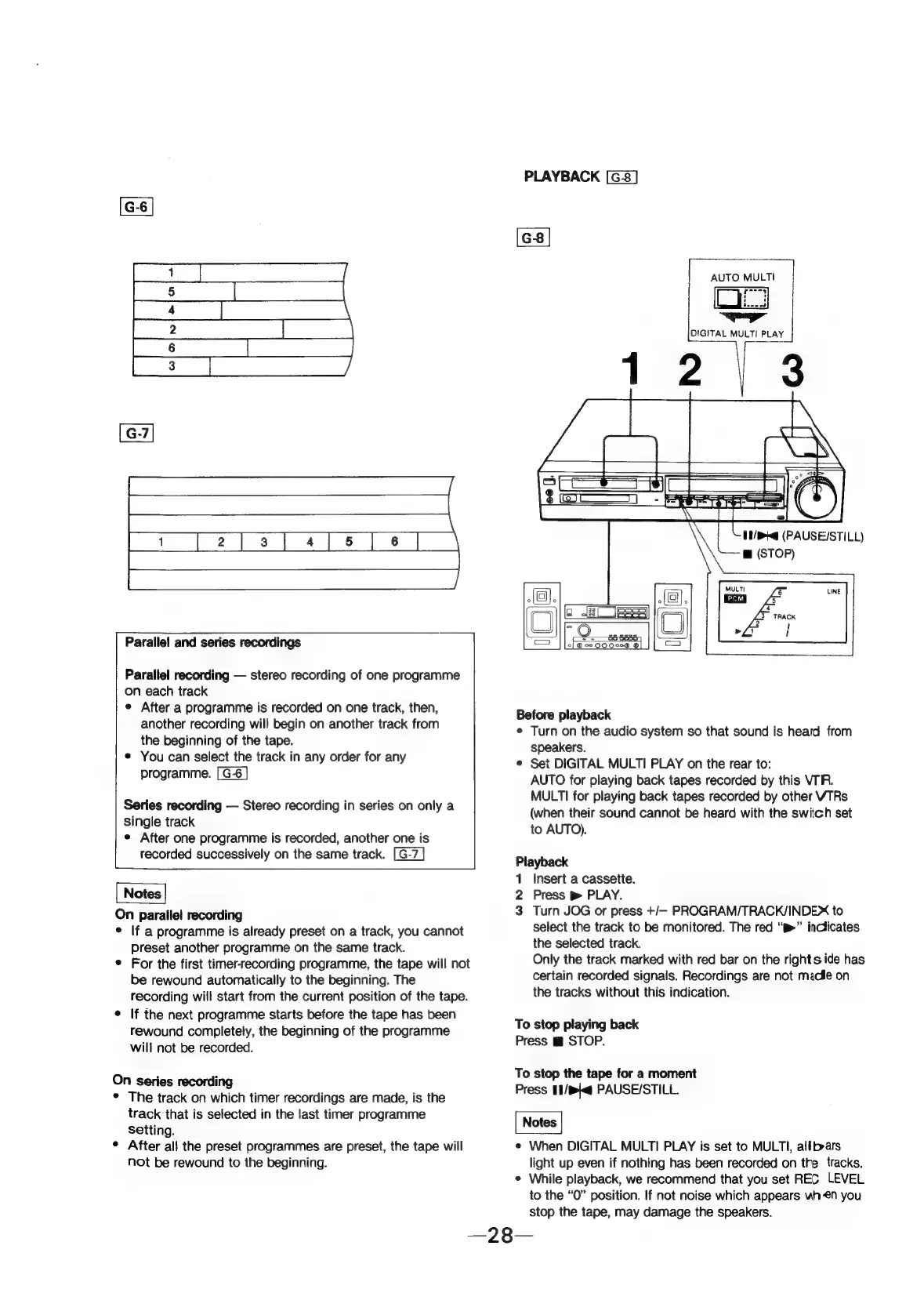
Parallel
and
series
recordings
Parallel
recording
stereo
recording
of
one
programme
on
each
track
e
After
a
programme
is
recorded
on
one
track,
then,
another
recording
will
begin
on
another
track
from
the
beginning
of
the
tape.
e
You
can
select
the
track
in
any
order
for
any
programme.
Series
recording
Stereo
recording
in
series
on
only
a
single
track
e
After
one
programme
is
recorded,
another
one
is
recorded
successively
on
the
same
track.
Notes
On
parallel
recording
©
If
a
programme
is
already
preset
on
a
track,
you
cannot
preset
another
programme
on
the
same
track.
©
For
the
first
timer-recording
programme,
the
tape
will
not
be
rewound
automatically
to
the
beginning.
The
recording
will
start
from
the
current
position
of
the
tape.
¢
If
the
next
programme
starts
before
the
tape
has
been
rewound
completely,
the
beginning
of
the
programme
will
not
be
recorded.
On
series
recording
*
The
track
on
which
timer
recordings
are
made,
is
the
track
that
is
selected
in
the
last
timer
programme
Setting.
¢
After
all
the
preset
programmes
are
preset,
the
tape
will
not
be
rewound
to
the
beginning.
PLAYBACK
sino
wueT
ae
all
DIGITAL
MULT!
PLAY
UNH
(PAUSE/STILL)
@
(STOP)
MULTI
7
UNE
5
4
TRACK
Before
playback
e
Turn
on
the
audio
system
so
that
sound
is
heard
from
speakers.
©
Set
DIGITAL
MULTI
PLAY
on
the
rear
to:
AUTO
for
playing
back
tapes
recorded
by
this
VIR.
MULTI
for
playing
back
tapes
recorded
by
other
VTRs
(when
their
sound
cannot
be
heard
with
the
switch
set
to
AUTO).
Playback
1
Insert
a
cassette.
2
Press
pm
PLAY.
3
Turn
JOG
or
press
+/—
PROGRAM/TRACK/INDE
to
select
the
track
to
be
monitored.
The
red
“p>”
inclicates
the
selected
track.
Only
the
track
marked
with
red
bar
on
the
rights
ide
has
certain
recorded
signals.
Recordings
are
not
madle
on
the
tracks
without
this
indication.
To
stop
playing
back
Press
m
STOP.
To
stop
the
tape
for
a
moment
Press
11/b\<q
PAUSE/STILL.
Notes
e
When
DIGITAL
MULTI
PLAY
is
set
to
MULTI,
allbars
light
up
even
if
nothing
has
been
recorded
on
the
tracks.
e
While
playback,
we
recommend
that
you
set
REC
LEVEL
to
the
“0”
position.
If
not
noise
which
appears
wh
€n
you
stop
the
tape,
may
damage
the
speakers.