EasyManua.ls Logo

Sony EV-S800 - Index Scan

Sony EV-S800
44 pages
Print Icon
To Next Page IconTo Next Page
To Previous Page IconTo Previous Page
Loading...
e
Between
each
index
signal,
there
must
be
a
minimum
space
of
2
minutes
for
LP
mode
and
1
minute
for
SP
mode.
If
index
signals
are
marked
at
shorter
intervals,
index
scan
or
search
functions
may
not
be
operated
correctly.
¢
For
tapes
that
index
signals
are
marked
automatically,
index
scan
or
search
may
not
be
made
correctly
because
of
the
quality
of
the
audio
source.
In
this
case,
set
AUTO
INDEX
to
OFF
and
mark
index
signals
manually.
e
Index
marking
and
erasing
cannot
be
made
during
tape
editing.
(When
the
EDIT
lamp
is
lit.)
INDEX
SCAN
To
play
back
the
beginning
of
each
programme
in
sequence
Before
operating
Set
PCM
MODE
to
NORM,
or
P
(or
S).
If
you
have
set
to
P
(or
S),
select
the
digital
multi
audio
track.
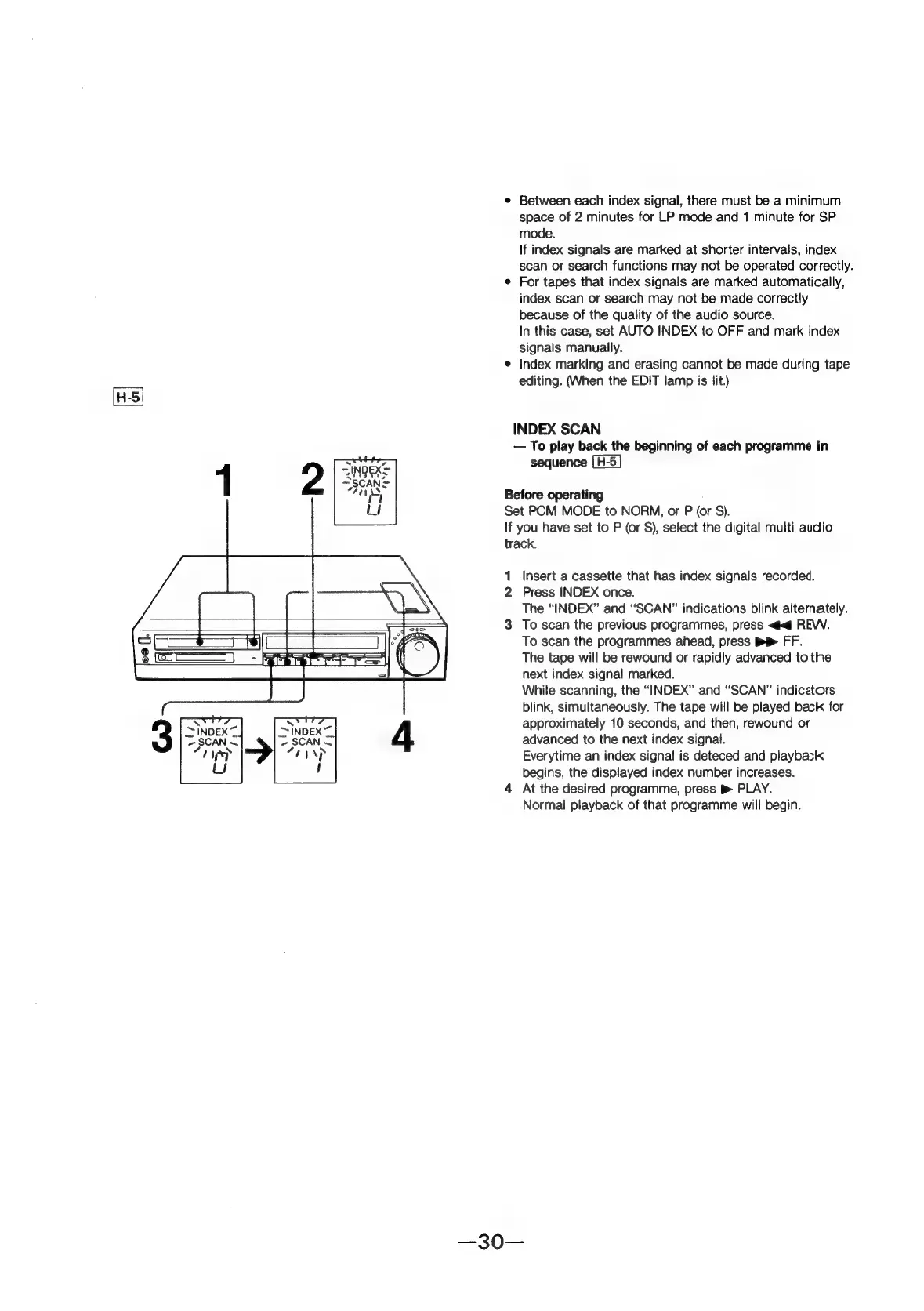
1
Insert
a
cassette
that
has
index
signals
recorded.
2
Press
INDEX
once.
The
“INDEX”
and
“SCAN”
indications
blink
alternately.
3
To
scan
the
previous
programmes,
press
<q
REV.
To
scan
the
programmes
ahead,
press
me
FF.
The
tape
will
be
rewound
or
rapidly
advanced
to
the
next
index
signal
marked.
While
scanning,
the
“INDEX”
and
“SCAN”
indicators
blink,
simultaneously.
The
tape
will
be
played
back
for
approximately
10
seconds,
and
then,
rewound
or
~lnoex~
>
SCAN
=|
advanced
to
the
next
index
signal.
“rnp
Everytime
an
index
signal
is
deteced
and
playback
!
begins,
the
displayed
index
number
increases.
4
At
the
desired
programme,
press
p
PLAY.
Normal
playback
of
that
programme
will
begin.