EasyManua.ls Logo

Sony EV-S800 - Input Select

Sony EV-S800
44 pages
Print Icon
To Next Page IconTo Next Page
To Previous Page IconTo Previous Page
Loading...
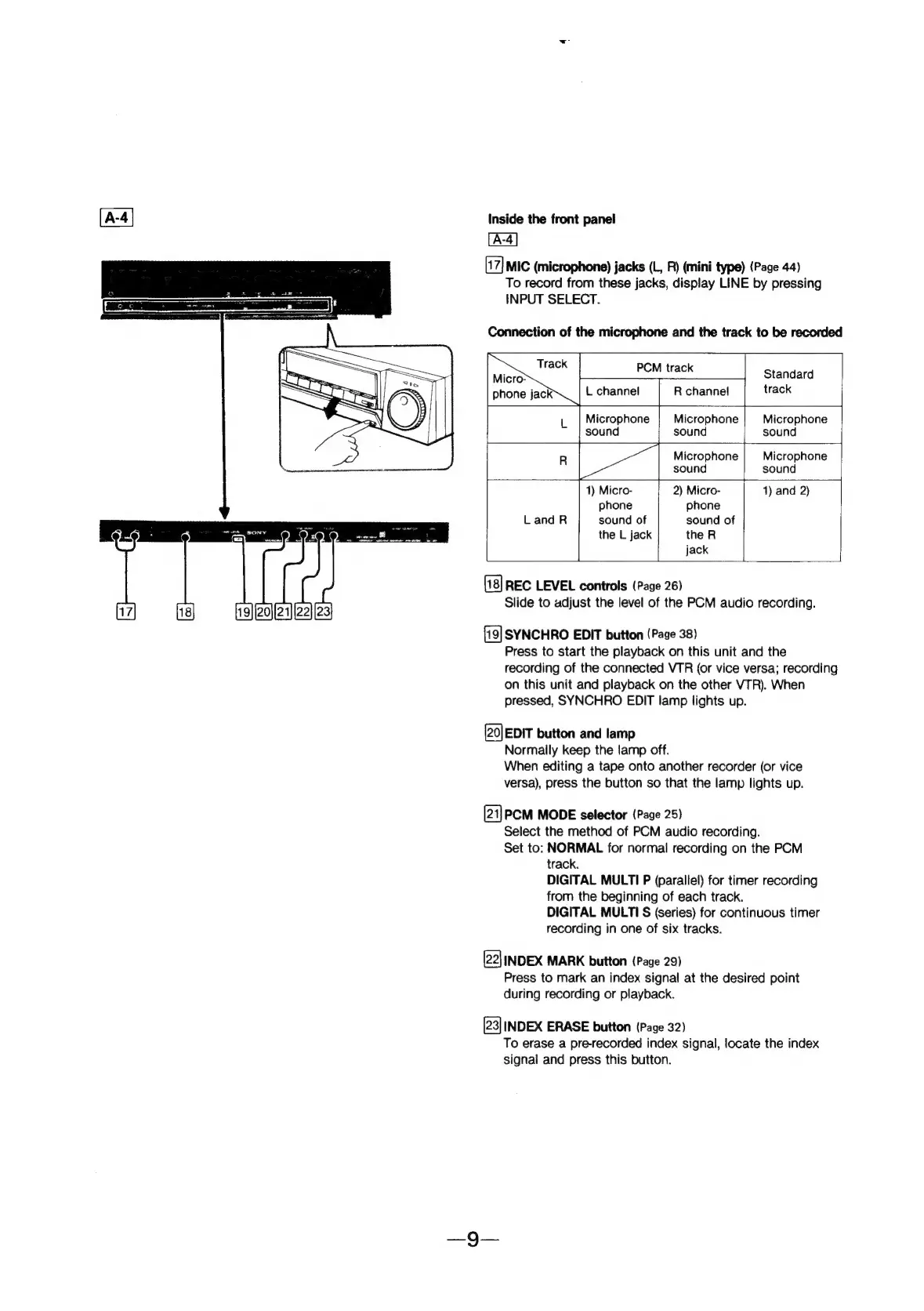
Inside
the
front
panel
MIC
(microphone)
jacks
(L,
R)
(mini
type)
(Page
44)
To
record
from
these
jacks,
display
LINE
by
pressing
INPUT
SELECT.
Connection
of
the
microphone
and
the
track
to
be
recorded
PCM
track
Standard
L
channel
R
channel
track
|
Microphone
Microphone
Microphone
sound
sound
|
sound
R
Microphone
Microphone
sound sound
1)
Micro-
2)
Micro-
1)
and
2)
phone
phone
LandR
sound
of
sound
of
the
L
jack
the
R
jack
REC
LEVEL
controls
(Page
26)
Slide
to
adjust
the
level
of
the
PCM
audio
recording.
SYNCHRO
EDIT
button
(Page
38)
Press
to
start
the
playback
on
this
unit
and
the
recording
of
the
connected
VTR
(or
vice
versa;
recording
on
this unit
and
playback
on
the
other
VTR).
When
pressed,
SYNCHRO
EDIT
lamp
lights
up.
(20)
EDIT
button
and
lamp
Normally
keep
the
lamp
off.
When
editing
a
tape
onto
another
recorder
(or
vice
versa),
press
the
button
so
that
the
lamp
lights
up.
[21]PCM
MODE
selector
(Page
25)
Select
the
method
of
PCM
audio
recording.
Set
to:
NORMAL
for
normal
recording
on
the
PCM
track.
DIGITAL
MULTI
P
(parallel)
for
timer
recording
from
the
beginning
of
each
track.
DIGITAL
MULTI
S
(Series)
for
continuous
timer
recording
in
one
of
six
tracks.
22]
INDEX
MARK
button
(Page
29)
Press
to
mark
an
index
signal
at
the
desired
point
during
recording
or
playback.
[23]
INDEX
ERASE
button
(Page
32)
To
erase
a
pre-recorded
index
signal,
locate
the
index
signal
and
press
this
button.