EasyManua.ls Logo

Sony EV-S800 - Page 10

Sony EV-S800
44 pages
Print Icon
To Next Page IconTo Next Page
To Previous Page IconTo Previous Page
Loading...
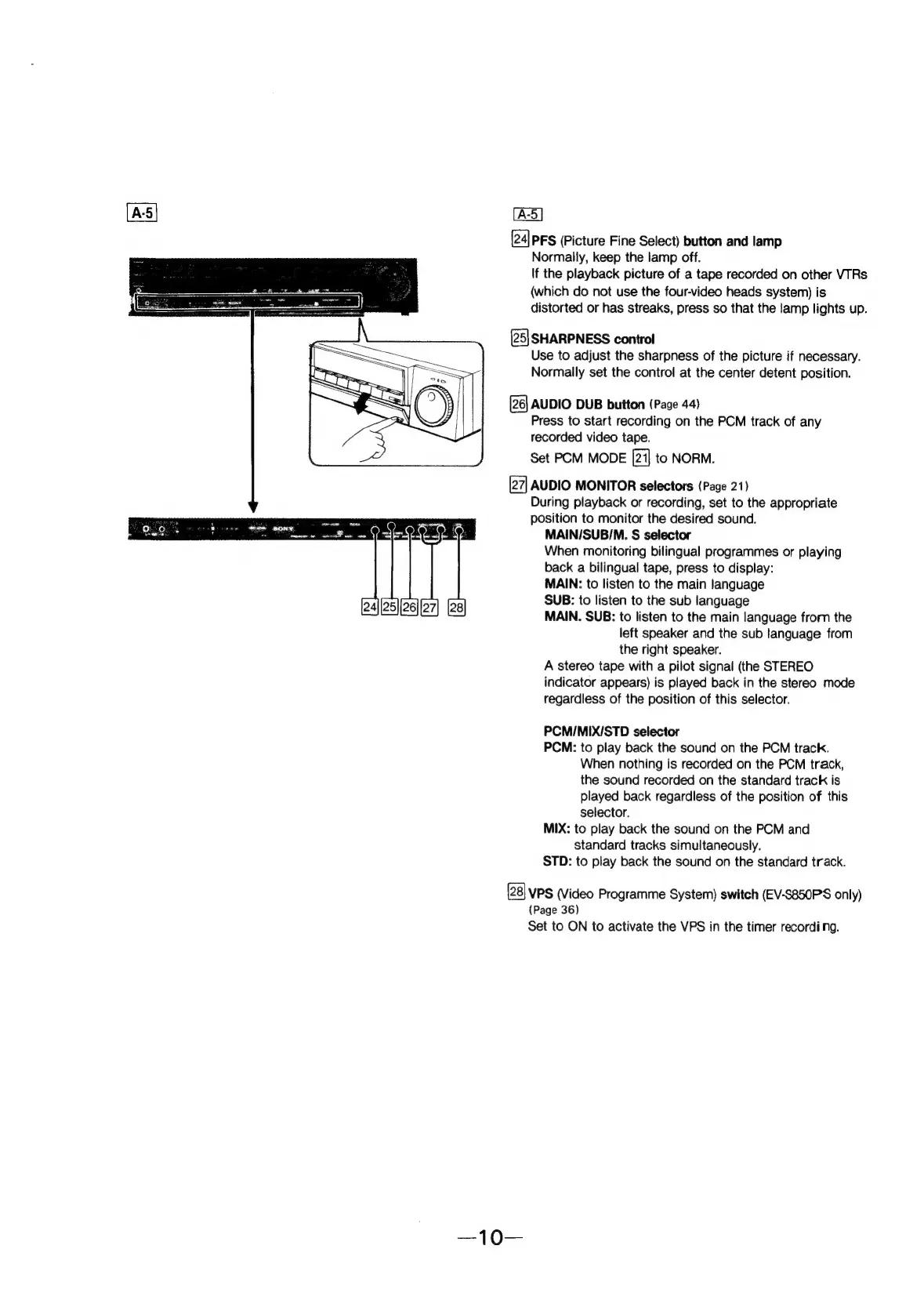
24]
PFS
(Picture
Fine
Select)
button
and
lamp
Normally,
keep
the
lamp
off.
If
the
playback
picture
of
a
tape
recorded
on
other
VTRs
(which
do
not
use
the
four-video
heads
system)
is
distorted
or
has
streaks,
press
so
that
the
lamp
lights
up.
(25|SHARPNESS
control
Use
to
adjust
the
sharpness
of
the
picture
if
necessary.
Normally
set
the
control
at
the
center
detent
position.
[26]
AUDIO
DUB
button
(Page
44)
Press
to
start
recording
on
the
PCM
track
of
any
recorded
video
tape.
Set
PCM
MODE
[21]
to
NORM.
AUDIO
MONITOR
selectors
(Page
21)
During
playback
or
recording,
set
to
the
appropriate
position
to
monitor
the
desired
sound.
MAIN/SUB/M.
S
selector
When
monitoring
bilingual
programmes
or
playing
back
a
bilingual
tape,
press
to
display:
MAIN:
to
listen
to
the
main
language
SUB:
to
listen
to
the
sub
language
MAIN.
SUB:
to
listen
to
the
main
language
fromm
the
left
speaker
and
the
sub
language
from
the
right
speaker.
A
stereo
tape
with
a
pilot
signal
(the
STEREO
indicator
appears)
is
played
back
in
the
stereo
mode
regardless
of
the
position
of
this
selector.
PCM/MIX/STD
selector
PCM:
to
play
back
the
sound
on
the
PCM
track.
When
nothing
is
recorded
on
the
PCM
track,
the
sound
recorded
on
the
standard
track
is
played
back
regardless
of
the
position
of
this
selector.
MIX:
to
play
back
the
sound
on
the
PCM
and
standard
tracks
simultaneously.
STD:
to
play
back
the
sound
on
the
standard
track.
VPS
(Video
Programme
System)
switch
(EV-S850PS
only)
(Page
36)
Set
to
ON
to
activate
the
VPS
in
the
timer
recording.