EasyManua.ls Logo

Sony EV-S800 - Page 11

Sony EV-S800
44 pages
Print Icon
To Next Page IconTo Next Page
To Previous Page IconTo Previous Page
Loading...
On
the
front
panel
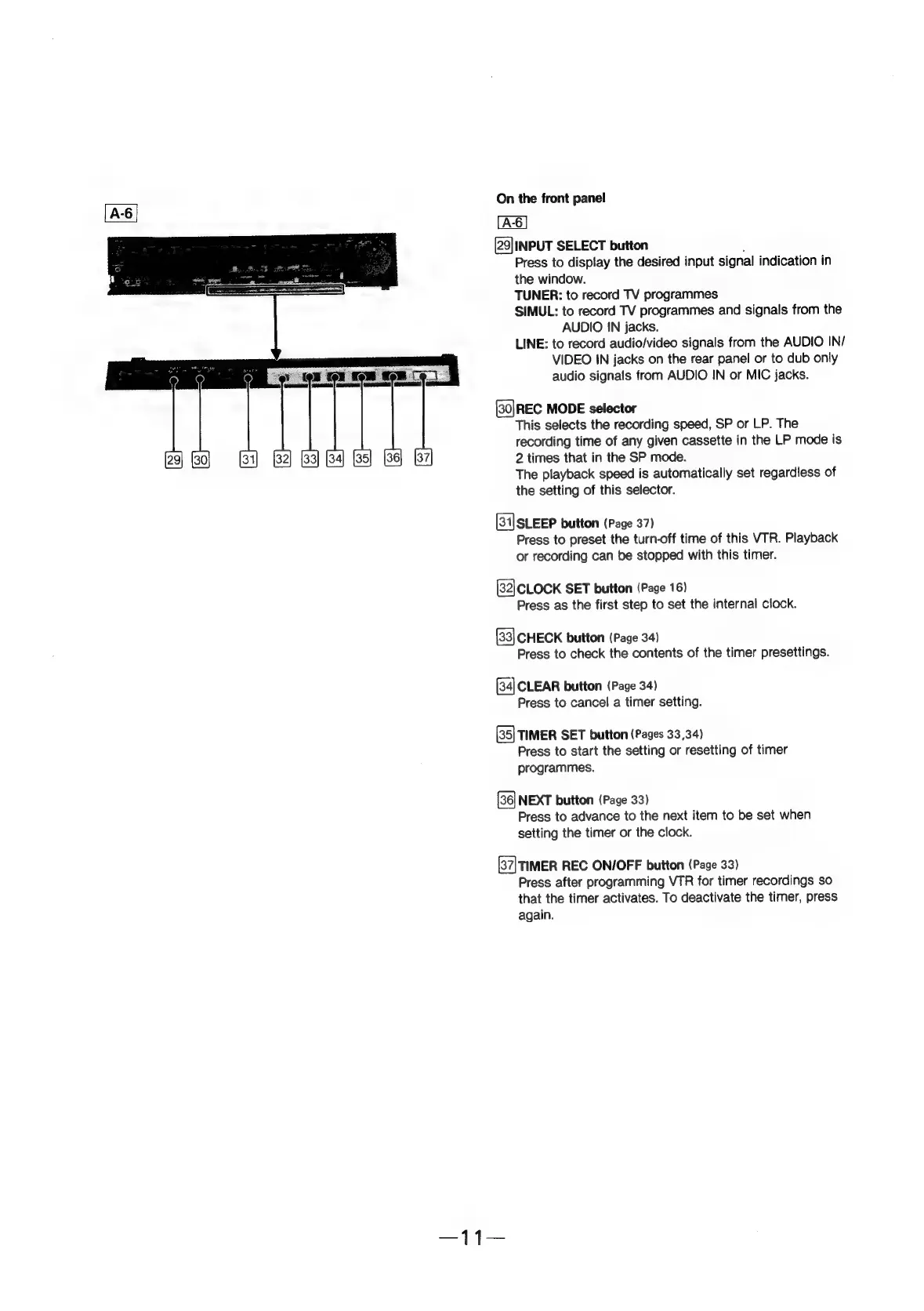
[29|INPUT
SELECT
button
;
Press
to
display
the
desired
input
signal
indication
in
the
window.
TUNER:
to
record
TV
programmes
SIMUL:
to
record
TV
programmes
and
signals
from
the
AUDIO
IN
jacks.
LINE:
to
record
audio/video
signals
from
the
AUDIO
IN/
was
ae
VIDEO
IN
jacks
on
the
rear
panel
or
to
dub
only
{Od
(el
ton
:
Ze
audio
signals
from
AUDIO
IN
or
MIC
jacks.
sosunane
|
vewmetean!
(30]REC
MODE
selector
This
selects
the
recording
speed,
SP
or
LP.
The
recording
time
of
any
given
cassette
in
the
LP
mode
is
2
times
that
in
the
SP
mode.
The
playback
speed
is
automatically
set
regardless
of
the
setting
of
this
selector.
(31]SLEEP
button
(Page
37)
Press
to
preset
the
turn-off
time
of
this
VTR.
Playback
or
recording
can
be
stopped
with
this
timer.
(82|CLOCK
SET
button
(Page
16)
Press
as
the
first
step
to
set
the
internal
clock.
CHECK
button
(Page
34)
Press
to
check
the
contents
of
the
timer
presettings.
[34]
CLEAR
button
(Page
34)
Press
to
cancel
a
timer
setting.
(35]
TIMER
SET
button
(Pages
33,34)
Press
to
start
the
setting
or
resetting
of
timer
programmes.
NEXT
button
(Page
33)
Press
to
advance
to
the
next
item
to
be
set
when
setting
the
timer
or
the
clock.
(37\TIMER
REC
ON/OFF
button
(Page
33)
Press
after
programming
VTR
for
timer
recordings
so
that
the
timer
activates.
To
deactivate
the
timer,
press
again.