EasyManua.ls Logo

Sony EV-S800 - TV Programme Recording

Sony EV-S800
44 pages
Print Icon
To Next Page IconTo Next Page
To Previous Page IconTo Previous Page
Loading...
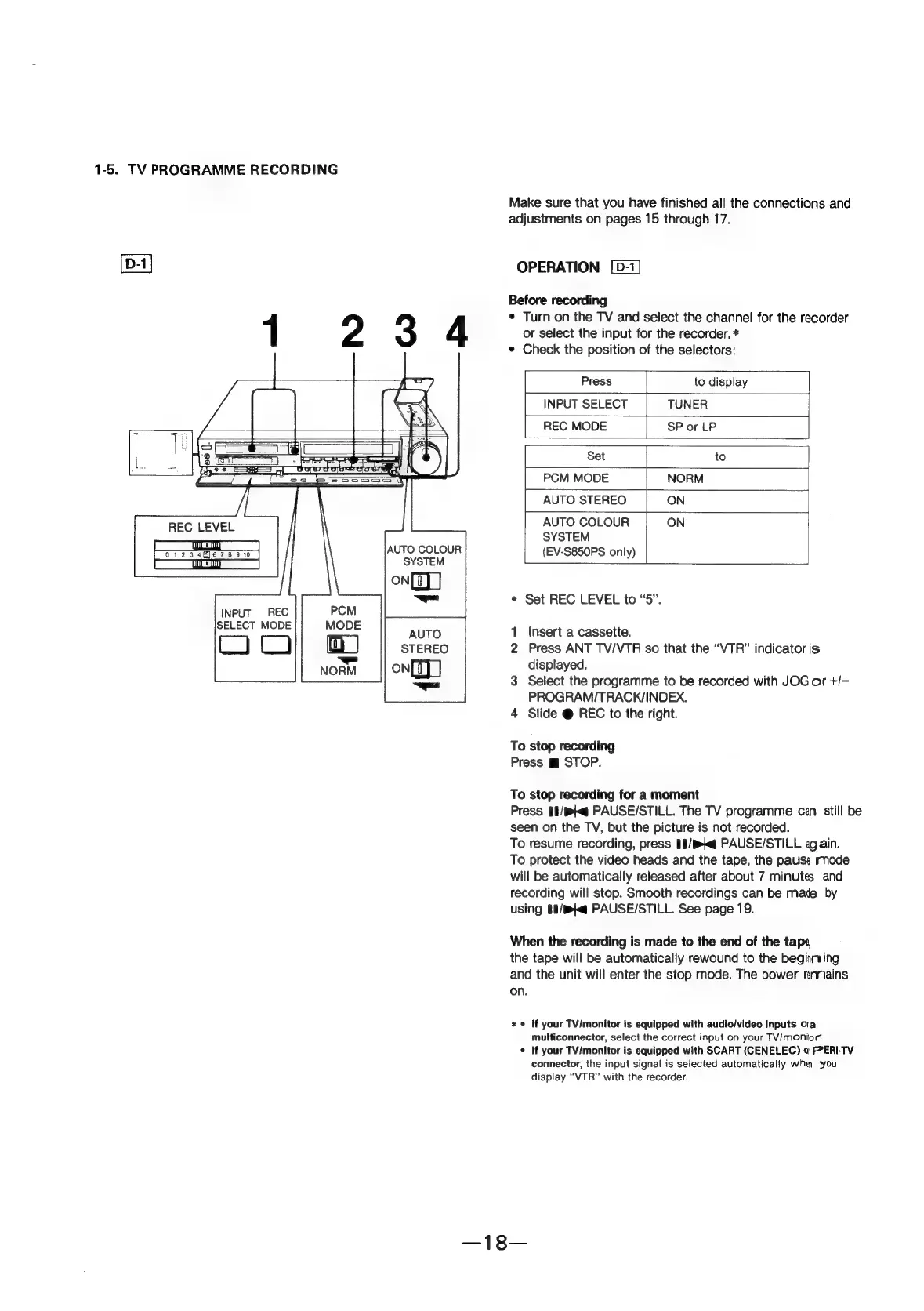
1-5.
TV
PROGRAMME
RECORDING
REC
LEVEL
Ir
ac)
SYSTEM
on]
—-
INPUT
REC
SELECT
MODE
AUTO
STEREO
on]
=
Make
sure
that
you
have
finished
all
the
connections
and
adjustments
on
pages
15
through
17.
OPERATION
Before
recording
¢
Turn
on
the
TV
and
select
the
channel
for
the
recorder
or
select
the
input
for
the
recorder.
*
¢
Check
the
position
of
the
selectors:
Press
to
display
INPUT
SELECT
TUNER
REC
MODE
SP
or
LP
Set
to
PCM
MODE
NORM
AUTO
STEREO
ON
AUTO
COLOUR
ON
SYSTEM
(EV-S850PS
only)
¢
Set
REC
LEVEL
to
“5”.
1
Insert
a
cassette.
2
Press
ANT
TV/VTR
so
that
the
“VTR”
indicator
is
displayed.
3
Select
the
programme
to
be
recorded
with
JOG
or
+/-
PROGRAM/TRACK/INDEX.
4
Slide
@
REC
to
the
right.
To
stop
recording
Press
m
STOP.
To
stop
recording
for
a
moment
Press
11/pKg
PAUSE/STILL.
The
TV
programme
cen
still
be
seen
on
the
TV,
but
the
picture
is
not
recorded.
To
resume
recording,
press
1I/Kg
PAUSE/STILL
again.
To
protect
the
video
heads
and
the
tape,
the
pause
rnode
will
be
automatically
released
after
about
7
minutes
and
recording
will
stop.
Smooth
recordings
can
be
mate
by
using
§1/pg
PAUSE/STILL.
See
page
19.
When
the
recording
is
made
to
the
end
of
the
tape,
the
tape
will
be
automatically
rewound
to
the
begining
and
the
unit
will
enter
the
stop
mode.
The
power
mnnains
on.
x
©
If
your
TV/monitor
is
equipped
with
audio/video
inputs
Oa
multiconnector,
select
the
correct
input
on
your
TV/monior.
¢
If
your
TV/monitor
is
equipped
with
SCART
(CENELEC)
o
FP*ERI-TV
connector,
the
input
signal
is
selected
automatically
whi
you
display
“VTR”
with
the
recorder.