EasyManua.ls Logo

Sony EV-S800 - Timer-Activated Recording

Sony EV-S800
44 pages
Print Icon
To Next Page IconTo Next Page
To Previous Page IconTo Previous Page
Loading...
1-9.
TIMER-ACTIVATED
RECORDING
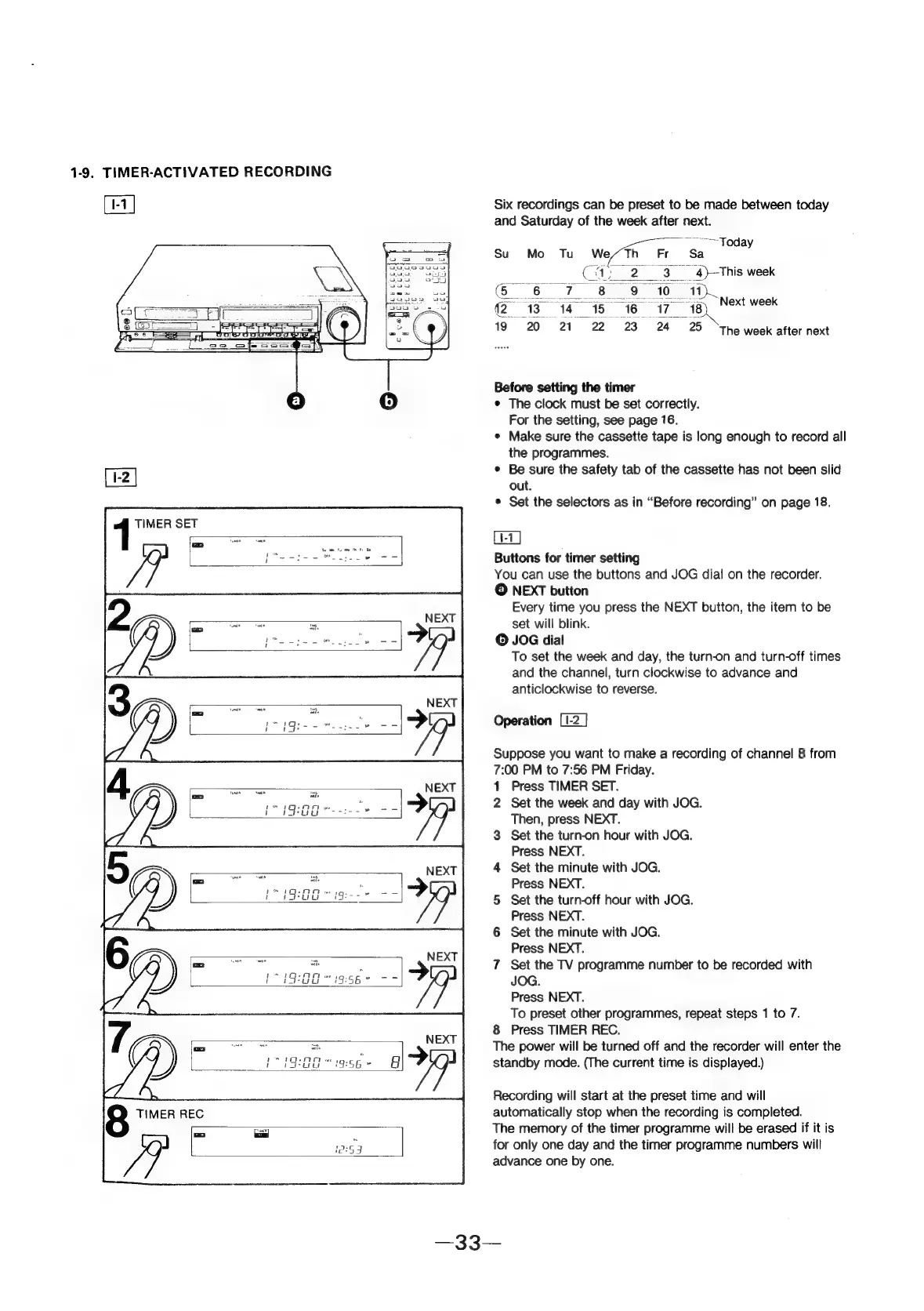
[1-1]
Six
recordings
can
be
preset
to
be
made
between
today
and
Saturday
of
the
week
after
next.
~——~Foday
Su
Mo
Tu
We,/Th
Fr
Sa
Ca
23)
Ths
week
CRI
te
ee
ae)
@
13
14
15
16
i718,
Net
week
19
20
21
23°
24
25
‘The
week
after
next
Before
setting
the
timer
e
The
clock
must
be
set
correctly.
For
the
setting,
see
page
76.
¢
Make
sure
the
cassette
tape
is
long
enough
to
record
all
the
programmes.
¢
Be
sure
the
safety
tab
of
the
cassette
has
not
been
slid
out.
¢
Set
the
selectors
as
in
“Before
recording”
on
page
18.
[1-1]
Buttons
for
timer
setting
You
can
use
the
buttons
and
JOG
dial
on
the
recorder.
©
NEXT
button
Every
time
you
press
the
NEXT
button,
the
item
to
be
set
will
blink.
©
JOG
dial
To
set
the
week
and
day,
the
turn-on
and
turn-off
times
and
the
channel,
turn
clockwise
to
advance
and
anticlockwise
to
reverse.
Operation
Suppose
you
want
to
make
a
recording
of
channel
8
from
7:00
PM
to
7:56
PM
Friday.
1
Press
TIMER
SET.
2
Set
the
week
and
day
with
JOG.
Then,
press
NEXT.
3
Set
the
turn-on
hour
with
JOG.
Press
NEXT.
4
Set
the
minute
with
JOG.
Pee
cies
"
Press
NEXT.
esl
iam
5
Set
the
turn-off
hour
with
JOG.
Press
NEXT.
6
Set
the
minute
with
JOG.
Press
NEXT.
7
Set
the
TV
programme
number
to
be
recorded
with
JOG.
Press
NEXT.
To
preset
other
programmes,
repeat
steps
1
to
7.
8
Press
TIMER
REC.
The
power
will
be
turned
off
and
the
recorder
will
enter
the
standby
mode.
(The
current
time
is
displayed.)
Recording
will
start
at
the
preset
time
and
will
automatically
stop
when
the
recording
is
completed.
The
memory
of
the
timer
programme
will
be
erased
if
it
is
for
only
one
day
and
the
timer
programme
numbers
will
advance
one
by
one.