EasyManua.ls Logo

Sony EV-S800 - Page 32

Sony EV-S800
44 pages
Print Icon
To Next Page IconTo Next Page
To Previous Page IconTo Previous Page
Loading...
=
ay
aa
as
eo
ip?)
|
_
Oa
ogo
ee
[so
aie
pose
it
4ia
INDEX
ERASE
When
the
desired
programme
cannot
be
played
back
with
the
index
function,
check
the
following:
e
The
nearest
index
signal
may
not
have
been
counted.
If
the
point
where
you
pressed
<q
REW
or
FF
is
fairly
close
within
2
minutes
of
the
normal
tape-run
to
the
nearest
index
signal,
that
signal
will
not
be
counted.
e
Is
there
a
space
of
more
than
2
minutes
between
two
index
signals?
If
there
is
more
than
one
index
signal
marked
within
an
interval
of
2
minutes
of
the
normal
tape-run,
the
mechanism
may
not
function
properly.
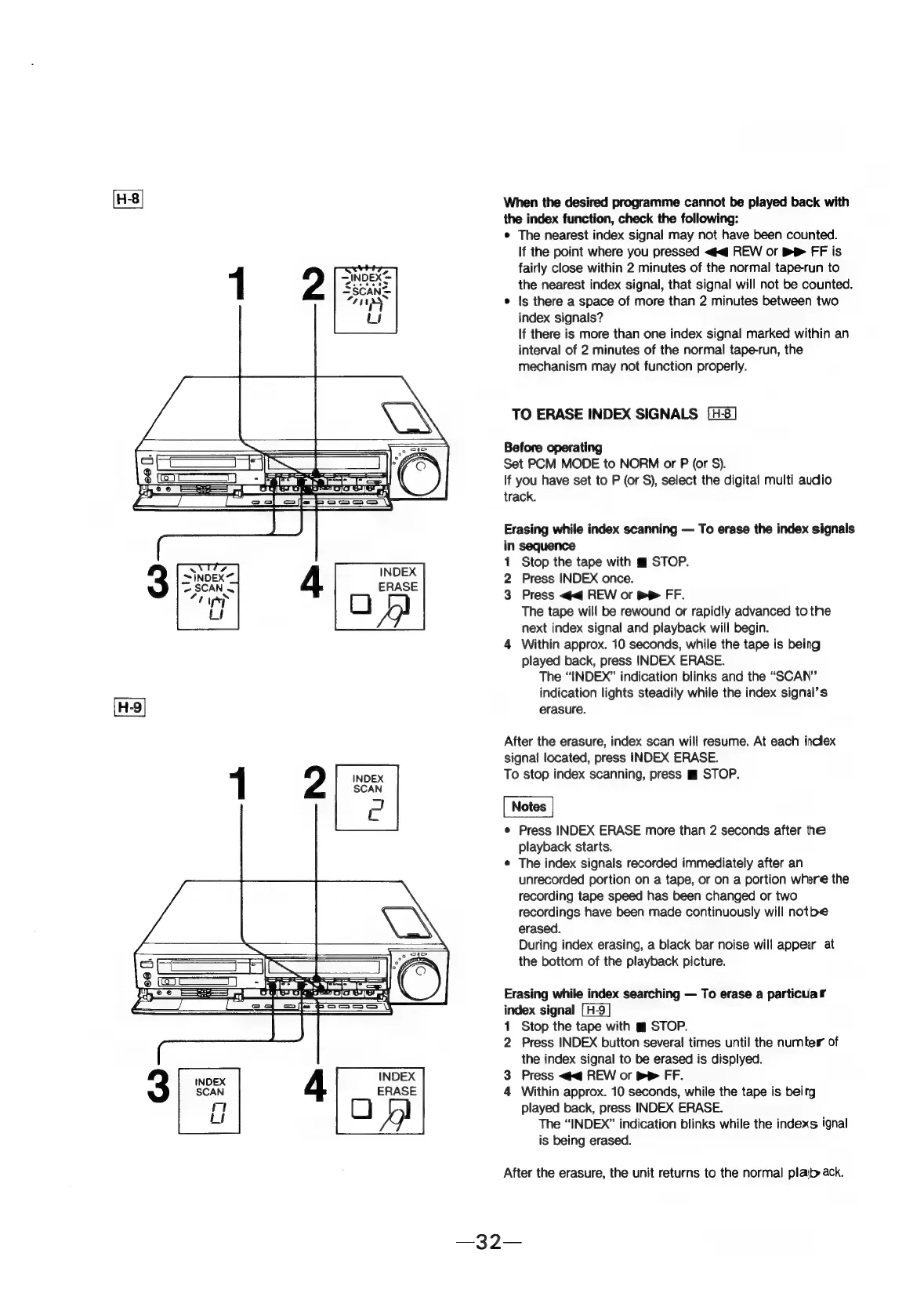
TO
ERASE
INDEX
SIGNALS
Before
operating
Set
PCM
MODE
to
NORM
or
P
(or
S$).
If
you
have
set
to
P
(or
S),
select
the
digital
multi
audio
track.
Erasing
while
index
scanning
To
erase
the
index
signals
in
sequence
1
Stop
the
tape
with
m
STOP.
2
Press
INDEX
once.
3
Press
<q
REW
or
p>
FF.
The
tape
will
be
rewound
or
rapidly
advanced
to
the
next
index
signal
and
playback
will
begin.
4
Within
approx.
10
seconds,
while
the
tape
is
being
played
back,
press
INDEX
ERASE.
The
“INDEX”
indication
blinks
and
the
“SCAN”
indication
lights
steadily
while
the
index
signal’s
erasure.
After
the
erasure,
index
scan
will
resume.
At
each
inclex
signal
located,
press
INDEX
ERASE.
To
stop
index
scanning,
press
m
STOP.
e
Press
INDEX
ERASE
more
than
2
seconds
after
the
playback
starts.
¢
The
index
signals
recorded
immediately
after
an
unrecorded
portion
on
a
tape,
or
on
a
portion
where
the
recording
tape
speed
has
been
changed
or
two
recordings
have
been
made
continuously
will
notbe
erased.
During
index
erasing,
a
black
bar
noise
will
appear
at
the
bottom
of
the
playback
picture.
Erasing
while
index
searching
To
erase
a
particular
index
signal
1
Stop
the
tape
with
gm
STOP.
2
Press
INDEX
button
several
times
until
the
number
of
the
index
signal
to
be
erased
is
displyed.
3
Press
<<@
REW
or
bP
FF.
4
Within
approx.
10
seconds,
while
the
tape
is
beirg
played
back,
press
INDEX
ERASE.
The
“INDEX”
indication
blinks
while
the
indexs
ignal
is
being
erased.
After
the
erasure,
the
unit
returns
to
the
normal
plajb
ack.