EasyManua.ls Logo

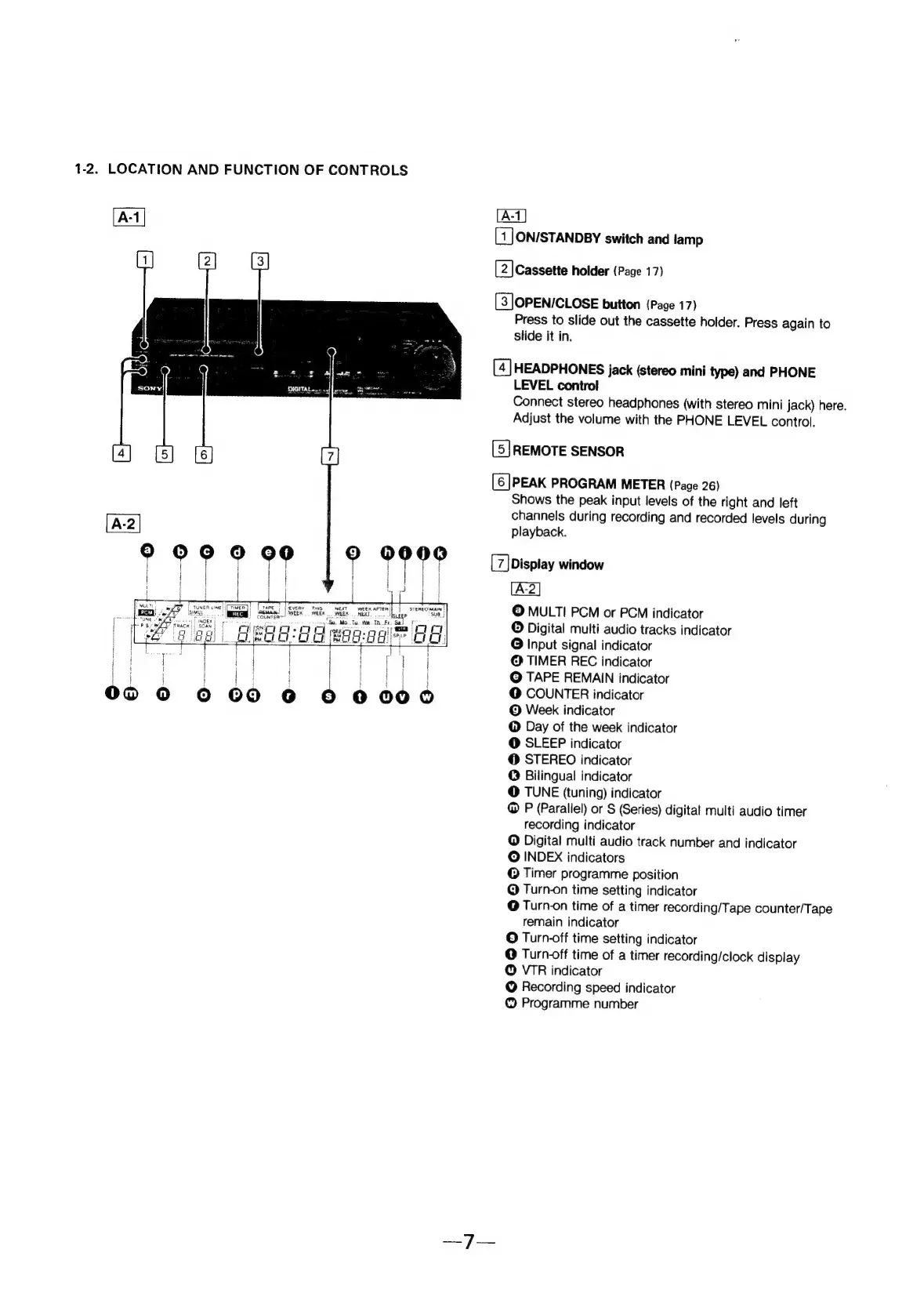
Sony EV-S800 - Location and Function of Controls; Remote Sensor

Sony EV-S800
44 pages
Print Icon
To Next Page IconTo Next Page
To Previous Page IconTo Previous Page
Loading...
1-2.
LOCATION
AND
FUNCTION
OF
CONTROLS
NEXT
WEEK
AFTER
satan!
|
WEEK
weeK
WEEK.
REE
‘Isveer
‘COUNTER
=
que
ta.
fee
Ta
Fe.
Sal
ra
CROs
FT
ee.
5
i{
Koei
oo
BEG:a
ae
ON/STANDBY
switch
and
lamp
[2]
Cassette
holder
(Page
17)
[S]OPEN/CLOSE
button
(Page
17)
Press
to
slide
out
the
cassette
holder.
Press
again
to
slide
it
in.
HEADPHONES
jack
(stereo
mini
type)
and
PHONE
LEVEL
control
Connect
stereo
headphones
(with
stereo
mini
jack)
here.
Adjust
the
volume
with
the
PHONE
LEVEL
control.
REMOTE
SENSOR
[6]PEAK
PROGRAM
METER
(Page
26)
Shows
the
peak
input
levels
of
the
right
and
left
channels
during
recording
and
recorded
levels
during
playback.
Display
window
©
MULTI
PCM
or
PCM
indicator
©
Digital
multi
audio
tracks
indicator
O
Input
signal
indicator
@
TIMER
REC
indicator
@
TAPE
REMAIN
indicator
@
COUNTER
indicator
©
Week
indicator
@
Day
of
the
week
indicator
@
SLEEP
indicator
@
STEREO
indicator
@
Bilingual
indicator
@
TUNE
(tuning)
indicator
@
P
(Parallel)
or
S
(Series)
digital
multi
audio
timer
recording
indicator
@
Digital
multi
audio
track
number
and
indicator
O
INDEX
indicators
©
Timer
programme
position
Q
Turn-on
time
setting
indicator
@
Turn-on
time
of
a
timer
recording/Tape
counter/Tape
remain
indicator
©
Turn-off
time
setting
indicator
@
Turn-off
time
of
a
timer
recording/clock
display
©
VIR
indicator
@
Recording
speed
indicator
©
Programme
number