EasyManua.ls Logo

Sony EV-S800 - Digital Multi Audio Recording and

Sony EV-S800
44 pages
Print Icon
To Next Page IconTo Next Page
To Previous Page IconTo Previous Page
Loading...
1-7.
DIGITAL
MULTI
AUDIO
RECORDING
AND
PLAYBACK
G-3
SURsuenaaaer
et
Ce
Ow
CAF
eee
GOURKGROGUEECH
Cac
UE
Coden
eee
=|=NMWo
AOD
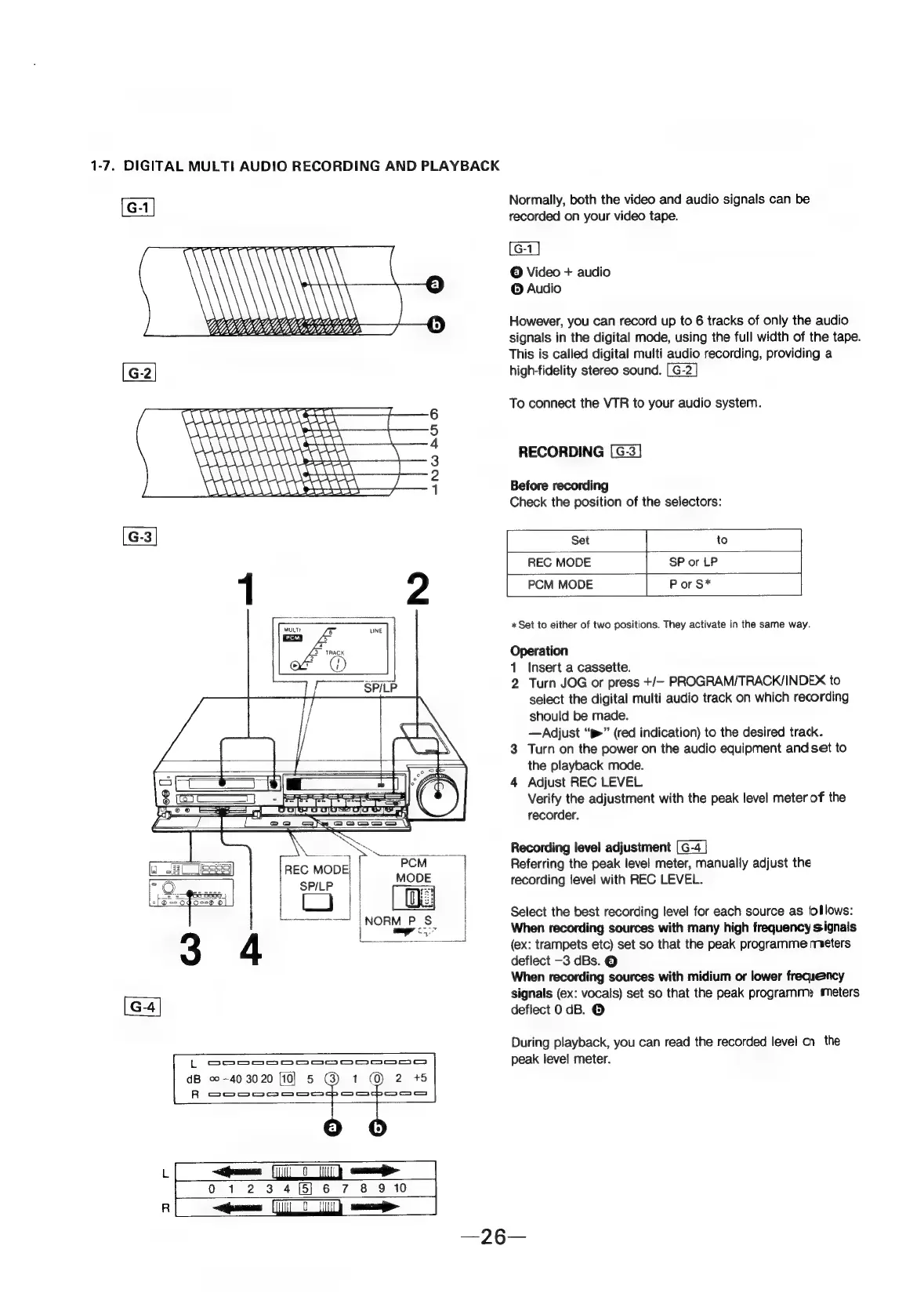
Normally,
both
the
video
and
audio
signals
can
be
recorded
on
your
video
tape.
©
Video
+
audio
©
Audio
However,
you
can
record
up
to
6
tracks
of
only
the
audio
signals
in
the
digital
mode,
using
the
full
width
of
the
tape.
This
is
called
digital
multi
audio
recording,
providing
a
high-fidelity
stereo
sound.
To
connect
the
VTR
to
your
audio
system.
RECORDING
Before
recording
Check
the
position
of
the
selectors:
Set
to
dB
©-40
3020
10]
5
G
R
oom
MAOOcC
ne
ee
ee
1
(0)
2
+5
om
ace
REC
MODE
SP
or
LP
|
PCM
MODE
P
or
S*
*
Set
to
either
of
two
positions.
They
activate
in
the
same
way.
Operation
1
Insert
a
cassette.
2
Turn
JOG
or
press
+/—
PROGRAM/TRACK/INDEX
to
select
the
digital
multi
audio
track
on
which
recording
should
be
made.
—Adjust
“p>”
(red
indication)
to
the
desired
track.
3
Turn
on
the
power
on the
audio
equipment
and
set
to
the
playback
mode.
4
Adjust
REC
LEVEL
Verify
the
adjustment
with
the
peak
level
meter
of
the
recorder.
Recording
level
adjustment
Referring
the
peak
level
meter,
manually
adjust
the
recording
level
with
REC
LEVEL.
Select
the
best
recording
level
for
each
source
as
{ollows:
When
recording
sources
with
many
high
frequency
signals
(ex:
trampets
etc)
set
so
that
the
peak
programme
meters
deflect
-3
dBs.
©
When
recording
sources
with
midium
or
lower
frequency
signals
(ex:
vocals)
set
so
that
the
peak
programme
meters
deflect
0
dB.
©
During
playback,
you
can
read
the
recorded
level
on
the
peak
level
meter.