EasyManua.ls Logo

Sony EV-S800 - Page 25

Sony EV-S800
44 pages
Print Icon
To Next Page IconTo Next Page
To Previous Page IconTo Previous Page
Loading...
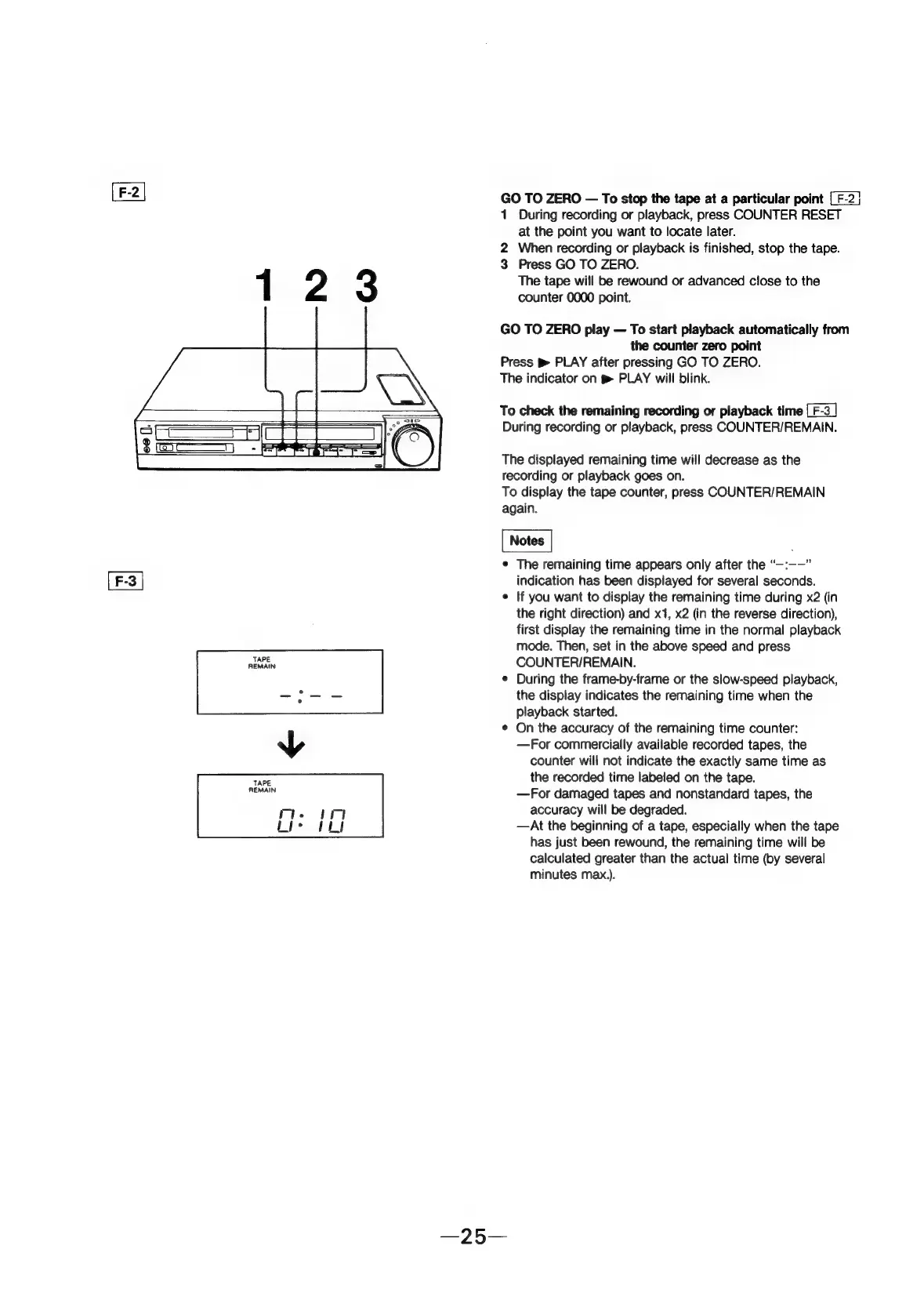
[F-2]
GO
TO
ZERO
To
stop
the
tape
at
a
particular
point
[F-2]
1
During
recording
or
playback,
press
COUNTER
RESET
at
the
point
you
want
to
locate
later.
2
When
recording
or
playback
is
finished,
stop
the
tape.
3
Press
GO
TO
ZERO.
The
tape
will
be
rewound
or
advanced
close
to
the
counter
0000
point.
GO
TO
ZERO
play
To
start
playback
automatically
from
the
counter
zero
point
Press
PLAY
after
pressing
GO
TO
ZERO.
The
indicator
on
g
PLAY
will
blink.
To
check
the
remaining
recording
or
playback
time
During
recording
or
playback,
press
COUNTER/REMAIN.
The
displayed
remaining
time
will
decrease
as
the
recording
or
playback
goes
on.
To
display
the
tape
counter,
press
COUNTER/REMAIN
again.
e
The
remaining
time
appears
only
after
the
“—:-—”
[F-3
|
indication
has
been
displayed
for
several
seconds.
¢
If
you
want
to
display
the
remaining
time
during
x2
(in
the
right
direction)
and
x1,
x2
(in
the
reverse
direction),
first
display
the
remaining
time
in
the
normal
playback
mode.
Then,
set
in
the
above
speed
and
press
ALAIN
COUNTER/REMAIN.
e
During
the
frame-by-frame
or
the
slow-speed
playback,
the
display
indicates
the
remaining
time
when
the
playback
started.
¢
On
the
accuracy
of
the
remaining
time
counter:
—For
commercially
available
recorded
tapes,
the
counter
will
not
indicate
the
exactly
same
time
as
TARE
the
recorded
time
labeled
on
the
tape.
TENA
—For
damaged
tapes
and
nonstandard
tapes,
the
7.
Ir
accuracy
will
be
degraded.
fe
kh
—At
the
beginning
of
a
tape,
especially
when
the
tape
has
just
been
rewound,
the
remaining
time
will
be
calculated
greater
than
the
actual
time
(by
several
minutes
max,).